
A camera can deliver valid images while a picking controller receives scenes too late to use. In a shared-camera system, the delay may affect one consumer while another continues picking normally. The useful question is not simply whether images arrive, but whether each controller receives the right scene before its tracking window expires. This troubleshooting procedure separates acquisition faults from stale delivery, identifies where data ages, and verifies recovery without changing the machine's validated safety functions.
Start with scene age, not the camera
A scene usually combines detected objects with an image reference, a conveyor reference and routing information. Its useful lifetime depends on conveyor travel, the reachable picking region and the controller's documented tracking rules.
An old-scene warning does not, by itself, prove that acquisition failed. The controller may be correctly rejecting information that arrived after newer information or after the associated objects passed a usable boundary.
Begin by preserving the warning history and identifying exactly which component generated it. Consult the manufacturer's documentation for the installed software version. Establish whether the message concerns scene order, conveyor position, elapsed time or an internal queue limit; these are different conditions.
For missing images or transport interruptions, use the separate acquisition failure troubleshooting procedure. For the broader relationship between observations and robot motion, see the visual-servoing loop design guide. Here, the focus is the age and identity of data at the controller handoff.
Build an event trace across the complete handoff
Capture one trace spanning the trigger, image processing, communication and controller acceptance stages. Use existing diagnostics or lightweight instrumentation that does not change production scheduling substantially.
For each scene, record the following where the equipment exposes it:
| Event or field | What to record | What it helps distinguish |
|---|---|---|
| Physical trigger | Event identifier and observed trigger time | Missing or duplicated acquisition requests |
| Image reference | Frame identifier and timestamp meaning | Exposure timing versus host receipt timing |
| Conveyor reference | Encoder count and coordinate convention | Position-reference mismatch |
| Processing completion | Scene identifier and completion time | Variable inspection duration |
| Routing decision | Destination and object assignment | Incorrect shared-camera distribution |
| Communication | Send time, receipt time and sequence | Transport delay or reordering |
| Controller result | Accepted, rejected or pending, with reason | Delivery versus acceptance |
| Queue state | Pending depth and oldest pending age | Backlog rather than isolated latency |
A successful network send is not proof of controller acceptance. Likewise, an empty object list is not necessarily a missing scene: an inspection may have completed correctly without finding eligible parts.
Record timestamp definitions explicitly. A camera timestamp might represent exposure start, exposure end or another documented event. A host callback timestamp usually describes when software handled the result, not when the image was exposed. The guide to verifying camera metadata explains why metadata meaning must be checked rather than inferred.
Calculate the useful age budget
Use one monotonic clock for elapsed intervals within a host. Across devices, subtract timestamps only when their clocks share a documented synchronization relationship with measured uncertainty. Otherwise, correlate scene identifiers and measure local intervals separately.
A basic latency breakdown is:
Do not add overlapping measurements twice. For example, an interval measured from image exposure to processing completion may already include camera readout and transfer.
For a constant-speed conveyor, a screening estimate for the available scene-age budget is:
Suppose an object has 300 mm of usable conveyor travel remaining at the image reference. Conveyor speed is 800 mm/s. The assumed command-and-motion allowance is 80 ms, with a further 45 ms reserve.
The arithmetic is:
- Available travel time: 300 mm / 800 mm/s = 0.375 s = 375 ms.
- Maximum scene age: 375 ms - 80 ms - 45 ms = 250 ms.
- Conveyor travel during a 120 ms delay: 800 mm/s × 0.120 s = 96 mm.
If measured contributions are 25 ms for acquisition and processing, 10 ms for transport, 120 ms waiting downstream and 5 ms for acceptance handling, total age is 160 ms. That leaves 90 ms against the illustrative budget.
This is a diagnostic estimate, not a replacement for the controller's tracking model. Acceleration, pick trajectories, object geometry and coordinate transforms can change the usable window. Evaluate the oldest accepted scene and the latency tail, not just the average.
Test likely causes in a practical order
Start with downstream backlog when images continue arriving and only selected consumers stop picking. Change the order when the trace points elsewhere; the table is a diagnostic sequence, not a universal failure ranking.
| Suspected cause | Test | Corrective direction |
|---|---|---|
| Consumer cannot keep pace | Compare oldest pending age and queue depth before the warning | Remove the measured bottleneck or reduce admitted workload through supported settings |
| Slow consumer blocks shared delivery | Compare receipt times for the same scene at each destination | Use documented independent delivery or scheduling arrangements |
| Scene completion order changes | Compare trigger order with processing completion and send order | Preserve required ordering or use documented sequence handling |
| Routing or ownership is wrong | Trace each object assignment and destination | Correct work-area mapping and assignment rules |
| Communication pauses | Compare send-to-receipt intervals with link and application diagnostics | Correct the measured connection or scheduling fault |
| Clock references disagree | Compare local elapsed intervals with cross-device age calculations | Correct synchronization or stop treating unrelated clocks as comparable |
| Encoder references differ | Compare counts, direction and reset history at the same event | Restore the documented conveyor-reference configuration |
| Acquisition is irregular | Compare physical triggers, frame identifiers and image receipt | Diagnose trigger acceptance and image transport separately |
A queue that grows only during bursts may still fail even when average throughput looks adequate. For example, a consumer processing 12 scenes/s cannot sustain an incoming stream of 15 scenes/s. The pending count grows by approximately 3 scenes/s while those rates continue.
Reducing image-processing time will not solve a queue that exists entirely after processing. Measure the stage before changing it.
Separate shared-camera delivery from object ownership
Shared images do not imply shared object assignments. Maintain separate identifiers for the source image, derived scene and destination-specific object set. This lets you distinguish a missing delivery from a legitimate decision to assign no objects to a particular controller.
For each consumer, check:
- Whether it receives every scene or only scenes containing assigned objects.
- Whether an empty result advances its scene sequence.
- Whether acknowledgement means received, accepted or completed.
- Whether an unavailable destination blocks other destinations.
- Whether retries preserve the original scene identity.
- Whether reassignment can leave duplicate ownership or abandoned reservations.
Consider two consumers receiving results from the same image. One receives promptly; the other pauses while handling earlier work. If delivery is serialized behind that slow consumer, the delay may eventually spread. If delivery is independent, the symptom may remain isolated.
Trace an individual scene through both paths. Do not infer system-wide health from a preview window or from another robot continuing to pick. The camera preview overlay guide offers useful ways to display frame identity and tracking state, but an overlay remains a diagnostic display rather than proof of controller acceptance.
Check encoder alignment, ordering and triggers
A scene can arrive promptly yet appear stale when its conveyor reference is wrong. Confirm encoder direction, units, count scaling, reference capture timing and the documented handling of counter rollover.
For illustration, a configured scale of 0.10 mm/count makes a difference of 960 counts equivalent to 96 mm. If another component uses a different scale or origin, its interpretation of the same scene can diverge immediately.
Do not reset an encoder or change its reference during active tracking unless the manufacturer's procedure explicitly coordinates that operation with all consumers. A reset can invalidate queued positions even when image timestamps remain correct.
Next, compare acquisition order with processing completion order. Parallel workers can finish later images first. A controller that has already advanced to a newer scene may correctly reject an older result delivered afterward. Check how the documented interface handles sequence gaps, retries and duplicates.
Finally, verify the physical trigger path. Compare trigger events with captured frames rather than assuming each pulse produced an image. Use the external-pulse trigger troubleshooting guide when pulses arrive faster than the acquisition chain can accept them.
Recover through a documented, controlled sequence
Use the manufacturer's recovery procedure and the site's approved machine-safety process. Queue clearing, tracking resets and application restarts can affect object ownership and pending motion.
- Preserve evidence. Export logs, queue states, software versions and relevant configuration before restarting anything.
- Establish a safe machine state. Follow the approved stopping and isolation procedure for any inspection, wiring or mechanical work.
- Resolve pending state. Identify queued scenes, reserved objects and issued picks. Clear or reconcile them only through documented controls.
- Apply one supported correction. Keep a record of the setting, software change or connection repair and its expected effect.
- Re-establish references. Confirm the documented conveyor reference and work-area mapping before admitting new objects.
- Validate with safeguards active. Use the approved test mode and production restart procedure. Do not defeat interlocks or protective functions.
- Repeat the original operating condition. Check the workload and burst pattern that previously produced the warning.
Record accepted-scene age, rejected-scene reasons, oldest pending age and queue depth throughout the test. Recovery is stronger evidence when queues remain bounded and each eligible object has a consistent outcome.
If software changes are involved, use the software upgrade validation checklist to preserve a rollback path and repeat the relevant acceptance tests.
Choose hardware only after locating the delay
Browse area scan cameras through the camera finder when the trace identifies an acquisition requirement that existing equipment cannot meet. Compare interface, shutter and integration requirements separately from application-level scene delivery.
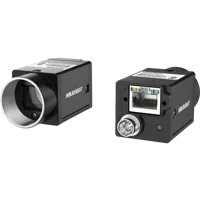
The LS-MV-133GM-GE and MV-CU020-90GC are GigE area scan camera options with global shutters. Their catalog listings do not establish compatibility with a particular picking application or its timestamp, trigger and tracking interfaces.

- Sensor format
- 1/2.7"
- Interface
- GigE
- Sensor format
- 1/1.7"
- Interface
- GigE
Before considering vision controllers, define the required camera connections, processing workload and supported scene interface. Port count alone does not establish queue behavior, application compatibility or worst-case delivery time.
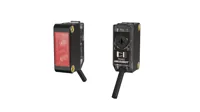
If the trace identifies an unreliable part-present event, compare photoelectric sensors in the trigger sensor finder. The MV-PE5502 is a diffuse-reflective sensor with an NPN output. Check electrical compatibility, target behavior and the documented input connection before selecting it; it is not a substitute for an encoder reference.
- Output
- NPN
- Light source
- Red LED
- Sensing range
- 100 mm - 1 m
- Type
- Diffuse-reflective
Do not replace a camera merely because downstream software rejects old scenes. Faster acquisition can worsen an already overloaded consumer by increasing the arrival rate.
Final verification checklist
Before closing the fault investigation, confirm these points:
- Identity: every traced trigger, frame, scene and destination can be correlated without relying on display order.
- Time basis: each timestamp has a known meaning, and cross-device comparisons account for clock uncertainty.
- Conveyor reference: scale, direction, origin and rollover behavior agree across the documented interfaces.
- Delivery: receipt and acceptance are distinguishable, including empty scenes and retries.
- Queues: oldest pending age and depth remain bounded during representative bursts.
- Ownership: each eligible object has one consistent assignment and outcome under the configured routing rules.
- Recovery: stop, reset and restart behavior follows documented procedures without weakening motion safety.
- Acceptance limits: the measured latency tail fits the application budget, not merely its average.
Keep the trace and acceptance limits with the machine configuration. They provide a baseline when workload, routing or software changes later.
For help reviewing the handoff, send the trigger rate, conveyor speed, timestamp definitions, queue measurements and a representative event trace through applications support. If the evidence identifies a hardware requirement, start with the camera configurator or the trigger configuration step.
Questions
Does stale scene data mean the camera failed?
Not necessarily. A valid image can produce a scene that waits too long in processing, communication or a controller queue. Correlate frame identifiers with scene delivery and acceptance records. Investigate acquisition separately if physical triggers lack corresponding images or the image stream shows unexplained gaps.
Why can one controller stop picking while another continues?
Different consumers can have different queue depths, workloads, assignments and communication delays. Compare the same source scene at each destination, including whether it was expected to receive objects. This reveals whether the delay is shared upstream or isolated to a particular delivery and acceptance path.
Can camera and controller timestamps be compared directly?
Use timestamps for direct age calculations only when their event meanings and clock relationship are documented. Unsynchronized device clocks can create misleading differences. Without a common time basis, correlate scene identifiers and measure elapsed intervals locally at each stage instead of subtracting unrelated timestamps.
Should the stale-scene timeout be increased?
A larger limit does not remove the underlying delay and may admit information outside the useful tracking window. First identify where the scene waits and calculate the available travel budget. Change limits only through documented application settings, with the required engineering validation and safety review.
What evidence shows that the timing fault is resolved?
Retain a correlated event trace, queue-depth trends, oldest pending age, acceptance outcomes and the configuration used during testing. Repeat representative workload bursts with safeguards active. A restart that briefly restores picking is insufficient evidence if pending data begins accumulating again under normal demand.