
A failed transfer of vision-derived pick data does not identify the failing network component. Camera traffic may be competing with control messages, but a damaged link, unavailable receiver or incompatible software combination can produce similar symptoms. This troubleshooting procedure is for maintaining an existing vision system during operation. You will learn how to collect comparable evidence, isolate traffic safely and distinguish a delivery failure from a processing or acknowledgement failure.
Preserve the evidence before changing settings
First, place the machine in the safe service state required by its documented procedure. Disconnecting a camera or control connection can change machine behavior. Do not disable safety functions, introduce an alternate control path or perform traffic tests during hazardous motion.
Record the following before restarting equipment:
- Exact fault text, timestamp and affected destination.
- Whether acquisition, image processing and other communications continued.
- Camera count, image dimensions, pixel format and acquisition rate.
- Network topology, including switches, uplinks and separate network adapters.
- Link speed, duplex, addressing and relevant software versions.
- Whether the failure followed a recipe change, restart or maintenance activity.
Draw the actual traffic paths. Separate cables do not necessarily mean separate bandwidth: camera streams and result messages may converge on the same switch egress port.
Confirm that this is a delivery problem rather than an old result reaching the application. The stale pick-data timing guide addresses result age and scene association. If failures occur only during initialization, use the startup synchronization troubleshooting procedure instead.
Calculate the image load, then measure the shared path
Estimate image payload before blaming network congestion. For an unpacked monochrome image, use the transmitted bytes per pixel rather than the sensor's nominal bit depth. Packed formats, row padding and additional metadata can change the calculation.
Consider an illustrative application with two cameras. Each sends images measuring 1600 × 1200 pixels, using 1 transmitted byte per pixel at 30 frames per second:
- Per camera: 1600 × 1200 × 1 × 30 = 57,600,000 bytes/s.
- Combined: 2 × 57,600,000 = 115,200,000 bytes/s.
- In bits: 115,200,000 × 8 = 921,600,000 bits/s, or 921.6 Mbit/s.
- On a shared 1 Gbit/s path: 921.6 / 1000 = approximately 92% of nominal capacity before protocol overhead.
That leaves little nominal headroom. It is a warning, not proof that congestion caused a particular fault. Simultaneous image transmission can also create bursts that an average-rate calculation hides.
Measure receive and transmit rates on each relevant port over the same interval. Inspect peak behavior and queue drops where the switch provides them. A low average utilization does not rule out short bursts, receiver stalls or contention elsewhere.
Do not assume a small result message cannot be delayed. Its payload may be tiny while its queueing delay is large.
Separate physical-link errors from queue congestion
Take counter snapshots at the start and end of a repeatable test. A 60-second window is a practical starting point, provided it includes the failing operating condition. Use counter differences, not lifetime totals, and record any resets.
| Observation during the fault window | Likely direction | Next test |
|---|---|---|
| CRC or frame-check errors increase | Physical path, interference or link configuration | Inspect connectors and substitute a known-good compatible cable |
| Link transitions or speed changes appear | Connection, power or negotiation instability | Correlate link events with device power and switch logs |
| Egress queue drops increase | Output contention or downstream backpressure | Reduce competing traffic on that specific egress path |
| Pause counters increase | Flow control is active | Check receiver load and downstream queues; do not assume pause means repair |
| No relevant port errors, but sends time out | Endpoint, routing, application or unobserved queue | Examine receiver logs and transfer-stage timestamps |
Counter names and meanings vary. Check the switch documentation before interpreting a generic discard counter as congestion. Switches may discard frames for reasons unrelated to exhausted queue space.
When acquisition itself becomes unreliable, the intermittent acquisition troubleshooting guide helps separate transport problems from camera or application failures. If symptoms begin after power cycling, compare them with the image-corruption recovery checks.
Run controlled traffic-isolation tests
Change one variable at a time and preserve a route back to the original configuration. Perform these tests only in an approved maintenance state, using documented acquisition and network controls.
- Establish a baseline. Record transfer failures, acquisition rate, queue drops, link errors and receiver load over a defined interval.
- Reduce camera traffic without changing the result path. Lower the documented acquisition rate or image region where the application permits it. Keep the receiver, addressing and result-message settings unchanged.
- Repeat the same operating sequence. Compare equivalent cycles and counters. Note whether transfer failures disappear, become less frequent or remain unchanged.
- Restore the baseline. Confirm whether the symptom returns. A fault that disappears once after a restart is weak evidence of a bandwidth problem.
- Test path separation if supported. Move camera traffic to a documented dedicated adapter or network segment. Confirm that it no longer crosses the same constrained egress link.
- Compare receiver load. Check whether reduced acquisition also reduced image-processing CPU demand or application queue depth.
That final check matters. Reducing image rate changes both network traffic and processing demand. Improvement alone does not distinguish the two.
Do not generate extra traffic on a running machine to provoke congestion. Use authorized maintenance conditions or a representative isolated test setup. Do not bridge networks or alter access controls merely to make a temporary test convenient.
The strongest congestion diagnosis combines repeatable load sensitivity with queue evidence on the affected path. If only application load tracks the fault, investigate processing and scheduling before replacing network hardware.
Timestamp delivery and receiver availability separately
A sender timeout does not prove that a message never arrived. The receiver may have accepted it but delayed processing or acknowledgement. Retrying without understanding that distinction can create duplicate results.
Where the software exposes suitable diagnostics, record these stages:
- Image acquisition completed.
- Inspection result became available.
- Result entered the outbound queue.
- Transmission was attempted.
- Receiver accepted or rejected the result.
- Application acknowledgement completed or timed out.
Attach the same result identifier to every available stage. Use a consistent local monotonic clock for elapsed times within each host. Cross-host timestamps require verified clock alignment before you subtract them; ordinary wall-clock displays may not be comparable.
For example, a send attempt followed by a receiver acceptance event points away from complete network loss. A growing delay before the send attempt points toward local queueing or processing. Acceptance without an application acknowledgement points toward receiver handling, although the return network path still needs checking.
Check that the destination service is running, listening on its documented interface and ready to accept the relevant data. Examine address changes, connection limits, service restarts and authorized firewall logs. Basic reachability does not prove application availability.
For reconnect behavior, the idle-disconnect diagnostic procedure provides related checks. Avoid automatic retries of motion-related results unless documented handling prevents duplicate execution.
Verify link settings and software compatibility
Do not treat an arbitrary speed or duplex reduction as a general repair. A mismatch can introduce errors and poor performance, while a slower link can conceal one symptom by changing traffic timing.
Start with the supported negotiation settings for both ends of each link. If documentation requires fixed settings, configure both ends consistently and verify the resulting operational state. Preserve the previous settings and record why the change is supported.
Likewise, jumbo frames and flow control are not universal congestion fixes. Larger frames require compatible settings across the relevant path. Flow control can shift delay upstream instead of removing the bottleneck. Change either only through a documented, reversible test.
Build a compatibility record covering the vision application, camera transport software, operating system, receiving controller and relevant firmware. Check manufacturer documentation for the supported combination and the release notes for the exact symptom. Obtain updates and manuals only from the manufacturer or its authorized distributors.
The GigE Vision software compatibility checks explain why a matching interface label alone does not establish application support. Before any update, use the software upgrade validation checklist to plan backups, licensing, rollback and acceptance tests.
Choose replacement parts only after locating the fault
A replacement camera will not repair an overloaded switch uplink or an unavailable receiver. Select hardware after identifying the failing resource and confirming compatibility with the existing application.
The area scan cameras category and camera finder help compare interfaces and imaging requirements. The following are catalog examples, not confirmation that either camera works with a particular installed application.
The LS-MV-133GM-GE is a GigE monochrome camera with a global shutter and C-mount.

- Sensor format
- 1/2.7"
- Interface
- GigE
- Resolution
- Up to 3 MP
- Shutter
- Global
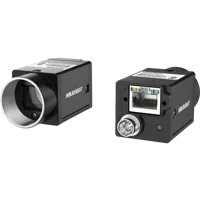
The MV-CU020-90GC is a GigE color camera with a global shutter and C-mount.
- Sensor format
- 1/1.7"
- Interface
- GigE
- Resolution
- Up to 3 MP
- Shutter
- Global
Confirm the required acquisition rate, pixel format, trigger behavior and software support separately. Do not infer transport performance from the interface name alone.
When evaluating vision controllers, verify the internal network topology and supported camera connections. Several external ports do not, by themselves, prove independent bandwidth or application compatibility.
Vision computers and fanless industrial PCs
190 models · from $1,119.00For a suspected physical fault, use the cables category and accessory finder to identify the required connection type. Match connector wiring, environmental requirements and motion rating; a similar-looking connector is not sufficient evidence of compatibility.
Camera data, power and I/O cables
366 models · from $39.00Verify the repair and leave a usable record
Repeat the original failing sequence under representative load, including simultaneous image transmission and the normal result-message rate. Include reconnects, recipe changes and service restarts only where the approved validation procedure permits them.
Use this handover checklist:
- Traffic: Record image payload estimates and measured rates on shared paths.
- Links: Confirm expected operational speed, duplex and stable link state.
- Counters: Compare error and discard deltas over equivalent observation windows.
- Delivery: Reconcile attempted, accepted, acknowledged and failed result identifiers.
- Timing: Confirm result age remains within the application's documented limits.
- Recovery: Verify documented reconnect behavior without duplicate result execution.
- Configuration: Save the topology, versions, settings and rollback instructions.
If the original fault occurred only once per shift, a short clean test cannot establish that it is resolved. Choose an observation period that meaningfully covers the previous failure pattern, and state the limits of the evidence.
For help selecting a compatible replacement, send the topology, measured traffic, counter differences and documented interface requirements through application support. That evidence supports a targeted recommendation instead of an unsupported hardware swap.
Questions
Does a failed pick-data transfer prove network congestion?
No. A timeout can result from queueing, physical-link errors, an unavailable destination service or delayed application processing. Establish which transfer stage failed, then correlate that event with traffic measurements and counter changes. A congestion diagnosis is stronger when controlled load changes reproduce both the fault and relevant queue drops.
Can camera traffic delay a small control message?
A small message can wait behind image traffic on a shared output queue. It can also wait inside the sending application before reaching the network. Compare application-stage timestamps with switch counters to distinguish local processing delay from delay along the transmission path.
Should link speed or duplex be forced to stop transfer faults?
Do not select a lower speed or half duplex as a general troubleshooting remedy. Follow the documented requirements for both connected devices, and verify the operational settings at each end. An unsupported change can create a mismatch or alter timing without correcting the underlying fault.
What evidence should be collected before contacting support?
Capture the fault timestamp, affected destination, topology, software versions, image format and rate, link settings and counter differences from the same test interval. Include receiver logs and result identifiers when available. Preserve the original configuration so support can compare a controlled change with a reliable baseline.
When is a software update justified for transfer failures?
Update when the documented compatibility information and release notes support the proposed combination, not simply because a newer version exists. Prepare backups, confirm licensing and rollback options, and define acceptance tests for acquisition, result delivery, timing and recovery before changing a production installation.