
Replacing the image source in a visual servoing application is not just an image-conversion task. The original example may depend on depth, camera timestamps, calibration files or acquisition behavior that the replacement does not provide. This explainer is for teams adapting an existing vision application to another camera. You will learn how to define the acquisition contract, validate image integrity and freshness, and identify assumptions that must change before robot motion is considered.
Decide whether the camera can supply a valid input
Start with a documented, authorized acquisition interface. Confirm that the camera manufacturer supports access from your intended host, operating system and application environment. A visible image in a browser or preview window does not establish a supported integration path.
A camera adapter should deliver more than an image array. It should supply enough information to interpret the pixels and determine whether the observation is suitable for control.
| Adapter output | What you need to establish | Why it matters |
|---|---|---|
| Image data | Dimensions, format, stride and orientation | Prevents misinterpreted pixels and displaced features |
| Buffer ownership | Lifetime and permitted access | Prevents processing memory that acquisition has overwritten |
| Capture identity | Frame identifier or documented equivalent | Helps detect repeated deliveries and dropped frames |
| Capture timing | Timestamp meaning and clock domain | Supports image-age and pose-association checks |
| Optical configuration | Calibration and active image geometry | Connects image measurements to the camera model |
| Depth information | Source, units, alignment and validity | Supports algorithms that require feature depth |
| Acquisition status | Timeouts, incomplete frames and disconnects | Allows invalid input to be rejected explicitly |
Treat missing information as an integration limitation, not a field to populate with an estimate silently. For control architecture beyond the camera adapter, see the separate visual servoing loop design guide.
Establish the supported acquisition path
Use the manufacturer's documented acquisition library, supported standard interface or explicitly supported video interface. Obtain software and documentation from the manufacturer or its authorized distributors.
If a device exposes only a supported application interface, ask whether raw frames, calibration and timing information are available through it. Do not build a production dependency on an undocumented snapshot address or an interface intended only for service access.
For GigE Vision equipment, check application compatibility separately from basic network connectivity. The GigE Vision software compatibility checks explain why camera discovery alone does not prove that acquisition will work correctly.
Choose the architecture before choosing the adapter implementation:
- An area scan camera can be appropriate when the host application needs image data, subject to documented acquisition support.
- A smart camera may perform inspection internally. Verify whether it exposes images, results or both through a supported interface.
- A vision controller can host acquisition and processing, but its hardware category alone does not establish application or driver compatibility.
Compare these routes through the area scan cameras, smart cameras and vision controllers categories. The camera finder helps narrow the imaging hardware; software support still needs its own confirmation.
Make the pixel and memory contracts explicit
Record the delivered width, height, pixel format, row stride, channel order and orientation. Do not infer any of them from a preview application's appearance.
A grayscale detector may accept an intensity image, but the conversion must match the incoming format. Bayer data needs an appropriate interpretation; packed formats need documented unpacking. Color conversion can also change feature contrast, so validate the detector again after conversion.
For an uncompressed image, the minimum active pixel payload is:
For example, a hypothetical 1280 × 960 image with three 8-bit channels contains:
The actual buffer can be larger because rows may include padding. An adapter that assumes tightly packed rows can create distorted images even when the buffer size appears plausible.
Establish ownership just as carefully. If the acquisition library recycles a buffer after a release call, either finish processing while holding the documented buffer lease or copy the image into application-owned storage. A wrapper around external memory does not necessarily copy that memory.
Use this processing order:
- Acquire a complete frame through the supported interface.
- Read image metadata while it still belongs to that frame.
- Hold the buffer or copy its pixels according to documented ownership rules.
- Convert the format and run feature extraction.
- Release acquisition resources at the documented point.
Test this sequence under sustained acquisition, not only with a single saved image.
Rebuild calibration and depth assumptions
Do not reuse the original camera's intrinsic calibration. Focal lengths expressed in pixels, principal point and distortion describe a particular optical configuration and image geometry.
Calibration must match the replacement camera, lens, focus setting and active image area. Cropping, binning, resizing and rotation can change the coordinates seen by the control algorithm. A mathematically correct conversion between image containers does not correct those geometric changes.
If the lens or working distance is changing, review the machine vision lens focal length guide before finalizing the calibration setup.
Check feature sampling independently of calibration accuracy. As a simple planning example, suppose the horizontal field of view is 120 mm and a 0.3 mm feature should span at least 4 pixels:
This is a sampling estimate, not a guarantee of detection. Blur, contrast, distortion and feature shape still affect performance.
Depth requires a separate decision. Many image-based control formulations use feature depth when constructing their interaction matrix. An example originally written around a depth-capable camera may obtain that value automatically.
A replacement intensity or color image does not contain an equivalent depth channel merely because it has the correct dimensions. Depending on the algorithm, legitimate alternatives can include a calibrated known plane, pose estimation from known geometry or a separately validated depth sensor.
Each alternative introduces assumptions. Record their valid operating range and define what happens when they fail. If the algorithm requires measured depth and the replacement cannot provide it, the camera change is also an algorithm change.
Prove frame freshness and timestamp meaning
Keep capture time, host arrival time and processing completion time separate. A timestamp generated after image decoding measures completion on the host, not the moment the scene was exposed.
Determine whether the device timestamp represents exposure start, exposure end, a sensor event or another documented event. Also identify its clock domain. Subtracting a device timestamp directly from an unrelated host clock does not produce a meaningful image age.
Where the clocks have a validated mapping, image age at command submission can be expressed as:
If exposure-start time is available, the midpoint estimate adds half the exposure duration. That approximation still needs to be interpreted against shutter behavior and the camera's documented timing.
Check freshness with capture identifiers and acquisition status where available. Compare them with timestamps and host arrival records. Identical pixel data is not proof of a stale frame: a stationary scene may legitimately produce nearly identical images.
Conversely, a changing arrival timestamp does not prove a fresh capture. A transport layer may repeatedly deliver an older image while the application assigns a new receipt time.
For interfaces that cannot establish capture identity or capture time, document the limitation explicitly. Such a path may be useful for visualization while remaining unsuitable for the intended closed-loop timing requirements.
The per-frame metadata verification guide provides a useful approach to associating metadata with the correct image rather than reading settings independently.
Measure latency instead of relying on frame rate
Frame rate describes how often images become available. It does not describe how old an image is when the application uses it.
As a planning example, consider these non-overlapping delay contributions:
| Contribution | Example delay |
|---|---|
| Exposure midpoint to exposure completion | 4 ms |
| Remaining readout and transfer | 9 ms |
| Decode and copy | 3 ms |
| Feature extraction | 8 ms |
| Application queue wait | 20 ms |
| Command preparation and submission | 6 ms |
| Total | 50 ms |
The arithmetic is 4 + 9 + 3 + 8 + 20 + 6 = 50 ms. Real pipelines may overlap stages, so confirm the total with timestamp traces rather than summing independently measured averages.
At an illustrative relative speed of 60 mm/s, motion during that interval is:
This is a delay illustration, not an allowable control error or a safe operating speed.
Queueing can dominate the result. At 25 frames per second, one frame period is 40 ms. Four older frames ahead of the next image can represent roughly 4 × 40 = 160 ms of additional waiting.
For a loop that needs the newest observation, use a bounded queue and a documented policy for discarding superseded complete frames. Do not hide overload by allowing an ever-growing queue. Log age limits, processing overruns and discarded-frame counts.
Report median, high-percentile and maximum observed delays under representative load. A short average cannot compensate for occasional delays that violate the validated operating assumptions.
Select hardware without assuming software capabilities
Camera listings help narrow shutter type, interface, color and lens mount. They do not establish buffer semantics, timestamp availability, depth output or compatibility with your control library.
The LS-MV-133GM-GE is a mono GigE area scan camera with a global shutter and C-mount.

- Sensor format
- 1/2.7"
- Interface
- GigE
- Resolution
- Up to 3 MP
- Shutter
- Global
The MV-CU020-90GC is a color GigE area scan camera with a global shutter and C-mount.
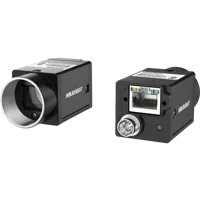
- Sensor format
- 1/1.7"
- Interface
- GigE
- Resolution
- Up to 3 MP
- Shutter
- Global
These illustrate different image-format choices, not interchangeable software interfaces. Confirm the supported acquisition path and required metadata for any candidate before ordering.
A global shutter avoids the row-dependent exposure timing characteristic of a rolling shutter, but it does not eliminate exposure blur or downstream latency. Likewise, a network interface does not establish that a camera supplies depth or synchronized robot pose information.
Validate the adapter before enabling motion
Begin with a stationary target and an offline or motion-disabled application. Save source frames, converted frames, metadata and detected features together so that failures can be replayed without moving the machine.
Use a concise acceptance checklist:
- Image geometry: Confirm dimensions, orientation and feature coordinates against a known target.
- Memory integrity: Run repeated acquisition while checking for corruption, overwritten frames and resource growth.
- Calibration: Measure residual errors throughout the intended image area, not only at its center.
- Depth handling: Exercise valid, missing and out-of-range depth conditions explicitly.
- Timing: Record capture identity, mapped capture time, arrival time and command-submission time where available.
- Overload: Increase processing load and verify bounded queues and explicit rejection of over-age observations.
- Recovery: Interrupt acquisition and confirm that old frames are not treated as new after reconnection.
- Control handoff: Verify coordinate conventions, units and the association between image capture and robot pose.
Use preview overlays for motion-tracking diagnostics to display feature identifiers and image coordinates during these tests. Keep diagnostic rendering separate from the timing measurements it might otherwise disturb.
Only progress to supervised motion testing under the machine's approved risk assessment and commissioning procedure. Repeat the adapter validation after changes to acquisition software, firmware, optics or image geometry; the software upgrade validation checklist helps structure that regression work.
Before selecting a replacement, prepare a requirements sheet covering image format, calibration, depth, capture metadata and maximum acceptable observation age. Use the camera configuration starting point to organize the hardware, or contact the applications team to review acquisition requirements before ordering.
Questions
Is converting the replacement camera image enough?
Image conversion only makes the pixel container compatible. You must also validate image geometry, buffer lifetime, calibration, capture timing and any depth requirements. A replacement can produce a visually correct image while delivering observations that are too old or geometrically inconsistent for the existing control algorithm.
Can a camera without depth support image-based visual servoing?
Sometimes, but only when the control method has a validated alternative for the depth information it needs. Known geometry or a calibrated plane may support particular tasks. They do not provide general depth measurements, and their assumptions must remain valid throughout the intended operating range.
How can you tell whether a delivered frame is stale?
Use documented capture identifiers and timestamps when available, then associate them with host arrival and processing records. Receipt time alone cannot establish capture freshness. If an interface provides neither capture identity nor meaningful timing, its suitability for closed-loop control needs separate evidence rather than assumptions based on the preview.
What should you confirm before ordering a replacement camera?
Confirm the supported host interface, required software licensing, image formats, buffer ownership rules and metadata availability. Then verify optical compatibility and whether the application needs depth. Request documentation for any essential capability that the catalog does not establish before committing to the hardware.