
A frozen multi-camera preview does not identify the failed stage. Trigger pulses may continue while acquisition buffers remain held, callbacks fail, or the display repeatedly shows old images. Adding locks without tracing these boundaries can make the problem harder to isolate.
This troubleshooting procedure is for externally triggered camera applications that collect synchronized images, particularly calibration sets. You will separate electrical triggering, acquisition ownership, application queues and display work, then verify which boundary stops progressing. The objective is not simply to restart the preview: it is to preserve complete, correctly matched image sets without letting slow consumers stop acquisition.
Find the first counter that stops advancing
Instrument each camera independently before changing throughput limits or adding synchronization locks. Maintain counters and monotonic timestamps in memory, then report aggregated results outside the acquisition callback. Printing every frame can introduce the delay you are investigating.
Record these boundaries:
| Boundary | Evidence to collect | What a stopped counter suggests |
|---|---|---|
| Trigger output | Measured edges and pulse timing | Trigger generator or scheduling problem |
| Camera trigger acceptance | Documented acceptance or exposure status, where available | Camera not ready, input configuration or electrical problem |
| Callback entry | Count and entry timestamp | Acquisition, transport, stream state or buffer availability problem |
| Frame status | Complete and incomplete frame counts | Whether callbacks deliver usable images |
| Application handoff | Successful queue admissions and explicit drops | Consumer backlog or admission policy |
| Buffer return | Successful return calls and failures | Ownership leak or stream lifecycle problem |
| Matched-set output | Completed, rejected and expired sets | Missing frames or incorrect association |
| Display update | Last displayed acquisition identity | Rendering delay or stale preview state |
A pulse measured at the generator does not prove that every camera accepts it. Likewise, a callback counter advancing does not prove that the display receives fresh data.
Track buffer ownership through the SDK's documented lifecycle. If callbacks acquire ownership but return counts progressively fall behind, inspect every exit path. Compare counters at equivalent lifecycle points rather than expecting instantaneous equality while callbacks are active.
Use the broader camera acquisition failure troubleshooting procedure when discovery, connection loss or a single-camera stream also fails. Here, the distinguishing evidence is where progress stops across multiple cameras.
Protect buffer ownership against callback exceptions
An acquisition frame often references memory owned by the SDK. Returning that buffer allows another exposure to use it. Retaining an array view after return can produce changing image contents; failing to return buffers can eventually leave the stream with none available.
Do not assume that a generic deep copy produces an independent image with the required lifetime. Use the SDK's documented image-copy or buffer-ownership mechanism.
Audit the callback in this order:
- Record entry before image conversion or metadata access.
- Check the frame status without assuming every callback contains a complete image.
- Copy required pixels and metadata into application-owned storage, or use a documented retained-buffer mechanism.
- Attempt a nonblocking handoff to a bounded application queue.
- Count queue rejection separately from incomplete acquisition.
- Return or release the acquisition buffer through the documented ownership path.
- Capture errors and request recovery through a separate control channel.
For APIs that require explicit requeueing inside the callback, place that operation in a finally path covering processing and handoff. This is a structural pattern, not permission to requeue after the stream has stopped: shutdown ordering must follow the SDK contract.
The return operation itself can fail. Catch and record that failure at the callback boundary, then signal a controlled stop rather than allowing an exception to disappear inside an SDK-managed thread. Keep enough context to identify the camera, operation and acquisition sequence.
Avoid blocking queue insertion, disk writes, display calls, trigger generation and waiting for another camera inside a callback. A lock held by a slow consumer can exhaust acquisition buffers just as effectively as a missing return.
A queue-full check followed by insertion is not an atomic reservation. Another producer can fill the queue between those operations. Use nonblocking insertion and handle its full condition directly. If copying is expensive, use a documented buffer pool with explicit reservations rather than treating a preliminary capacity check as a guarantee.
Separate trigger generation from display work
A display loop is a poor trigger scheduler. Window handling, image resizing and operator interaction can pause unpredictably. If triggering runs there, any display delay also changes exposure timing.
Use separate responsibilities:
- Trigger coordinator: controls acquisition requests and monitors readiness.
- Acquisition callbacks: validate frames, transfer data and return ownership promptly.
- Set assembler: associates corresponding camera images and applies completeness rules.
- Processing worker: detects calibration features or writes accepted sets.
- Preview consumer: displays replaceable snapshots without controlling acquisition timing.
For a fixed-rate source, timing should come from an appropriate hardware timing device. Host commands can start or stop it, but operating-system sleeps should not be treated as precision timing. If the application instead requests individual calibration sets, the coordinator can wait for capacity and readiness before requesting each set.
Build a startup barrier. Configure every required camera, allocate and queue acquisition buffers, start streams, and check documented readiness indications where available. Release the trigger source only after the required cameras have reached the ready state. A live thread alone is not proof of camera readiness.
The startup synchronization troubleshooting guide explains the broader sequencing problem. For exposure duration, readout limits and trigger acceptance, use the hardware-trigger frame-rate guide.
Stop triggering before dismantling acquisition. Keep shutdown notification separate from a droppable image queue: a full data queue must not prevent a stop event or camera-disconnect notification from reaching the coordinator.
Calculate queue capacity and sustained processing load
Separate the SDK's acquisition-buffer pool from your application queue. Increasing the application queue cannot repair acquisition buffers that never return. Increasing either queue cannot solve a sustained processing deficit.
For an illustrative system with 3 cameras receiving 15 triggers per second, the application receives 45 individual frames per second when every trigger is accepted.
A serial consumer taking 20 ms per frame has a nominal capacity of:
1 / 0.020 = 50 frames per second
That exceeds the 45-frame arrival rate, but leaves little margin for variable processing time. At 30 ms per frame, capacity becomes:
1 / 0.030 ≈ 33.3 frames per second
Backlog then grows by approximately:
45 − 33.3 = 11.7 frames per second
An initially empty queue holding 10 frames fills in roughly 10 / 11.7 ≈ 0.85 seconds. This is a steady-rate estimate; synchronized camera bursts can fill it sooner.
A 250 ms consumer pause produces an average of 45 × 0.250 = 11.25 frames. Allow at least the next whole frame in this simplified estimate, then add headroom for simultaneous arrivals, existing backlog and timing variation. Measure the actual burst pattern before choosing capacity.
Memory matters too. An illustrative unpacked monochrome image measuring 640 × 480 pixels at 8 bits per pixel contains:
640 × 480 × 1 = 307,200 bytes
At 45 frames per second, pixel payload alone is 307,200 × 45 = 13,824,000 bytes per second. Copies, converted images and transport overhead add further load. Calculate from the actual acquisition dimensions and format, not the resized preview.
Use different queue policies for different purposes. A preview may replace an old snapshot. Calibration data should either enter a complete set or produce an explicit rejection; silently discarding an arbitrary frame hides missing observations.
Assemble complete calibration sets instead of latest images
A dictionary containing each camera's latest image is suitable for a dashboard, not proof of synchronized capture. If one camera misses an exposure, its old image can remain beside newer images indefinitely.
Define a set identifier and the expected camera membership. The assembler should maintain pending sets, admit each camera image once, and release a set only when all required members are present.
The association method must have evidence behind it:
- A documented trigger identifier can associate frames when supported and correctly configured.
- Frame counters can help after a verified common starting point, but independent counters are not automatically equivalent across devices.
- Device timestamps require a known time relationship and known timestamp semantics.
- Host callback timestamps indicate delivery timing, not necessarily exposure timing.
For metadata availability and interpretation, consult per-frame exposure and gain verification. Confirm whether each recorded field describes the delivered image rather than a setting read after acquisition.
Assign pending sets a timeout. For example, at 15 triggers per second, the nominal trigger interval is 1 / 15 ≈ 66.7 ms. Choose the timeout from measured worst-case delivery latency and the permitted backlog, not from that interval alone.
When a set expires, record its missing cameras and reject it explicitly. Do not fill a missing position with an older image. Bound the number of pending sets so one absent camera cannot cause unlimited memory growth.
Preserve original calibration pixels and metadata. Add labels, resize images and combine preview panels only in a display copy. The preview overlay guide offers ways to expose acquisition identity without confusing display state with measurement data.
Isolate transport faults without masking software faults
Once ownership and queue counters are visible, test transport separately. Run one camera, then add cameras while keeping exposure settings and trigger rate controlled. Disable display, saving and feature detection before interpreting a bandwidth test.
Use incomplete-frame status, transport diagnostics and callback timing to distinguish damaged transfers from callbacks that stop entirely. Neither symptom proves a particular cause by itself.
For USB connections, inspect which physical ports share a host controller. For Ethernet connections, check shared links, interface configuration and documented transport diagnostics. Nominal connector speed is not a guarantee of available aggregate throughput.
Reducing the region of interest, trigger rate or transmitted payload can help establish whether load affects the failure. Treat improvement as evidence to investigate, not proof that bandwidth was the original fault. Lower traffic can also delay an ownership leak or reduce callback contention.
Check the trigger circuit against every camera's documented input requirements: voltage, polarity, pulse duration, input current and reference arrangement. Shared fan-out must be electrically suitable for all connected inputs. Do not assume a logic output can drive an arbitrary number of camera inputs directly.
A rolling-shutter device may require additional analysis of exposure timing across rows. Shared trigger edges alone do not establish simultaneous exposure throughout every image.
Check camera and cable requirements before ordering
Replacing hardware should follow a measured limitation. Browse area scan cameras and the camera finder after defining shutter behavior, interface, triggering and SDK requirements.
The MV-CH120-11UC is a global-shutter USB3 camera to evaluate against those requirements. The catalog information alone does not establish its timing behavior or software compatibility for your application.
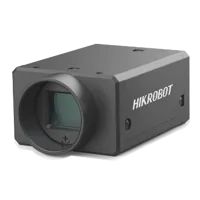
- Sensor format
- 1.1"
- Interface
- USB3
- Resolution
- 12 MP
- Shutter
- Global
The LS-MV-133GM-GE is a global-shutter GigE alternative. Changing interfaces can change transport constraints, but cannot correct missing buffer returns or mismatched calibration sets.

- Sensor format
- 1/2.7"
- Interface
- GigE
- Resolution
- Up to 3 MP
- Shutter
- Global
Select camera cables through the accessories finder only after checking connector pinouts, data interface, routing and movement requirements. A mechanically compatible connector does not establish electrical compatibility.
Before ordering, confirm:
- The SDK supports your operating system, runtime and intended simultaneous camera count.
- The trigger input accepts the proposed electrical signal and timing.
- The ownership documentation explains callback lifetime, copying, return and shutdown.
- The transport design supports aggregate payload with measured margin.
- Frame metadata supports a defensible set-association method.
- Cables suit the connector, installation and movement conditions.
Verify recovery under deliberate consumer stalls
Repeat the original failure conditions with the counters enabled. A smooth preview alone is not an acceptance test.
First, acquire with the minimal callback and no image consumer. Next, enable bounded handoff, set assembly, processing, saving and preview individually. The stage that introduces unbounded latency or lost ownership becomes visible without changing several variables together.
Pause a consumer deliberately for a defined interval, such as 500 ms. Verify that acquisition buffers still return, application drops follow the declared policy, incomplete sets expire, and memory remains bounded. Resume processing and check that current sets appear rather than an unexplained backlog of stale images.
Repeat startup and shutdown with one required camera unavailable. The coordinator should refuse incomplete acquisition readiness or report degraded operation explicitly. Exercise shutdown while the data queue is full and confirm that control events still complete.
The usual advice to add buffers is wrong when processing is permanently slower than acquisition. More buffers only delay failure. Likewise, more locks are wrong when a callback waits behind display work. Correct ownership, bounded queues and explicit set completeness come first.
Use the camera system configurator once those requirements are measured. If trigger wiring, ownership behavior or camera readiness remains unclear, send the counter trace and set-completeness requirements through application support before changing hardware.
Questions
Why can camera images freeze while trigger pulses continue?
First confirm that the pulse reaches each camera input and is accepted. Then compare callback-entry and buffer-return counters. Continued electrical pulses cannot replenish buffers held by software, restart a stopped stream, or prove that a camera was ready for another exposure.
Should every frame be copied inside the acquisition callback?
Use the SDK's documented ownership mechanism. Copy pixels and required metadata into application-owned storage when workers must outlive the callback. A documented retained-buffer workflow may avoid copying, but it needs explicit release and enough buffers for every outstanding operation.
How large should a multi-camera frame queue be?
Size it from measured arrival bursts, maximum consumer stalls, image payload and acceptable latency. Also verify that sustained processing capacity exceeds sustained arrivals. A larger queue absorbs temporary pauses but cannot compensate indefinitely for slower processing or acquisition buffers that never return.
Does displaying each camera's latest image prove synchronization?
No. A preview can combine an older image from one camera with newer images from the others. Calibration capture needs a validated association method, explicit camera membership and a timeout that rejects incomplete sets instead of reusing previous images.
Will adding more threads prevent acquisition freezes?
Use additional threads to separate responsibilities, not as an automatic throughput fix. Blocking SDK calls, image-processing libraries and runtime scheduling behave differently. Measure callback duration and processing capacity, then choose workers or processes without making acquisition callbacks wait for their results.