
A color preview can look healthy while depth and infrared acquisition remain unavailable. For an integration engineer, that partial success can send troubleshooting toward cables before the software stack has been checked. An unknown pixel format warning calls for a narrower first test: determine which stream and software layer cannot describe the format. You can then separate compatibility problems from transport limits without changing several variables together.
Start with the stage that fails
Color acquisition proves that one acquisition path works, not that every interface, format or processing component is supported. A sensor may expose several interfaces, while an SDK may generate depth from underlying image streams.
Prioritize the following checks when formats are missing before acquisition starts. This is a diagnostic order, not a universal ranking of failure rates.
| Observation | First hypothesis to test | Useful discriminator |
|---|---|---|
| Depth or infrared format is absent during enumeration | Format support or acquisition-path mismatch | Compare operating-system enumeration with the supported SDK viewer |
| SDK viewer works, application does not | Application configuration or runtime mismatch | Run the supplied example with the same environment |
| Installed driver package looks correct, but behavior is unchanged | Different driver is active | Identify the bound driver and loaded-module evidence |
| Each stream works alone, but simultaneous acquisition fails | Transport, buffering or processing limit | Add streams individually and record when failure begins |
| Frames arrive, but depth display is blank | Interpretation, validity or scene issue | Inspect raw values, invalid-value rules and display scaling |
A warning alone does not establish a fatal failure. Record whether the affected stream actually disappears, refuses to start or produces unusable data.
For devices that disappear entirely or fail unpredictably, use the broader intermittent camera acquisition troubleshooting guide. Here, keep attention on repeatable differences between working and missing streams.
Capture a reproducible compatibility record
Before updating anything, save the exact configuration. A distribution name alone is insufficient because kernel packages, architecture and SDK builds can differ.
Record:
- Sensor model and hardware revision, where available.
- Firmware revision reported by the manufacturer's supported utility.
- Operating-system release, running kernel release and processor architecture.
- SDK release, application build and libraries loaded at runtime.
- Driver or backend selected for each interface.
- Requested stream types, formats, dimensions and frame rates.
- Whether the error appears during connection, enumeration, configuration or acquisition.
On a Linux host, these read-only commands identify the running kernel and architecture:
uname -r
uname -m
For USB-connected equipment, the following provides a topology and negotiated-speed view:
lsusb -t
Do not treat this topology report as proof of sustainable throughput. It describes the connection, not the complete acquisition workload.
Architecture belongs in the record even when an application starts successfully. Optional processing libraries or plugins may have different requirements. The ARM64 acquisition compatibility checks explain how to separate processor support from successful device discovery.
Save the first relevant warning and the events immediately around it. Repeated warning lines are less useful than knowing which operation first triggered them.
Enumerate each stream through the correct interface
First establish the manufacturer's intended acquisition path. Some equipment uses operating-system video interfaces; other equipment requires a dedicated SDK backend. Not every depth stream should appear as an ordinary video device.
For an installation documented to use Video4Linux interfaces, these read-only queries can help:
v4l2-ctl --list-devices
v4l2-ctl --device=/dev/video0 --list-formats-ext
The device path is an example. Match each actual node to its interface before interpreting the output, and repeat the query for relevant capture nodes. Node numbering can change after reconnection.
Build a stream inventory with one row for color, depth and each infrared stream the manufacturer documents. Record the formats advertised by the SDK and, where applicable, by the operating system.
Then compare three states:
- Advertised: Does the intended interface list the requested format and operating mode?
- Configurable: Does selecting that exact mode succeed?
- Delivering: Do frames arrive with the expected payload layout and timestamps?
These are different tests. Successful enumeration does not prove acquisition, and successful acquisition does not prove correct interpretation.
A four-character format identifier or hexadecimal code identifies a format convention. It does not, by itself, establish depth units, calibration, packing or invalid-value semantics. Obtain those definitions from the manufacturer's documentation.
Verify the active driver, not just the installed file
A successful installer or build does not prove that the intended driver is running. An older module may remain loaded, another package may supply the selected module, or the application may use a different backend entirely.
For a documented UVC acquisition path, these commands provide useful starting evidence:
modinfo -n uvcvideo
modinfo -F vermagic uvcvideo
lsmod
The first command reports the module file selected by the current module lookup configuration. It does not prove that this file supplied the module already loaded in memory. Likewise, a module appearing in lsmod does not establish which camera interface is bound to it.
Use the operating system's device-binding information and the manufacturer's diagnostics to connect the interface, active driver and installed package. Where available, compare loaded-module version information against the package records. A built-in driver requires different evidence from a loadable module.
Follow the documented reboot or reload procedure after installing a supported driver package. Stop acquisition first and schedule downtime when the change affects production equipment or other connected devices.
If the manufacturer's SDK uses a direct USB backend, changing the video driver may not address the failure. Confirm the backend before modifying the host.
Restore a supported software combination
Kernel, firmware, driver and SDK releases form a compatibility set. A newer release of one component is not automatically compatible with every older component.
Request a manufacturer-supported combination for the exact sensor revision. It should identify the operating-system release, kernel requirements, firmware range, SDK release and any required driver packages.
Obtain software, firmware and manuals only from the manufacturer or its authorized distributors. Use the documented firmware query and update procedure; do not infer a revision from purchase date or enclosure markings.
Test the supported combination on a controlled host image when practical. Preserve the original configuration and change one component at a time unless the documented installation requires a coordinated update. Some firmware changes cannot be reversed, so confirm recovery options beforehand.
Use the machine vision software upgrade validation checklist to organize rollback planning and acceptance evidence. For this fault, the key comparison is whether the required formats become visible and deliver valid frames.
Do not treat a generic video viewer as the final authority. It may support color while lacking the sensor-specific handling needed for depth. Conversely, a successful manufacturer viewer shifts attention toward your application's configuration, linked libraries and selected backend.
Investigate bandwidth after format support
Bandwidth becomes a stronger hypothesis when streams enumerate correctly and work independently, but fail together. It is a weaker explanation for a format that is rejected before payload transfer begins.
For uncompressed image data, estimate payload rate with:
Use stored bytes per pixel, not just nominal sensor bit depth. Packing, row padding, metadata and compression can change the actual payload.
Consider a hypothetical workload, unrelated to the catalog products below:
| Stream | Assumed image layout | Payload calculation | Payload rate |
|---|---|---|---|
| Depth | 640 × 480, 2 bytes per pixel, 30 frames/s | 640 × 480 × 2 × 30 | 18,432,000 bytes/s |
| First infrared image | 640 × 480, 1 byte per pixel, 30 frames/s | 640 × 480 × 1 × 30 | 9,216,000 bytes/s |
| Second infrared image | Same assumed layout | 640 × 480 × 1 × 30 | 9,216,000 bytes/s |
| Color | 1280 × 720, 3 bytes per pixel, 30 frames/s | 1280 × 720 × 3 × 30 | 82,944,000 bytes/s |
The sum is 119,808,000 bytes/s, or approximately 119.8 MB/s using decimal units. This is image payload only, excluding transport overhead and additional data.
Also distinguish application output from data transmitted by the sensor. An SDK might produce a color image after conversion, so its output buffer size may not equal the USB payload.
Test the documented connection arrangement, then add streams individually. Reduce frame rate while retaining a supported format. If failure depends on aggregate load, examine shared host-controller traffic, cabling, power, processing time and buffer handling. If enumeration fails identically at every supported rate, return to compatibility evidence.
Verify recovery with data, not just a preview
A practical acceptance test should exercise the full required stream set and the application's real processing path.
- Enumerate the documented modes and save the results.
- Start each required stream independently using the supported sample application.
- Inspect payload dimensions, format identifiers, timestamps and frame counters where available.
- Run the required simultaneous configuration and check for gaps or acquisition errors.
- Repeat using your application with the same requested settings.
- Close and reopen acquisition, then test a documented power-cycle sequence.
As an initial bench check, capture 300 frames from each required stream. At 30 frames/s, that represents 10 seconds of acquisition per stream. This can expose immediate faults but does not replace a production-length endurance test.
For depth, verify documented invalid-value handling and units against a stationary target at known positions. A nonzero buffer is not proof of correct distance measurement. A black preview can also result from display scaling rather than missing acquisition.
Acceptance should require usable data from every required stream, not simply the disappearance of a warning.
Request compatibility evidence before selecting a replacement
The 3D sensors category includes different sensing methods and acquisition architectures. Use the camera finder to shortlist the inspection technology, then request integration evidence for the exact candidate.
The MV-DPS200P-02 is listed as a projected structured-light camera.
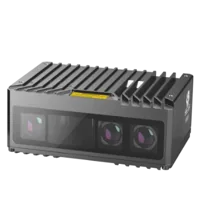
- Type
- Stereo / structured light
The MV-DLS300P-04 is listed as a laser galvanometer stereo camera.
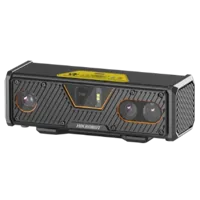
- Type
- Stereo / structured light
These catalog descriptions do not establish host-interface compatibility, raw infrared availability, pixel formats or operating-system support. Treat them as starting points for an application review, not confirmed replacements for another sensor.
Ask for a compatibility matrix and a representative acquisition demonstration. The evidence should show the required outputs operating together on the intended host software combination. If your algorithm needs raw infrared images, confirm that output explicitly; a device providing processed depth may not expose its internal images.
Laser profilers and stereo 3D cameras
170 models · from $699.00Keep a prevention checklist with the installation
Before releasing the system or ordering replacement hardware, check that:
- Required streams and simultaneous operating modes are documented.
- Enumeration results are saved for the accepted configuration.
- Active driver or backend evidence matches the supported installation.
- Firmware and SDK versions are recorded together.
- The application loads the intended runtime libraries.
- Aggregate payload and host processing have been tested under load.
- Restart and power-cycle tests reproduce the accepted behavior.
- Software changes have a documented recovery plan.
Retest the required stream set after operating-system, kernel, SDK or firmware changes. Color-only regression testing cannot protect a depth-dependent application.
For the next step, send the compatibility record, per-stream enumeration and first failing operation through application support. For a new selection, include the required outputs and target host environment so the review addresses acquisition compatibility as well as sensing performance.
Questions
Does a working color preview prove the depth sensor is supported?
No. It confirms that the color acquisition path works under the current conditions. Depth and infrared may depend on different interfaces, formats, processing libraries or firmware support. Test every required stream independently, then verify the simultaneous configuration used by your application.
Should USB bandwidth be checked before an unknown pixel format warning?
Not normally as the first step when the failure occurs during format enumeration. Establish that the requested format is recognized through the supported acquisition path. Bandwidth testing becomes more informative when streams work separately but fail together, or when errors increase with aggregate payload.
Must every depth stream appear as a separate video device?
Only if the manufacturer documents that acquisition architecture. Some SDKs obtain data through dedicated backends or calculate depth from other images. Check the supported SDK's stream inventory before deciding that a missing operating-system video node indicates a driver fault.
What compatibility evidence should be requested before buying a replacement?
Request the supported operating system, kernel, architecture, firmware, driver and SDK combination for the exact model. Also request confirmation of required formats and simultaneous outputs. A demonstration using the intended host environment provides stronger evidence than device discovery or a color-only preview.