
An acquisition package that installs on one computer may have no compatible binary for an ARM64 host. That failure can occur before a camera is connected, so changing cables or camera settings will not help. This troubleshooting procedure separates package selection, native-library loading, transport discovery and image delivery. You will identify the first failing layer, collect useful evidence and verify software support before selecting camera hardware. Use manufacturer-supported packages or documented builds rather than assuming a standard camera interface guarantees host compatibility.
1. Identify the first failing layer
Start with the earliest error, not the final exception printed by your application. Package installation, module import, transport loading and acquisition are separate tests. Passing one does not establish that the next will work.
The GigE Vision camera software compatibility checks explain protocol and application compatibility. Here, the narrower question is whether the required executable code can install and run on your particular host.
| First observed symptom | Likely causes, in checking order | First useful test |
|---|---|---|
| No matching package distribution | Wrong interpreter, unsupported Python version, unsupported platform tag, inaccessible approved repository | Confirm the active interpreter and accepted wheel tags |
| Module cannot be imported | Wrong environment, missing dependency, incompatible extension binary | Import it using the interpreter that performed installation |
| Native library cannot be loaded | Wrong architecture, missing dependency, incompatible runtime ABI | Inspect the exact library and preserve the loader error |
| Producer loads but no camera appears | Unsupported transport, wrong producer configuration, connection or discovery problem | Test the documented producer with the supported diagnostic application |
| Camera opens but frames fail | Buffer handling, transport settings, bandwidth or application processing | Acquire a minimal stream without inspection processing |
Do not troubleshoot network discovery while the Python binding still fails to import. Record each successful boundary so later changes do not undo a working layer.
2. Check the operating system and active Python runtime
ARM64 describes an instruction-set architecture, not a complete software platform. A compatible installation also depends on operating-system family, userspace architecture, Python implementation and version, and the native runtime libraries.
On Linux, collect the following information from the same environment that launches your application:
uname -m
getconf LONG_BIT
python -m pip --version
python -m pip debug --verbose
If your interpreter has a different executable name, use that name consistently. Calling a standalone package installer can accidentally target another Python installation.
Use this interpreter-level check as well:
import platform
import struct
import sys

print(sys.executable)
print(sys.version)
print(platform.machine())
print(platform.libc_ver())
print(struct.calcsize("P") * 8)
The final value reports the pointer width of the running Python process. For example:
A 64-bit process is not necessarily an ARM64 process. Combine that result with architecture information and executable inspection. A 64-bit kernel can also run a different userspace, and containers can make host-level checks misleading.
Repeat these checks inside the actual virtual environment, container or service environment. An interactive terminal is not evidence that a background application uses the same interpreter or library paths.
3. Match the package to Python and its ABI
A Python wheel carries compatibility tags for the interpreter, application binary interface and platform. The installer compares those tags with its supported set. A package can exist while offering no wheel that matches your environment.
Consider an illustrative CPython installation using version 3.11. A wheel tagged cp310-cp310 targets a different interpreter and ABI combination. A compatible ARM64 platform tag alone does not make that wheel suitable. Wheels using the stable abi3 interface can have broader compatibility, but only within their declared requirements.
Check these items in order:
- Confirm the package name and supported installation command in the provider's documentation.
- Compare the documented Python versions with the active interpreter, including the minor version where required.
- Compare available wheel tags with the output of
python -m pip debug --verbose. - Check the operating-system and runtime requirements, not only the architecture label.
- Confirm access to the manufacturer- or distributor-documented package repository.
Labels such as aarch64 and x86_64 describe different executable architectures. Linux wheel tags may also distinguish runtime families and minimum runtime compatibility. An ARM64 binary for one operating system is not interchangeable with an ARM64 binary for another.
A package tagged py3-none-any may contain only Python code, but its dependencies can still require native binaries. Follow the dependency chain until every compiled component has a supported installation route.
An installer update may help it recognize newer supported tags. It cannot create a missing architecture build or supply an unavailable native dependency.
4. Inspect native libraries before changing camera settings
Successful installation does not prove that compiled extensions can load. Import the acquisition binding by itself before running discovery or opening an inspection project. Preserve the complete error, including the library name and any missing symbol.
Common distinctions matter:
- Library not found: the required file or one of its dependencies cannot be located.
- Wrong executable format: the file may target another architecture or operating system.
- Missing symbol or symbol version: a library was located, but the available ABI does not satisfy the caller.
- Permission or access error: the application cannot read or load a required component under its actual account.
On Linux, file and readelf -h can help identify an executable's architecture. readelf -d shows declared shared-library dependencies. These checks do not prove that every dependency will resolve successfully at runtime; follow the provider's diagnostic procedure and capture the loader's actual complaint.
The entire in-process chain must be compatible: Python, its compiled extension, the acquisition library, the transport producer and their dependencies. Replacing only the top-level Python package may leave the incompatible component untouched.
Keep supported library versions together. Avoid copying individual shared libraries from an unrelated installation or adding broad search paths that mix releases. If a documented source build is available, follow its stated compiler, dependency and licensing requirements. A local compilation is not automatically a supported deployment.
5. Verify an architecture-matched GenTL producer
A GenTL consumer provides the application-facing acquisition interface. A GenTL producer supplies a transport implementation, commonly exposed through a .cti library. Installing the consumer does not necessarily install a usable producer.
Obtain the producer from the manufacturer or an authorized distributor through its documented route. Check the support matrix for the exact operating system, CPU architecture and transport you intend to use.
For the usual in-process loading model, the producer must match the consumer process architecture and have compatible dependencies. A producer built for a different CPU cannot be made compatible by pointing an environment variable at it.
Verify these boundaries separately:
- The producer file exists at the documented location.
- Its architecture matches the running consumer.
- Its native dependencies resolve in the application's environment.
- The consumer loads it without an architecture or symbol error.
- The producer supports the selected camera transport and connection arrangement.
Where the documentation uses GENICAM_GENTL64_PATH, check its value in the actual application environment. This variable helps locate producers; it does not certify their compatibility. Multiple producer installations can also make it unclear which file was loaded.
Once the producer loads, follow Linux GigE Vision camera discovery troubleshooting if a network camera remains invisible. If the camera opens but a feature lookup fails, use the separate GenICam feature-access diagnosis.
6. Prove acquisition with a staged test
Use a minimal test before adding image processing, graphical interfaces or application services. Run it with the same account and environment intended for deployment.
First, confirm that the manufacturer's supported diagnostic application works on the target, where one is available. This establishes a useful reference, but it does not prove your Python binding uses the same libraries or producer.
Then progress through the application stack:
- Import the required binding without connecting a camera.
- Load the documented producer and record its exact path and release.
- Enumerate devices and record the reported identifiers.
- Open the intended device and read basic identification information.
- Acquire images using documented buffer allocation and release behavior.
- Stop acquisition, close the device and repeat the sequence.
For an initial acceptance run, capture 100 frames and count complete, incomplete and timed-out acquisitions separately. Then repeat opening and closing 10 times. These are commissioning checks, not a guarantee of production reliability; extend the run to represent the actual duty cycle.
Record image dimensions, pixel format, frame identifiers where available, and the application settings used. Keep processing disabled initially so a slow inspection algorithm does not masquerade as a transport failure.
If acquisition works interactively but fails as a service, compare interpreter paths, permissions, environment variables and library locations first. If frames fail intermittently after successful initialization, continue with intermittent acquisition troubleshooting rather than reinstalling packages without evidence.
7. Choose camera hardware only after the software proof
Use area scan cameras and the camera finder to compare hardware after you have established a supported acquisition path. Interface choice affects the host stack, but neither a camera listing nor a transport standard establishes ARM64 package support.
The MV-CU020-90GC is a GigE, global-shutter color camera. Treat it as a camera-interface candidate, not as evidence that a particular ARM64 SDK exists.
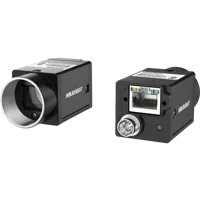
- Sensor format
- 1/1.7"
- Interface
- GigE
- Resolution
- Up to 3 MP
- Shutter
- Global
For a network-camera design, confirm producer support, host network configuration and power arrangements separately. The optical requirements remain independent: field of view, exposure and image detail still determine whether the camera suits the inspection.
The MV-CH120-11UC is a USB3, global-shutter color camera. Its suitability for your acquisition software must be verified against the supported host configuration.
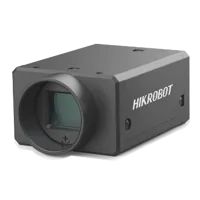
- Sensor format
- 1.1"
- Interface
- USB3
- Resolution
- 12 MP
- Shutter
- Global
A USB connection does not remove native-library requirements. Depending on the documented implementation, the stack may require a transport library, driver components, device-access rules or particular controller behavior.
If your host design needs an expansion interface, review frame grabbers and interface cards through the accessories finder. Check the expansion bus, host driver and operating-system support before selecting a card.
The MV-GE2204 is a GigE Ethernet adaptor. Confirm its supported host and driver configuration independently of the camera software.
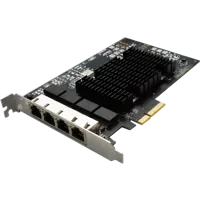
- Interface
- GigE
- Ports
- 4 ports
Adding an interface card cannot repair an incompatible Python extension or producer binary. Also, a board with several connectors does not establish simultaneous acquisition performance on your host.
When the target lacks a supported producer or binding, stop hardware qualification at that dependency. Legitimate alternatives include a supported Python version, a manufacturer-documented native API, a documented build or a different supported host architecture. Each changes the deployment requirements; none should be treated as a drop-in substitute without testing.
8. Close the issue with a reproducible support record
Before ordering or escalating, assemble a compact compatibility record:
- Host and userspace: operating-system release, CPU architecture and process pointer width. These identify the actual binary target.
- Python environment: executable path, version and accepted wheel tags. These distinguish interpreter problems from package availability.
- Software provenance: documented download location and exact installed releases. This keeps the investigation reproducible.
- Native components: extension and producer paths, architecture checks and dependency errors. These identify the failing load boundary.
- Acquisition result: whether import, producer loading, discovery, opening or streaming fails. This prevents unrelated troubleshooting.
- Deployment conditions: service account, container details and startup environment. These explain differences from interactive tests.
After a successful test, preserve the supported package set and configuration. Recheck the staged acquisition test after changing Python, the operating system, the SDK or the producer.
Use the camera configuration starting point once the software route is established. If support remains uncertain, send the compatibility record through application support before selecting parts. Ask for confirmation of the complete host, binding and transport combination—not only whether the camera uses a standard interface.
Questions
Does a GigE Vision camera automatically work with an ARM64 host?
No. GigE Vision describes camera communication, while the host still needs executable acquisition software for its operating system and architecture. Verify the consumer, Python binding if used, transport producer and dependencies together. A successful stream on the intended host provides stronger evidence than interface compatibility alone.
Why can an existing Python package report no matching distribution?
The installer may find no release matching your interpreter, ABI or platform, even though the package exists elsewhere. An incorrect package name, restricted repository access or an unsupported Python version can produce similar symptoms. Check the documented installation route and interpreter tags before concluding that ARM64 is unsupported.
Can compiling the Python binding solve an ARM64 installation failure?
Only consider this when the provider documents a source build and supplies the required components through an authorized route. The binding may depend on a separately distributed native SDK or producer. Building one component does not establish compatibility, licensing rights or support for the remaining stack.
Do all acquisition applications need a separate GenTL producer?
A GenTL-based application needs a compatible producer for its transport. Other acquisition APIs may package transport support differently. Determine which architecture your application actually uses, then verify its documented dependencies instead of installing a producer merely because another application uses one.
What should be confirmed before buying a camera for an ARM64 system?
Request confirmation for the exact host operating system, architecture, Python release, acquisition SDK and producer combination. Also ask about required drivers and deployment licensing. Prefer a reproducible acquisition test with representative settings, because a general statement about ARM64 support may exclude your particular software configuration.