
A software upgrade can open an existing conveyor-tracking project without preserving its measured performance. Camera drivers, encoder interpretation, calibration data and detection settings all need separate checks. This checklist is for teams planning a controlled maintenance change on an established inspection or picking system. Use it to define the recovery path, document compatibility and collect acceptance evidence before returning the machine to production.
1. Define the release decision before installation
Treat project conversion and production acceptance as different milestones. Conversion means the application can read and save the project. Acceptance means the complete system meets its documented operating requirements.
- [ ] Name the target release and upgrade path. Confirm whether the manufacturer supports a direct upgrade or requires intermediate releases. Do not infer compatibility from similar version names.
- [ ] Check licensing and activation requirements. Obtain upgrade entitlements, installers and activation instructions from the manufacturer or an authorized distributor. An existing license does not automatically establish entitlement to another release.
- [ ] Assign release and rollback authority. Identify who reviews the evidence and who authorizes production restart.
- [ ] Write measurable acceptance limits. Include positional error, detection performance, missed events, duplicate results and operating speed. Compare against requirements, not merely against the previous installation.
- [ ] Separate safety validation from vision validation. Follow the machine's approved safety procedures and change-control process. A successful tracking test does not validate protective functions.
Make a test sheet before changing anything. Each row should identify the requirement, test condition, measurement method, acceptance limit and result.
2. Capture a recoverable baseline
A project export is necessary, but it may not contain every dependency required to restore operation. Back up the surrounding configuration as well.
- [ ] Export the original project without overwriting it. Retain an untouched copy and perform conversion on a separate working copy.
- [ ] Record application and dependency versions. Include the operating system, acquisition runtime, camera driver, frame-grabber driver and relevant controller software.
- [ ] Save camera and acquisition settings. Record exposure, gain, pixel format, image region, trigger source, trigger polarity and relevant transport settings.
- [ ] Preserve calibration and inspection assets. Include coordinate transforms, calibration images, trained models, masks, reference images, thresholds and conveyor layout data.
- [ ] Record encoder configuration. Capture the displayed firmware revision, interface settings, count interpretation, direction and distance-per-count conversion.
- [ ] Prepare supported recovery media. Retain authorized installers, license recovery instructions and documented restore procedures. Check whether converted projects can reopen in the older release.
Collect baseline images and tracking measurements while the existing system is functioning correctly. Save timestamps, encoder readings and expected results alongside the images. Keep representative difficult parts, not just convenient examples.
For systems using vision controllers, record the actual installed hardware configuration rather than relying on the project name or enclosure label alone.
3. Verify the complete compatibility chain
Check release notes and compatibility documentation for the exact installed combination. A supported camera family does not necessarily establish support for every driver, interface and operating-system combination.
| Dependency | Evidence to collect | Acceptance question |
|---|---|---|
| Application and license | Supported upgrade path and entitlement record | Can this installation be upgraded and activated legitimately? |
| Camera and acquisition runtime | Supported device and runtime versions | Can the required acquisition features be configured? |
| Frame grabber or network adapter | Supported driver, firmware and host interface | Is the complete acquisition path supported? |
| Encoder interface | Required firmware and count conventions | Will position events retain their intended meaning? |
| Motion controller interface | Supported protocol and coordinate conventions | Will results reach the correct tracking queue? |
| Project and model files | Conversion notes and known limitations | Which assets require rebuilding or retesting? |
Use the GigE Vision software compatibility checks when Ethernet camera acquisition is part of the installation. Protocol support alone does not establish application-level support for every feature.
The LS-MV-133GM-GE is a camera reference for a hardware inventory. It is not a confirmed replacement for an installed device or a compatibility claim for your software.

- Sensor format
- 1/2.7"
- Interface
- GigE
- Resolution
- Up to 3 MP
- Shutter
- Global
If replacement hardware is necessary, compare area scan cameras through the camera finder only after establishing the application's supported-device requirements.
4. Identify encoder firmware through documented tools
Do not assume the project configuration screen reports encoder firmware. It may show only the selected interface, a device description or the acquisition driver revision.
- [ ] Identify the physical encoder interface. Record the hardware identifier and its connection to the tracking system.
- [ ] Find the documented revision-reading procedure. Use the manufacturer's specified diagnostic utility, configuration page or device information screen.
- [ ] Distinguish firmware from software. A host utility version is not evidence of the firmware installed in the connected device.
- [ ] Compare the reported revision with the target release requirements. Record both the requirement and the observed value in the change log.
- [ ] Update only when the supported procedure requires it. Follow documented power, connection and recovery requirements. Do not flash firmware based on an assumed version relationship.
- [ ] Recheck counting after any relevant change. Confirm direction, effective counts per travel distance, reset behavior and event association.
Avoid changing unrelated dependencies simply to make their version numbers newer. Each additional change expands the acceptance work and complicates fault isolation.
5. Convert the project and audit what changed
Perform the conversion during an approved maintenance state. Keep automatic motion inhibited through the machine's approved operating procedures while checking configuration.
- [ ] Read and save conversion messages. Investigate unsupported objects, substituted devices, reset settings and discarded parameters.
- [ ] Compare the configuration against the baseline. Check camera assignments, image dimensions, coordinate frames, conveyor direction, trigger configuration and output destinations.
- [ ] Inspect model behavior, not just model presence. Confirm that masks, search regions, thresholds and orientation conventions retain their intended effect.
- [ ] Verify exposure and gain deliberately. Automatic settings can change image appearance and detection stability even when the model file is unchanged.
- [ ] Save the converted project separately. Preserve the original until acceptance and the agreed recovery period are complete.
Use per-frame exposure and gain verification where available metadata can confirm actual acquisition settings. A configured value and a frame's applied value are not always the same evidence.
Start with saved-image tests to isolate model changes. Then repeat with live images, because replay does not test triggering, transport or encoder synchronization.
6. Validate calibration and encoder scale with numbers
Do not automatically discard a valid calibration, but do not trust an imported calibration without measurement. Check independent reference positions across the working area and at the operating heights relevant to the application.
The following arithmetic is an illustrative test design, not a specification for any listed product.
Suppose an independent reference shows 200 mm of conveyor travel while the recorded count changes by 2,000 counts:
Use the effective count stream consumed by the application. Do not substitute an encoder label value without checking the documented decoding convention. Repeat over longer travel and in the normal operating direction to expose scaling errors and mechanical slip.
Next, suppose the positional residual changes by 0.8 mm between reference locations separated by 400 mm:
That pattern warrants investigation of scale, coordinate transforms and reference measurement before changing detection thresholds. A nearly constant offset suggests a different cause, although no single residual pattern proves the diagnosis.
At a belt speed of 400 mm/s, an uncompensated timing error of 5 ms produces:
This concerns timing error, not total processing latency. A tracking system may compensate a known delay; incorrect event association or variable delay can still produce position errors.
7. Test live acquisition and tracking across conditions
Run initial motion tests under the machine's approved commissioning procedures. Increase operating demand only after the preceding condition passes.
- [ ] Check stationary references first. Establish geometric accuracy without conveyor motion obscuring the result.
- [ ] Test minimum, normal and maximum approved speeds. Include acceleration and deceleration where the production process uses them.
- [ ] Vary part position and orientation. Cover working-area edges, difficult appearances and the smallest permitted object spacing.
- [ ] Count events end to end. Compare physical parts, triggers, acquired frames, inspection results and tracking entries. Investigate every mismatch.
- [ ] Verify recovery behavior. Test approved stop, restart and communication-recovery sequences for stale results and duplicate processing.
- [ ] Record timing and positional residuals together. Correlated logs help distinguish geometry problems from synchronization problems.
Use the hardware-trigger timing guide to check acquisition limits separately from project conversion. Where vision drives motion corrections, visual servoing loop design explains the additional feedback-timing considerations.
If acquisition hardware must change, review frame grabbers and the accessories finder against the documented host and driver requirements.
The MV-GE1104 is an acquisition-hardware reference, not an approved pairing for the camera shown earlier.
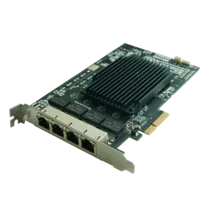
- Interface
- GigE
- Ports
- 4 ports
8. Set pass criteria that expose failures
Define sample size and operating conditions from process risk. A short successful run is useful evidence, but it cannot establish a rare-failure rate.
For an illustrative positional test, an application might require every observed error to remain within 1 mm on each specified axis. A run of 200 observations at each selected condition would reveal some repeatability problems, but it would not prove long-term reliability. Choose the actual limits and evidence volume through your acceptance process.
- [ ] Report maximum error as well as averages. Opposite-signed errors can cancel in the mean.
- [ ] Count false accepts and false rejects separately. An unchanged overall detection percentage can conceal a harmful tradeoff.
- [ ] Record missed and duplicated events explicitly. Do not remove them from the dataset as inconvenient outliers.
- [ ] Include a representative sustained run. Exercise expected load, normal logging and routine communications.
- [ ] Investigate regressions before release. Use the acquisition failure troubleshooting guide when frame delivery is unstable.
Acceptance requires both meeting the application's limits and resolving unexplained changes. Matching a previously inadequate baseline is not a pass.
9. Release or restore under change control
The usual answer is not always to recalibrate or retrain everything. If geometry and imaging remain unchanged and measurements pass, unnecessary adjustments can introduce new variation. Conversely, a changed lens, image region, count convention or coordinate transform can invalidate assumptions that project conversion preserves.
- [ ] Archive the approved project, dependency inventory and acceptance results together.
- [ ] Document every intentional difference from the baseline and its justification.
- [ ] Confirm that operations and maintenance teams can identify the released configuration.
- [ ] Keep recovery assets until the agreed observation period has passed.
- [ ] Restore through the supported procedure if acceptance fails and the cause cannot be resolved within the maintenance window.
Before ordering replacement parts, assemble the current hardware identifiers, target software release, compatibility requirements and measured failure evidence. Use applications support to review that information, or begin a camera configuration when documented requirements establish that a hardware change is necessary.
Questions
Does a machine vision software upgrade require a new license?
Check the manufacturer's licensing terms for the exact source and target releases. Some upgrades require a different entitlement, activation process or supported intermediate installation. Obtain software and licensing assistance from the manufacturer or an authorized distributor, and confirm the recovery process before removing the working installation.
Must every camera be recalibrated after an upgrade?
Not necessarily. An unchanged optical and mechanical setup may retain usable calibration data, but imported values still require independent verification. Measure reference positions across the working area and relevant heights. Recalibrate when measurements fail or when documented changes invalidate the original calibration assumptions.
How should the installed encoder firmware version be checked?
Identify the connected encoder interface and use its manufacturer's documented device-information procedure. The revision may appear in a diagnostic utility rather than the vision project. Record the device firmware separately from the host utility and driver versions, then compare it with the target application's compatibility requirements.
Can saved images replace live conveyor acceptance tests?
Saved-image tests can identify changes in model interpretation, thresholds and result coordinates. They do not exercise live exposure, triggering, frame transport, encoder association or motion timing. Use replay as an early isolation test, followed by live acceptance tests across the approved operating conditions.
What is needed for a reliable rollback plan?
Retain the original project, supported installers, dependency records, calibration assets and vendor-documented license recovery instructions. Establish whether project conversion and firmware changes are reversible. A rollback plan is credible only when its restore procedure and limitations are understood before the maintenance window begins.