
An Ethernet camera can connect to your computer without being usable by your inspection software. The connector establishes a network path, not an acquisition interface. For buyers and integrators, the useful question is whether the exact camera, software release, transport driver and operating system form a supported combination. These checks help you establish that combination before ordering, then confirm it with a small image-streaming acceptance test.
Check the complete compatibility chain
GigE Vision camera software compatibility depends on more than the camera's network interface. Start with the camera's documented acquisition protocol, then follow the path through the host transport software into your application.
Check these layers separately:
- Camera protocol: Does the exact model explicitly support GigE Vision, rather than simply Ethernet communication?
- Application interface: Does your software release provide a GigE Vision acquisition interface, a compatible transport interface, or a documented SDK integration route?
- Host software: Which driver, transport producer or runtime does that acquisition path require?
- Deployment environment: Are the operating system, processor architecture and application version supported together?
- Required functions: Can the interface deliver your pixel format, trigger mode, timestamps and other necessary features?
GigE Vision defines standardized camera communication and image transport over Ethernet. GenICam provides standardized ways to describe and access camera features. These standards help interoperability, but they do not make every application support every device feature automatically.
An interface listing that says only “GigE” is not sufficient evidence of GigE Vision support. Likewise, successful discovery does not prove that acquisition, triggering or reconnection will work.
If a supported combination already streams images but later becomes unreliable, use the separate intermittent acquisition troubleshooting guide. The checks below address the earlier purchasing and integration decision.
Choose the acquisition interface before choosing a driver
Identify the acquisition route your application actually supports. Different routes can expose the same camera through different software components.
| Acquisition route | Evidence to request | Main integration consideration |
|---|---|---|
| Native GigE Vision interface | Application documentation covering the camera's protocol and required functions | The application may supply its own transport components |
| GenTL consumer with a transport producer | Compatible consumer and producer documentation, including operating system and architecture | Both components must agree on their supported interface and deployment requirements |
| Application-specific acquisition adapter | Supported hardware, software release and adapter documentation | Adapter availability and licensing can differ between releases |
| Documented camera SDK interface | Supported SDK, runtime and application integration documentation | You must handle the SDK's acquisition and data-transfer requirements |
A GenTL producer supplies access to devices and image buffers; a GenTL consumer uses that access within an application. Not every application supports this arrangement, and not every SDK installation supplies a producer suitable for your software.
An SDK route can be appropriate when the application lacks a suitable standard interface or needs a feature that its existing interface does not expose. It is not automatically necessary just because the camera uses Ethernet.
Verify releases, licenses and required features
Request documentation for the exact combination you intend to deploy. A statement that a software family supports network cameras does not establish support in every release.
Record the following information in a short compatibility sheet:
- Camera model and firmware revision.
- Application release and acquisition component version.
- Transport producer, adapter or SDK version, where applicable.
- Operating system and processor architecture.
- Required licenses for development and deployment.
- Supported pixel formats, triggering functions and metadata.
- Installation instructions and any documented network-driver requirements.
Obtain software, firmware and documentation from the manufacturer or its authorized distributors. Follow the documented installation order, and do not assume an additional driver will improve an already supported acquisition route.
Some applications use their own transport implementation. Others depend on a separately installed component. Installing several competing network filter or transport drivers without a documented configuration can make the support boundary harder to establish.
Check features against the inspection task, not just the camera's headline capabilities. For example, a camera might offer a trigger function that your chosen adapter does not expose. A successful free-running preview would not reveal that limitation.
Ask for written confirmation when a required function is absent from the published compatibility information. Record any restrictions alongside the accepted software versions.
Estimate image payload and host buffering
Protocol compatibility and sufficient throughput are separate requirements. A supported camera can still exceed the capacity of the selected link, host or processing pipeline.
For uncompressed image data, estimate the payload using the transmitted pixel representation:
Consider a hypothetical monochrome stream with 1920 × 1200 pixels, an 8-bit transmitted format and 30 frames/s:
That is approximately 69.1 MB/s of image payload. It excludes packet headers, control traffic, retransmissions and any other devices sharing the network path. A 1 Gb/s link has a theoretical raw rate of 125 MB/s, not a guaranteed application payload capacity.
Pixel packing matters. A format carrying 12 useful bits in a 16-bit container requires more bandwidth than a packed representation carrying those same samples. Host conversion can also create additional memory traffic.
A queue of 10 frames in the example holds 23,040,000 bytes, or approximately 23 MB, before application copies and metadata. More buffering can absorb short delays, but it cannot correct a sustained processing deficit.
Use measured acquisition and processing rates to select the host, for example among industrial mini PCs. Port count or processor labels alone do not establish sustained acquisition performance.
Run a small acceptance test before full integration
A basic streaming test should isolate acquisition from your inspection algorithm. Use an evaluation unit, a demonstration system or an agreed acceptance process when possible.
- Prepare the supported host environment. Record software versions and install only the components required by the selected acquisition route. Follow documented network settings rather than changing several parameters at once.
- Confirm application-level discovery. Check that your intended application sees the correct camera identity. Network discovery in a separate utility is useful, but it does not prove that your application's acquisition component works.
- Start with a documented basic mode. Select a supported pixel format and conservative acquisition rate. Disable automatic display adjustments if they would obscure comparisons, and record the actual camera settings.
- Count delivered frames. Compare the requested acquisition behavior with received frames, incomplete-frame reports and transport errors. A moving preview alone is not adequate evidence.
- Test the intended operating mode. Apply the required resolution, frame rate, pixel format and triggering configuration. Confirm that exposure and feature settings survive acquisition stop and restart as expected.
- Repeat with the inspection workload. Add processing, logging and other expected host activity. Measure acquisition and processing separately so that a slow algorithm is not mistaken for a transport problem.
- Exercise documented recovery. Stop and restart acquisition, then test camera or application restart behavior under controlled conditions. Do not interrupt a running machine's control or safety functions.
As an illustrative bench criterion, a 30 frames/s stream observed for 60 seconds should deliver approximately 1800 frames after acquisition has stabilized. Use actual frame identifiers, timestamps or acquisition statistics where available; an imprecise wall-clock interval alone is not a definitive loss measurement.
Define acceptable errors and recovery behavior before testing. For a loss-sensitive inspection, any unexplained missing or incomplete frame should block acceptance until investigated.
The preview and tracking diagnostics guide explains how display information can help separate acquisition timing from later processing behavior.
Compare camera and host candidates without assuming compliance
Browse area scan cameras and use the camera finder to narrow interface, shutter, sensor format and mount requirements. Then obtain the acquisition-protocol and software-support evidence for each shortlisted model.
The LS-MV-133GM-GE lists a GigE interface and a global shutter. Those catalog attributes make it a candidate to investigate, not proof of compatibility with a particular application.

- Sensor format
- 1/2.7"
- Interface
- GigE
- Resolution
- Up to 3 MP
- Shutter
- Global
The MV-CU020-90GC also lists a GigE interface and a global shutter. Confirm its documented acquisition interfaces and the intended software path before selecting it for integration.
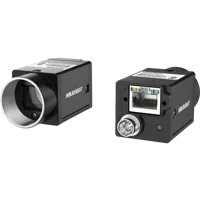
- Sensor format
- 1/1.7"
- Interface
- GigE
- Resolution
- Up to 3 MP
- Shutter
- Global
Treat host selection with the same discipline. Check the host PC's exact configuration, supported operating system and network-interface requirements against your chosen acquisition software.
Keep the hypothetical bandwidth example separate from these candidates. It illustrates sizing arithmetic; it does not state their available image modes, frame rates or measured performance.
Know when the standard acquisition route is insufficient
A native GigE Vision interface is usually the simplest route when it supports the required camera functions and deployment environment. It is not always the correct answer.
A camera might use a proprietary Ethernet protocol, or an application might lack the required acquisition interface. In those cases, investigate a documented SDK integration rather than assuming that an IP connection can supply images directly.
An SDK route also creates responsibilities. Your integration may need to manage buffer ownership, pixel conversion, callback threads, error reporting and orderly shutdown. Verify whether image memory remains valid after a callback returns and whether retaining a buffer can stall acquisition.
If licenses or unsupported releases block the intended route, use a supported license, software update or documented alternative. Do not build a deployment around an undocumented workaround.
A different camera or application interface can be a better purchasing decision than maintaining custom integration code. Compare the ongoing validation burden, not merely the initial streaming demonstration.
Complete the purchasing checklist
Before approving the combination, check that your evidence covers both compatibility and operating performance:
- Exact identities recorded: Model, firmware and software versions remove ambiguity from support requests.
- Acquisition route documented: Native interface, transport producer, adapter or SDK responsibilities are clear.
- Deployment licensed: Required runtime and acquisition permissions cover the intended installation.
- Features demonstrated: Triggering, pixel format and metadata work through the selected interface.
- Payload estimated and measured: The host and network sustain the intended workload with acceptable headroom.
- Acceptance results saved: Settings, delivered-frame counts, errors and test duration are recorded together.
- Recovery verified: Acquisition can stop, restart and recover using documented procedures.
- Updates controlled: Firmware, drivers and application releases are revalidated before production use.
Turn the evidence into a system specification
Use the camera configuration step to organize the camera requirements, and record the host PC's configuration alongside them. Keep the compatibility sheet with the system specification so future updates can be checked against it.
The configurator matches a camera, lens, light, light controller and cables to each other, step by step, and lists only parts that fit what you already picked.
If the acquisition route remains uncertain, send the exact software release, operating system, proposed camera and required image mode through application support. Ask for confirmation of the supported integration path before committing to the hardware.
Questions
Does an Ethernet interface mean a camera supports GigE Vision?
No. Ethernet describes the network connection, while GigE Vision defines camera communication and image transport. A camera may use Ethernet with another protocol. Request explicit protocol documentation for the exact model, then confirm that your application supports that acquisition route and the functions you need.
Do I need to install the camera SDK to acquire images?
Not always. Some applications include their own compatible acquisition interface, while others require a transport producer, adapter or SDK runtime. Establish the application's documented acquisition route first. Install the components it requires rather than assuming that every camera needs the same driver package.
Is successful camera discovery enough to confirm compatibility?
Discovery proves only part of the connection. Your application must also open the device, configure a supported image mode, receive complete frames and expose the features needed for inspection. Validate acquisition statistics and triggering behavior instead of accepting a preview window as the entire compatibility test.
When should I use an SDK instead of a native acquisition interface?
Use a documented SDK interface when the application lacks a suitable standard acquisition route or cannot access a required feature through its existing interface. Include buffer management, data conversion, runtime licensing and recovery behavior in the integration scope. Compare that maintenance effort with selecting another supported combination.
What should I send when requesting a compatibility check?
Provide the exact camera model, firmware, application release, operating system and proposed acquisition interface. Add the required resolution, pixel format, frame rate, trigger behavior and metadata. Ask which drivers or runtimes are required and whether the complete combination has documented support for deployment.