
A broken line on a grid target proves that your software can detect a broken target. It does not prove that the software can detect damage to the lens viewing it. For optical inspection and maintenance teams, the practical solution is to separate surface inspection from functional image testing. You can then choose lighting, targets and measurements that reveal the defects you actually need to reject, without confusing target damage with optical damage.
Decide whether you are inspecting a surface or its imaging performance
Camera lens scratch detection involves two different questions: is the optical surface damaged, and does that damage affect the acquired image? Those questions require different inspection arrangements.
In direct inspection, an external camera focuses on an accessible lens surface. Controlled illumination makes scratches scatter light toward the camera while the surrounding surface remains comparatively dark. This can reveal visible damage, but it does not establish its effect on the image formed through the lens.
In functional testing, the camera and lens under evaluation capture intact reference targets. You measure changes in sharpness, geometry, flare and color uniformity. A surface scratch usually does not appear as a sharply focused copy of its shape because it lies outside the object plane being imaged.
| Test | What it can establish | What it cannot establish alone |
|---|---|---|
| Direct surface inspection | Visible scratches, coating marks or contamination on accessible surfaces | Whether the complete assembly meets image-quality requirements |
| Intact grid capture | Changes in grid geometry and local image continuity | The presence or absence of every scratch |
| Edge or bar target capture | Changes in spatial contrast and sharpness | The physical cause of the change |
| Dark target with controlled bright source | Sensitivity to scattered light and veiling flare | Surface condition without further investigation |
| Neutral uniform target | Spatial brightness and color changes | Whether those changes originate in the lens, sensor or illumination |
Use both inspection paths when cosmetic condition and functional performance are separate acceptance requirements.
Build separate surface and functional test arrangements
For direct inspection, mount the lens or complete optical assembly in a repeatable fixture. Position an external inspection camera so it focuses on the accessible surface, not through the assembly onto a distant target. Curved surfaces may require several viewing positions or focus settings.
Area scan cameras provide the external image acquisition, while machine vision lenses establish the inspection field and sampling. The MV-CU020-90GC and LS-SMV2528P-6M are component candidates for that external station. Confirm coverage, working distance and usable surface detail before committing to the combination.
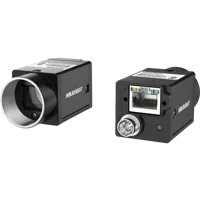
- Sensor format
- 1/1.7"
- Interface
- GigE

- Type
- Machine vision fixed
- Sensor format
- 2/3"
For functional testing, use the camera and lens assembly being qualified. Replacing its optics with the external inspection components would change the object of the test. For integrated or sealed assemblies, do not dismantle them merely to obtain a surface view.
Start direct inspection with bar lights positioned away from the camera axis. Adjust their angle so a defect scatters light into the camera while the undamaged surface returns less light. Sweep the illumination direction: a scratch that appears clearly from one direction may be weak from another.
The LS-LLDS-372-28-W is a diffused white-light candidate for illuminating reference targets. The LS-2BR30030 is a standard bar-light candidate for evaluating directional illumination. Confirm its emission color and electrical requirements before selecting it for a particular test.
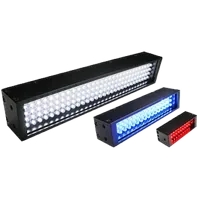
- Size
- 200-400 mm
- Type
- Diffused
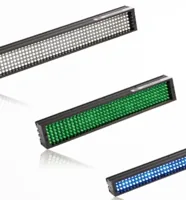
- Size
- 200-400 mm
- Type
- Standard
These parts are not a validated scratch-inspection package. Select source size, diffusion and angle through sample trials. The lighting finder helps narrow fixture choices once the geometry is known.
Use intact targets that answer distinct questions
A damaged grid changes the scene entering the optics. A damaged lens changes how the optics transmit and redistribute light. These are not equivalent transformations, even when their resulting images both look abnormal.
Use an intact, flat grid for geometry checks. Inspect the target independently for print breaks, dirt, scratches and warping. If you need quantitative distortion measurements, use a target with documented geometry and a calibration method appropriate to the required accuracy.
Add a sharp edge or repeating bar pattern for contrast measurements. Include features near the center and corners rather than assuming central sharpness represents the complete field.
Use a neutral, uniform target for brightness and color checks. Its illumination must also be stable and sufficiently uniform; otherwise, source variation becomes indistinguishable from an optical change.
Finally, use a dark target with a bright source at controlled positions near the field boundary to investigate flare. Record source position and intensity, and avoid saturation or illumination beyond the camera's documented limits.
Diffuse illumination can help control reflections, but it may hide scratches during direct inspection. The guide to dome lighting for reflective surfaces explains that tradeoff; a lighting arrangement useful for smooth appearance is not automatically useful for revealing surface damage.
Set surface sampling before choosing resolution
For direct inspection, estimate how many pixels will span the smallest relevant mark. This is an object-space sampling calculation, not a guarantee that the mark will be detectable.
Consider a hypothetical station viewing a locally near-planar surface region:
- Field width: 40 mm.
- Horizontal image width: 2000 pixels.
- Smallest target scratch width: 0.10 mm.
The arithmetic is:
That is a useful starting point for segmentation trials. It does not account for scratch contrast, curvature, defocus, diffraction or sensor noise. A narrow scratch can sometimes produce a detectable scattered-light signal without having a reliably measurable width.
Curvature changes local scale and focus, so verify sampling over the inspected surface rather than only at its center. Use the camera finder to compare acquisition options after defining the field and required detail.
For optical layout, the guide to choosing focal length from field of view provides the supporting calculation. Do not treat the nominal resolution rating of a lens as a scratch-detection specification.
Acquire repeatable reference and candidate images
Create a fixed acquisition recipe before developing a defect classifier. Otherwise, the classifier may learn fixture movement, automatic exposure changes or lighting drift instead of optical condition.
- Clean using the documented method. Capture before and after cleaning when contamination is a possible cause. Do not improvise abrasive cleaning or solvent treatments.
- Lock the mechanical geometry. Record target distance, orientation, focus, aperture and assembly seating. Secure adjustments that should remain unchanged.
- Fix acquisition settings. Disable automatic exposure, gain and white balance where available. Keep sharpening, gamma, denoising and other processing unchanged.
- Check the signal range. Avoid clipped highlights and dark measurements dominated by the noise floor. Use linear image data where available for quantitative intensity comparisons.
- Capture repeated baselines. As an initial study, acquire 10 repeated captures, then repeat after removing and reseating the assembly. Expand the study according to observed variation and risk.
- Run every target condition. Preserve separate recipes for grid, sharpness, uniformity and flare tests. Exposure can differ between recipes, but not between reference and candidate within a recipe.
Save raw captures or the least-processed available images, plus all relevant settings. Retain reference images from known-good assemblies rather than relying on a single photograph.
Measure geometry, sharpness, flare and color separately
Grid geometry
Detect grid intersections or line centers and compare their locations with the reference. Correct only permitted fixture differences, such as translation and rotation; allow scale adjustment only when the test specification permits it.
Avoid flexible image warping before scoring distortion. A transformation that bends the candidate grid onto the reference can remove the very defect you intended to measure.
Report positional residuals across the field, not merely whether lines look continuous. Stable grid geometry does not rule out surface damage or increased scatter. The guide to telecentric optics for dimensional gauging explains a different geometric requirement; dimensional stability and optical condition are not interchangeable acceptance tests.
Sharpness and contrast
Measure the same edge or bar regions in every capture. For a resolved repeating pattern, a simple contrast measure uses representative bright and dark regions rather than noisy single-pixel extrema.
Use dark-offset-corrected, linear intensities where possible, and reject measurements with an inadequate denominator. This contrast measurement is not a complete modulation transfer function measurement. Keep focus policy explicit: testing at a fixed focus and testing after refocusing answer different questions.
Flare
Measure the mean signal in a defined dark region while the bright source occupies repeatable positions. Compare it with a fixed reference signal captured under the same recipe. Subtract the applicable dark offset before forming a ratio.
A source-angle sweep can reveal damage that a uniformly illuminated target misses. Include the angles expected in service rather than choosing only the easiest laboratory condition.
Color and brightness uniformity
Compare neutral-target regions using fixed processing and stable illumination. Evaluate per-channel signals, spatial shading and channel ratios against the baseline. Avoid clipped channels and regions with inadequate signal.
Do not apply a newly calculated flat-field correction to every candidate before scoring it. That correction could conceal the shading change being investigated. If production correction is part of the requirement, retain both uncorrected diagnostic results and corrected performance results.
Work through a functional decision example
Suppose an unchanged bar-pattern recipe gives reference contrast of 0.80 and candidate contrast of 0.64. The relative loss is:
Now suppose grid residuals change only slightly, while the normalized dark-region flare signal increases. The combined result is more informative than searching for a broken grid line.
| Measurement | Reference | Candidate | Practical interpretation |
|---|---|---|---|
| Bar-pattern contrast | 0.80 | 0.64 | Reduced contrast under the specified recipe |
| Grid residual RMS | 0.12 pixels | 0.13 pixels | Little change in this geometric measurement |
| Dark-region signal relative to reference white | 1% | 3% | Increased veiling signal under the tested source position |
These are illustrative results, not universal acceptance limits. Investigate focus, contamination, source movement and acquisition settings before attributing the change to a scratch.
If the contrast loss exceeds a validated functional limit, report that functional failure even when the scratch itself is not localized. Conversely, an obvious surface mark may trigger a cosmetic rejection while the tested imaging functions remain acceptable. Keep those outcomes separate in the inspection report.
Validate with real defects and report only supported conclusions
Build the validation set from known-good assemblies and independently characterized examples of scratches, contamination, coating damage and other relevant conditions. Include borderline cases and variation in defect position and orientation.
Do not deliberately damage serviceable optics merely to create examples. Obtain appropriate nonserviceable samples or use an approved qualification process. A digitally edited grid can test software behavior, but it cannot establish sensitivity to physical optical damage.
For each proposed metric, compare variation among acceptable assemblies with variation caused by relevant defects. Choose thresholds from the required acceptance criteria and the measured distributions. Reserve independent samples for validation rather than adjusting thresholds until every development image passes.
Edge detection can help segment a bright scratch in a direct surface image. On a grid capture, it will mostly detect target edges. Template subtraction also requires controlled alignment and brightness; otherwise, ordinary movement produces strong false differences.
Display a defect mask only when the direct image supports localization. For functional tests, display affected image regions and metric failures instead of drawing a fictitious scratch outline on the target image.
Check the specification before ordering
Use this checklist to turn a demonstration into a repeatable station:
- Define the rejection rule. State whether it concerns surface appearance, imaging performance or both.
- Confirm surface access. Specify which surfaces can actually be inspected without disassembly.
- Match camera and lens. Check mount, sensor coverage, working distance, field size and required sampling.
- Verify illumination geometry. Check fixture clearance, source size, viewing angles and reflection paths.
- Confirm electrical compatibility. Verify the light's documented supply, control and connection requirements.
- Specify reference targets. Record geometry, finish, flatness, condition and replacement criteria.
- Document the acquisition recipe. Include processing settings and any permitted focus adjustment.
- Plan baseline checks. Recheck a known-good assembly after fixture changes or unexpected drift.
- Define the report. Separate visible surface damage, functional failures and unresolved causes.
The usual grid-only approach is wrong when the important failure is scatter, contrast loss or a cosmetic mark outside the focused scene. Start with representative defective assemblies and controlled lighting trials, then select hardware around the demonstrated signal.
Use the lens finder for the external viewing arrangement and the camera configuration step to assemble its components. If the defect samples or acceptance limits remain uncertain, contact the applications team with the viewing geometry, target images and required pass/fail criteria before ordering.
Questions
Will a scratched camera lens produce a broken grid line?
Usually, you cannot identify a lens scratch reliably by looking for a matching break in a grid. The grid is at the object plane, while the scratch lies on an optical surface. Damage may instead change contrast, scatter or flare, and some scratches may have little measurable effect under a particular test.
What lighting should I use to inspect lens surfaces?
For an accessible surface, start with off-axis illumination and adjust the viewing geometry to suppress the undamaged surface's reflection. Test several illumination directions because scratch visibility depends on orientation and curvature. Keep this direct surface inspection separate from tests measuring the image formed through the lens.
Can an edited target image replace a physically scratched lens?
An edited target is useful for checking registration, segmentation and reporting logic. It does not reproduce light scattering or other effects caused by damage to optical surfaces. Validate physical defect detection with independently characterized assemblies and include acceptable samples that represent normal manufacturing and fixture variation.
How should I choose a pass or fail threshold?
There is no universal contrast, flare or scratch-width threshold that suits every optical assembly. Set limits from the intended imaging task, cosmetic requirements and measured repeatability. Validate those limits against independent acceptable and defective samples, keeping surface-condition decisions separate from functional image-quality decisions.
Do I need a color camera for optical-condition testing?
A color camera is needed when the acceptance test depends on comparing color channels. A monochrome camera can support geometry, surface-scatter and sharpness measurements but cannot independently measure color balance. In either case, stable illumination and fixed processing are necessary to distinguish optical changes from acquisition changes.