
A sorting conveyor needs enough detail to distinguish parts, a short enough exposure to freeze motion, and images arriving before the sorting decision expires. These are separate requirements: adding megapixels does not stop blur, and increasing frame rate does not necessarily shorten exposure. For a prototype or production station, start with the smallest feature, belt speed and object spacing. Those measurements let you evaluate a webcam or industrial camera against the same practical tests.
1. Make three decisions before choosing a camera
Write down the inspection requirement before browsing area scan cameras. You need three independent answers:
- Spatial sampling: How many pixels must cover the smallest feature that changes the sorting decision?
- Exposure: How far may the part move while the sensor collects light?
- Acquisition timing: How often must you capture, and how late may a usable result arrive?
Also define what the algorithm actually measures. Sorting red parts from blue parts requires color information. Separating silhouettes may work with monochrome images. Reading a small printed character usually needs more detail than detecting a large missing tab.
Do not choose by megapixels alone. The camera finder helps narrow interfaces, shutter types and sensor formats, but your application determines the required image dimensions.
Keep machine safety separate from the sorting algorithm. A vision result used for classification is not automatically a safety-rated protective function.
2. Calculate pixels from the smallest sorting feature
Use the field width perpendicular to belt travel and the smallest relevant feature measured in that direction. As an initial estimate, allow roughly 4–8 pixels across a distinct feature. This is a starting point for testing, not a universal detection guarantee.
Low contrast, texture, printing defects and measurement tolerances can require more sampling. A feature occupying one pixel is highly sensitive to its position relative to the pixel grid.
Suppose the required field width is 240 mm, and the smallest sorting feature is 1.2 mm wide. Choosing an initial target of 6 pixels across that feature gives:
Now consider a hypothetical image measuring 1600 × 1200 pixels:
This provides sampling margin, but it does not prove the feature will be visible. Lens sharpness, lighting contrast, focus and motion still matter. Use the camera resolution calculator to explore other feature sizes and fields.
Check both image axes. A tall image cannot compensate for insufficient horizontal pixels when the critical feature runs across the belt.
3. Set exposure from belt speed and allowable blur
Frame rate describes the frequency of images. Exposure describes how long each image collects light. A camera can deliver frequent images that are all blurred if exposure remains too long.
For constant motion approximately parallel to the image plane, estimate motion blur using object-space sampling:
Continue the example with a belt speed of 600 mm/s and sampling of 0.15 mm/pixel. If the starting blur allowance is 0.5 pixel:
That exposure limit comes from image motion, not the desired capture rate. A low capture rate can still require a very short exposure.
At 1 ms exposure, the same arrangement produces:
Four pixels of blur can obscure a feature only eight pixels wide. Start testing near the calculated limit, then compare classification results on representative good and bad parts.
Check actual camera settings rather than assuming a requested exposure was accepted. The guide to verifying exposure and gain in camera metadata explains how to distinguish requested settings from reported acquisition values.
4. Calculate object rate and complete-view time
Object rate depends on pitch: the distance from one equivalent point on a part to the next. For regularly spaced parts, pitch equals part length along travel plus the gap.
For 60 mm parts with 40 mm gaps:
A triggered system taking one image per object therefore needs at least six accepted acquisitions per second under these nominal conditions. Add capacity for the shortest credible pitch, retries if permitted, and any additional views.
Free-running capture needs a different check. The entire object must be visible in at least one image, regardless of when it enters relative to the capture cycle.
For the hypothetical image above, equal object-space sampling along both axes gives a longitudinal field of 180 mm. A 60 mm part then has a complete-view travel window of:
A capture interval equal to that window leaves no useful timing margin. At 20 frames/s, the interval is 0.05 s, giving roughly four capture opportunities during the window. Software must still identify duplicate views of the same object.
If parts touch, overlap or change spacing, nominal object rate is insufficient. Test the densest arrival pattern and the smallest usable complete-view window.
For trigger acceptance, overlap modes and camera timing limits, use the separate guide to external-pulse acquisition and frame-rate limits. Those checks come after defining the required inspection rate.
5. Decide whether a webcam is sufficient
A webcam can be useful when the first question is whether the algorithm can distinguish the parts at all. It becomes a weaker choice when acquisition behavior cannot be controlled or verified.
Evaluate the exact device, driver and software path. Neither a webcam label nor an industrial-camera label establishes every required capability.
| Requirement | Webcam prototype assessment | Industrial camera assessment |
|---|---|---|
| Fixed exposure and gain | Confirm controls work through the chosen application | Check documented ranges and feature access |
| Fixed focus and white balance | Confirm automatic changes can be disabled | Confirm the optical setup and color controls |
| Image delivery | Check compression, buffering and stale frames | Check stream configuration, buffering and diagnostics |
| Motion geometry | Test shutter behavior on moving parts | Select the appropriate shutter type |
| Object-synchronized capture | Use free-running capture only if timing permits | Verify hardware trigger support and electrical details |
| Result deadline | Measure worst observed end-to-end delay | Measure it here too; the interface alone is not proof |
A webcam is a reasonable prototype candidate when you can lock the necessary settings, capture recognizable features and tolerate free-running acquisition. Stop-and-image experiments are especially useful for separating algorithm problems from motion problems.
Move toward an industrial camera when object association, synchronized lighting, repeatable acquisition timing or diagnostic access becomes a requirement. Confirm software support before committing; the camera software compatibility checks provide a useful acceptance process.
Do not approve either option using only its displayed preview. Save frames through the actual application and test those files with the intended algorithm.
6. Choose shutter, lens and framing together
A global shutter exposes the image together, reducing the geometric distortion associated with rows being exposed at different times. A rolling shutter can skew moving shapes even when each row uses a short exposure. Short exposure controls blur; it does not necessarily remove rolling-shutter geometry errors.
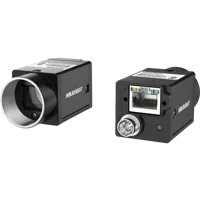
The MV-CU020-90GC is a color, global-shutter camera example. Treat it as a candidate to check against your required image dimensions, acquisition controls and software support, not as an automatic match for the worked example.
- Sensor format
- 1/1.7"
- Interface
- GigE
- Resolution
- Up to 3 MP
- Shutter
- Global
Choose machine vision lenses from the required field, sensor dimensions, working distance and available mounting space. The field must include belt wander and placement variation without making the sorting feature too small.
Use the lens focal-length selection guide to translate framing into a lens shortlist. Then check image-circle coverage, mount compatibility, focus range and edge sharpness in the lens finder.
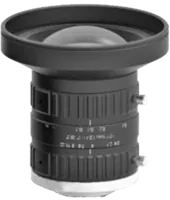
The LS-S1MV0824-10M is a C-mount lens example. Its suitability depends on the selected sensor and framing geometry; a matching mount alone does not establish the right field of view.
- Type
- Machine vision fixed
- Sensor format
- 1"
- Mount
- C-mount
- Resolution
- 6-10 MP
Test focus across the expected part-height range. If height variation changes the apparent feature size enough to affect sorting, address that geometry before increasing camera resolution.
7. Provide enough controlled light for the exposure
The blur calculation creates a lighting requirement. If a stationary image looks good but the calculated exposure produces a dark image, the solution is not automatically more gain. Gain raises the recorded signal and noise; it does not collect additional photons.
Use controlled illumination to make the sorting feature repeatable. Bar lights allow directional arrangements that can emphasize edges, texture or surface changes. Their angle can also create glare, so test with the most reflective part orientation.
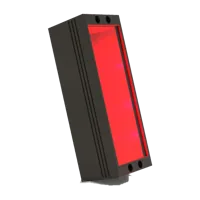
The LS-2LB-300X16 is a bar-light candidate for fixture trials. Confirm coverage, mounting clearance, electrical requirements and achievable image brightness in the actual arrangement.
- Size
- 200-400 mm
- Type
- Standard
- Voltage
- 24 V
Compare arrangements through the lighting finder after testing direction and diffusion. Do not infer illuminated field size directly from a light's physical dimensions.
For color sorting, hold illumination and white balance steady. For silhouette sorting, maximize separation between part and background rather than trying to reproduce a visually pleasing scene.
If pulsed lighting is needed, verify the light's documented operating limits and the controller's compatibility. Do not assume a continuous-duty light permits increased pulse current.
8. Budget latency to the sorting mechanism
Sharp images are not sufficient if the decision arrives after the part passes the diverter. Separate acquisition throughput from end-to-end latency.
With 300 mm between the imaging position and action point:
Suppose measured acquisition, transfer, processing and communication together consume 80 ms, while the mechanism requires 60 ms to respond:
That allowance must cover scheduling, jitter, tracking uncertainty and a practical margin. Measure distributions and worst observed delays under load, not only average processing time.
Identify every object from capture to action. A free-running system must avoid duplicate decisions, while any buffered system must avoid applying an old result to a new part. For development displays, preview overlays for motion-tracking diagnostics can help make those associations visible.
If belt speed changes, a fixed time delay may place the action incorrectly. Consider position-based tracking or an updated motion model, with the required position inputs verified separately.
9. Verify the system before ordering the final setup
Run a short acceptance sequence using the intended software and representative parts:
- Record the geometry. Measure field size, belt wander, part height and the smallest decision feature.
- Lock acquisition settings. Verify that exposure, gain, focus and relevant color settings remain unchanged.
- Check stationary images. Establish that the lens and lighting reveal the feature without motion.
- Run at maximum speed. Compare measured blur and classification performance with the calculations.
- Test minimum spacing. Count physical parts, usable images, decisions and sorting actions independently.
- Load the application. Include recording, displays and communications used during normal operation.
- Restart the system. Confirm settings are restored and the first usable result is correctly associated.
Keep original images and timing logs from failed decisions. If acquisition becomes intermittent, follow the camera acquisition failure troubleshooting sequence instead of changing several parameters simultaneously.
10. Know when the usual answer is wrong
More pixels are not always beneficial. Narrowing the field or improving contrast may reveal the sorting feature without increasing image size. Additional pixels can also increase transfer and processing load.
A faster camera is not always the next purchase. If exposure is too long, improve illumination or reduce motion. If latency comes from queued frames, increasing capture rate can make the queue worse.
An industrial camera is not mandatory for every experiment. A controlled, slow prototype can establish algorithm feasibility before you commit to synchronized acquisition. Conversely, a successful stationary demonstration does not establish performance on a moving conveyor.
Before selecting parts, collect a field-width sketch, minimum feature size, maximum speed, minimum pitch and distance to the sorting mechanism. Use those measurements in the camera configurator, or send them through application support to review the camera, lens and lighting together.
Questions
Should I choose resolution or frame rate first?
Check resolution and exposure first, then capture rate. Resolution must show the feature that determines the sorting class, while exposure must keep its motion blur acceptable. Capture rate must then cover the shortest object spacing or complete-view window. None of these requirements substitutes for the others.
Can a webcam work for a sorting conveyor prototype?
Yes, if the actual application can hold acquisition settings steady and deliver usable images before the decision deadline. Test saved frames rather than judging the preview alone. A webcam prototype can establish algorithm feasibility, but synchronized capture and predictable object association may require a different acquisition setup.
How many pixels should cover the smallest sorting feature?
Start by allocating roughly 4–8 pixels across a distinct feature, then validate with representative samples. Low contrast, fine print, dimensional measurement and variable orientation may need more. The requirement concerns pixels across the feature itself, not the total megapixel count advertised for the camera.
Does a higher frame rate automatically reduce motion blur?
Not necessarily. Frame frequency and exposure duration are separate settings, although a device may impose relationships between them. Calculate an exposure limit from belt speed, object-space sampling and acceptable blur. Then verify the exposure actually used by the camera and provide sufficient illumination for that duration.
When is hardware triggering worth specifying?
Consider triggering when each image must correspond to a known object position, when lighting must be synchronized, or when free-running capture creates unacceptable uncertainty. Confirm the camera's documented trigger behavior, input requirements and supported acquisition rate. Triggering does not eliminate transfer delay, processing latency or the need to track objects.