
A controller-ownership fault during product changeover often looks like a failed start, although the unresolved event happened during the previous stop. This troubleshooting procedure is for teams integrating vision-guided picking with production controls and safeguarding. You will learn to distinguish safety status from application status, identify which component still claims the controller, and collect evidence for documented recovery. The objective is a repeatable changeover sequence, not a way around an ownership check or safety interlock.
Separate the safety stop from the project release
A safety stop and a production stop serve different purposes. Safeguarding responds to a hazardous condition through the machine's validated safety functions. A production stop coordinates normal application activities, which may include stopping new work, resolving outstanding operations and releasing shared resources.
Those activities can interact, but neither status should be treated as proof of the other. An open guard may have stopped hazardous motion while leaving application cleanup incomplete. Conversely, an application reporting that production has stopped does not establish that entry into the machine is safe.
Treat an ownership message as evidence that the requested controller is unavailable to the requesting project. It does not, by itself, prove another project is running. Possible explanations include an incomplete release, another active session, lost communication or an inconsistent configuration.
The first diagnostic question is therefore specific: did the previous project complete its documented release sequence before the next project requested control?
Build a timeline before changing anything
Capture the failed sequence before restarting software or clearing messages. Recovery actions can remove the evidence needed to distinguish an unfinished stop from a communication problem.
Use documented status fields and available logs. The labels below describe functions; they are not guaranteed parameter names or interface features.
| Event or state | Evidence to collect | What it helps distinguish |
|---|---|---|
| Production stop requested | Request timestamp and originating station | A command was issued, not necessarily completed |
| Production stop acknowledged | Application and controller status | Whether normal stopping reached its expected endpoint |
| Safety stop active | Safety-system indication and event record | Whether safeguarding interrupted the sequence |
| Previous project released | Documented ownership or project status | Whether the shared controller became available |
| New project requested | Project identity, timestamp and target controller | Which project attempted to acquire which resource |
| Communication changed | Connection events and application logs | A retained owner versus an uncertain status display |
Record software versions, project revisions and the selected controller identity. Keep the unsuccessful start message alongside the preceding stop events, rather than saving only the final alarm.
When logs come from separate devices, check their clock relationship. A timestamp difference of 200 ms is not meaningful if the clocks differ by several seconds. Prefer documented transaction identifiers or event ordering when synchronized timestamps are unavailable.
Check the likely causes in a useful order
For a fault following an interrupted production stop, start with incomplete release. Then investigate competing sessions, communication and configuration. This is a diagnostic order based on the symptom, not proof of a particular failure mechanism.
1. The previous project never completed release
Test: Compare one successful changeover with the failed sequence. Find the last confirmed transition before they diverge. Look for a missing stop acknowledgment or release confirmation, not merely a stop-button event.
Fix: Follow the documented interrupted-stop recovery sequence for the installed application and machine. If release remains unavailable, retain the logs and escalate through the equipment supplier's support process.
Do not directly edit an ownership flag or jump execution past a cleanup routine. An apparently stale flag may represent unresolved application work.
2. Another session still owns the controller
Test: Inspect documented project and connection status on authorized engineering stations, operator stations and application services. Check for duplicate instances or a previous project that remains connected after its window closes.
Fix: End the owning session through its documented stop and disconnect procedure. Confirm release before requesting the controller from the replacement project.
Avoid terminating processes merely to make the message disappear. A process exit and a confirmed controller release are different events unless the documentation explicitly connects them.
3. Communication failed during the handover
Test: Correlate application connection events with the stop timeline. Check whether ownership status is current, unavailable or simply the last value displayed before a disconnect.
Fix: Restore communication through documented procedures, then establish the actual controller and project states before continuing. Do not interpret a disconnected display as confirmation that the resource is free.
If acquisition also drops out, use the intermittent acquisition troubleshooting procedure to separate image-transfer failures from project ownership.
4. Project configuration targets the wrong resource
Test: Compare the intended controller identity and resource mapping between the outgoing and incoming projects. Check a known-working revision rather than assuming similarly named projects are equivalent.
Fix: Correct the configuration through supported engineering tools and the normal change-control process. Validate the change offline where supported, then under the machine's approved commissioning procedure.
If the fault began after an installation change, use the software upgrade validation checklist to examine versions, dependencies and rollback evidence.
Work through an example without inventing a delay
Consider these illustrative logs from the same application. They are diagnostic examples, not required timing values for any product.
| Event | Successful changeover | Interrupted changeover |
|---|---|---|
| Production stop requested | 100 ms | 100 ms |
| Safety stop activated | Not activated | 190 ms |
| Production stop acknowledged | 340 ms | Not observed |
| Previous project released | 460 ms | Not observed |
| New project requested control | 600 ms | 250 ms |
For the successful run, the observed release duration is:
The failed run does not establish a release duration because no release was observed. It shows only that the new request arrived without recorded confirmation of release.
Adding a 360 ms delay would not resolve that uncertainty. The interrupted sequence might require documented recovery, and its completion time could differ from normal operation. Use confirmed state transitions for handover; use elapsed time to detect an abnormal wait and report it.
Recover through the documented sequence
Recovery should restore an understood machine state, not just clear the visible message. The exact commands depend on the installed application, controller and machine design.
- Establish safe conditions. Follow the site's safeguarding and energy-control procedures. Do not assume a stopped image display or inactive application means hazardous motion is prevented.
- Preserve the evidence. Save the timeline, project identities and relevant logs before actions that may erase them.
- Identify the current owner. Use supported status displays or diagnostics. If ownership cannot be established, treat it as unresolved rather than available.
- Follow interrupted-stop recovery. Use the documented procedure appropriate to the actual state. Do not substitute a generic restart for a required recovery operation.
- Confirm release explicitly. Check the documented indication that the previous project no longer owns the target resource.
- Load the intended project. Verify its resource mapping, recipe and approved revision before requesting control.
- Perform the prescribed restart checks. Restore operation only through the machine's approved sequence, with personnel clear and safeguarding functional.
If documented recovery cannot establish ownership, stop troubleshooting at that boundary and obtain supplier support. Do not remove persistent state files or alter controller memory based on an assumed stale connection.
Define changeover permissions independently of safety
A reliable application distinguishes a stop request from stop completion and resource release. Review these functional permissions against the supported interface and approved machine design:
- New production work is inhibited through the documented application mechanism.
- Outstanding application work reaches its documented stopped or recovered state.
- The outgoing project receives the required stop acknowledgment.
- The shared controller is confirmed released.
- The incoming project acquires the intended resource.
- The correct project and recipe are confirmed before production restart.
These are application-level conditions, not substitutes for safety functions. Any modification affecting machine behavior requires appropriate engineering review and validation.
Consider vision results as well as controller ownership. An incoming project must not accidentally consume results belonging to the previous recipe. Use documented result identifiers, recipe identifiers or queue-handling procedures where available; do not assume changing the project automatically invalidates every result.
For systems that continuously update robot targets, the visual servoing loop design guide explains why result age and coordinate consistency matter. Apply that reasoning to the handover boundary without inventing unsupported protocol fields.
Check the hardware and software responsibility boundary
Before replacing hardware, identify where project state actually resides. It may belong to the picking application, a controller-side program, a vision application or several coordinated components. Camera resolution and processor capacity do not establish ownership-protocol compatibility.
When reviewing vision controllers, ask for confirmation of supported software versions, operating environments and communication interfaces. The MV-SVC2506-16G60-128G is a vision-controller hardware candidate, not evidence that a particular picking package or release protocol is supported.
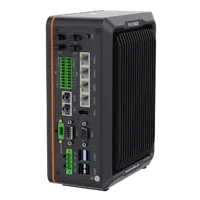
- LAN ports
- 5+ LAN ports
- USB 3 ports
- 2 USB 3 ports
- Light outputs
- 4 built-in channels
- Memory
- 16 GB
Likewise, moving inspection onto smart cameras does not automatically transfer responsibility for production sequencing. The MV-SC3013XM-12M-ATN-H is a mono vision sensor; its catalog listing does not establish compatibility with the project's ownership mechanism.
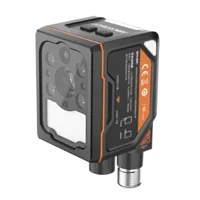
- Interface
- GigE
- Resolution
- Up to 3 MP
- Sensor format
- 1/1.45"
- Shutter
- Global
Use the camera finder only after defining the inspection requirements. Hardware selection and recovery design are related engineering tasks, but buying a different camera is not a demonstrated fix for an unresolved project release.
Verify normal and interrupted changeovers
Prove the repair with an approved test plan, not one successful restart. Include normal changeover and the interruption conditions the machine is designed to handle. Safeguarding tests belong under the machine's authorized validation procedure.
For each permitted test case, retain evidence of:
- The outgoing and incoming project identities.
- Stop request, stop acknowledgment and release events.
- The component that owns the controller at each handover boundary.
- The expected response when communication or release confirmation is unavailable.
- The handling of outstanding images, targets and recipe-specific results.
- The required operator action before production resumes.
For a reproducibility example, 12 successful attempts out of 12 demonstrate only those tested attempts. They do not prove that every interruption path is correct. Cover distinct state transitions and abnormal conditions rather than relying solely on repetition.
Record the verified recovery procedure with the project revision. Train operators to recognize an incomplete stop and escalate it, rather than repeatedly opening projects or cycling power.
Finish with a changeover readiness checklist
Before returning the machine to production, confirm:
- The previous project has a documented release indication.
- The incoming project targets the intended controller.
- Duplicate sessions have been excluded through supported diagnostics.
- Communication status is current rather than a retained display value.
- Vision results cannot cross recipe boundaries incorrectly.
- Interrupted-stop recovery has been validated for the machine.
- Safeguarding remains functional and independent of application permissions.
If the owner or release condition remains unclear, prepare the timeline and configuration details for supplier support. For help defining the vision hardware boundary, contact the applications team with the inspection task and interface requirements; resolve machine-specific recovery through the equipment's documented support path.
Questions
Does opening a safety guard release the controller from its project?
Not necessarily. Safeguarding and software resource management have different responsibilities. Hazardous motion can be stopped while the application retains a project association or awaits recovery. Determine ownership through the installed system's documented diagnostics, and follow its interrupted-stop procedure before attempting another project.
Can a longer changeover delay fix an ownership fault?
A longer delay may change how often a timing problem appears, but it cannot prove that release occurred. Prefer supported acknowledgment and ownership indications. A diagnostic timeout can report that a transition has taken too long; it should not grant permission to continue without the required state confirmation.
What evidence should be collected before contacting support?
Keep the complete stop-to-start event sequence, software and project revisions, target controller identity, connection status and the exact error text. Include a successful sequence for comparison when available. Note whether timestamps share a common clock, and preserve logs before restart actions remove useful evidence.
Will replacing the vision controller or smart camera solve the problem?
There is no general reason to expect replacement hardware to correct unfinished application cleanup. First identify which component controls project ownership and verify its supported recovery sequence. Consider hardware changes only when documented interface, software compatibility or inspection requirements show a specific limitation.