
An inspection can keep acquiring images while its processing callback becomes unreachable. That distinction matters: restarting acquisition may leave the failed software connection unchanged. This troubleshooting procedure is for integrations that call a separate processing object, extension service, or remote callback. You will separate object lifetime problems from process exits, transport faults, and slow execution, then choose a supported recovery path using repeatable tests rather than repeated restarts.
Identify which connection actually failed
Start by locating the boundary named in the exception. A camera connection, a processing-service connection, and a reference to a remote object are different resources. An error mentioning an unavailable object does not, by itself, establish that the camera disconnected.
Preserve the complete exception, including inner exceptions and the first failure timestamp. Later errors may only describe attempts to reuse a reference that was already invalidated.
Use this initial classification to choose the next test:
| Observation | Leading hypothesis | Evidence to collect |
|---|---|---|
| Images continue, but callback calls fail after inactivity | Remote-object lifetime or session expiry | Last successful qualifying call, object creation, expiry or disposal events |
| Callback host disappears or its process identity changes | Crash, service restart, or resource failure | Exit record, service events, runtime logs |
| Several connections fail together | Transport interruption or host outage | Connection errors, interface events, host availability |
| Calls fail only during expensive processing | Execution timeout, blocked callback, or queue saturation | Callback duration, queue depth, thread activity |
| Recreating the callback reference restores operation | Stale reference or expired registration | Registration identity before and after recovery |
If image delivery also stops, follow the separate intermittent acquisition troubleshooting procedure. That investigation focuses on acquisition evidence rather than assuming the processing extension caused the camera failure.
Build a timestamped timeline before changing settings
Record events on both sides of the callback boundary. A client-only log can show when a call failed, but not whether the server deliberately removed its target object.
Capture these fields where the application and runtime expose them:
- UTC timestamp for comparing events across processes.
- Monotonic elapsed time for measuring intervals within each process.
- Process identity and process start time.
- Project or session identity, plus callback registration identity.
- Object creation, registration, renewal, disposal, and reconnection events.
- Callback entry, exit, duration, and exception details.
- Request sequence, result sequence, and outstanding request count.
- Camera frame identifiers where they help connect image arrival to processing.
Clock synchronization helps correlate hosts, but wall-clock subtraction can be misleading if a clock is adjusted. Use a monotonic timer for callback duration and local idle intervals. Do not directly subtract monotonic readings from different computers.
Add instrumentation around registration and recovery, not just around image processing. Otherwise, a new remote object may look like the old object becoming healthy again.
Also record software versions and the active configuration. If memory rises steadily before failure, use the feature-access memory investigation to distinguish resource growth from an idle-dependent lifetime problem.
Run controlled idle tests
Perform these tests on a bench system or through an approved maintenance procedure. Do not alter machine safety functions or introduce unexpected motion while exercising callbacks.
- Create a known-good session. Use the documented initialization procedure, then complete a callback successfully. Record which process owns the object and which process holds its reference.
- Establish an active baseline. Run representative work continuously. Confirm that registration identity, result sequence, and process identity remain stable.
- Introduce measured inactivity. Try idle intervals of 30, 120, 300, and 600 seconds. These are diagnostic test points, not assumed software defaults. Repeat each condition from a fresh session when practical.
- Separate image inactivity from callback inactivity. Where supported, compare camera idle with continued service communication against image acquisition with no callback invocation. Determine which activity actually affects the failure.
- Resume with a traceable request. Submit a request carrying a unique diagnostic sequence. Record whether it enters the callback, completes, or fails before execution begins.
- Test supported re-registration. After saving the failure logs, recreate the connection through the documented application workflow. Record whether the recovered reference has a new identity.
Repeat conditions around the apparent failure boundary. One failure after a long pause is weak evidence; a consistent boundary across repeated sessions is much stronger.
Do not add arbitrary network traffic and call it a lifetime test. A ping, camera preview, or unrelated status request may leave the callback object's lease completely untouched.
Distinguish object lifetime from execution timeout
A lease limits how long a remote object remains valid unless the framework's renewal conditions are met. A session timeout limits an application's session. An execution timeout limits how long a particular operation may take. Not every integration implements all of these mechanisms.
Their timing signatures differ. A lease-related failure may occur on the first call after inactivity, before the callback starts. An execution timeout usually follows a call that has already begun or has waited too long in a queue.
Use the runtime's documented definition of qualifying activity when calculating idle time:
For example, suppose the last qualifying activity occurred at elapsed time 40 seconds. The next request starts at 370 seconds and fails at 371 seconds:
If the callback host remains alive and no callback-entry event appears, expiry or stale registration becomes more plausible. This does not prove a particular lease value: an internal cleanup task, session rule, or transport failure could produce similar evidence.
Now consider a request that enters immediately but fails after 60 seconds of processing. Investigate execution limits and blocking operations first. The same exception wording can hide different underlying causes.
Choose a supported lifetime or reconnection fix
Once the evidence points to object lifetime, check the extension API and runtime documentation for the supported ownership model. Determine who creates the object, who retains it, and what event ends its validity.
Legitimate remedies may include:
- Updating to a supported release that corrects lifetime handling.
- Retaining the callback object for the documented session duration.
- Using the framework's supported lease-renewal or sponsorship mechanism.
- Configuring a documented session or lifetime setting.
- Recreating the remote reference after a recognized disconnect.
- Reopening or re-registering the extension through the documented workflow.
These approaches are not interchangeable. Holding a local reference may prevent local garbage collection without renewing a remote lease. An application-level heartbeat may demonstrate connectivity without extending object lifetime.
Avoid disabling expiry globally or selecting an effectively unlimited lifetime without documented support. Those changes can leave abandoned objects and make recovery harder to reason about.
For reconnection, pause new submissions through approved application controls, classify outstanding work, reacquire the reference, and verify a successful request before resuming. Use bounded retries and a defined fault state if recovery fails.
A request whose response was lost may still have executed. Prevent duplicate inspection results or downstream commands by tracking request identity and using documented duplicate-handling behavior. Reconnection should not silently replay uncertain work.
Validate any corrected release using the software upgrade validation checklist, including the idle condition that originally caused the failure.
Test crashes, transport faults, and long callbacks separately
A lifetime diagnosis should survive tests of the alternatives. Work through these causes without changing several settings simultaneously.
Process exit or restart
Compare process start times before and after the incident. Review application events, service-manager records, runtime failures, and resource trends. If the host restarted, treat the old remote reference as invalid even when the service has returned.
Fix the recorded crash or resource problem before adjusting lifetime settings. Automatic restart can hide the original failure while leaving the client with a stale reference.
Transport interruption
Check whether other connections between the same hosts failed at the same time. Correlate interface state, connection errors, host sleep events, and approved network-maintenance records.
A successful reachability test after the incident does not prove the transport stayed healthy throughout it. Use timestamped evidence from the failure window. Keep diagnostics limited to systems you are authorized to administer.
Slow or blocked execution
Measure callback duration separately from queue wait. A fast algorithm can still time out if requests wait behind blocked work.
Look for synchronous file access, unavailable dependencies, lock contention, or a callback waiting for the thread that invoked it. Compare a minimal supported callback with the full processing path under the same workload.
Move work outside the callback only when the extension contract permits asynchronous completion. Otherwise, return within the documented contract, reduce processing cost, or apply supported workload controls. Returning early with an unfinished result can create a more serious integration fault.
Check deployment requirements before replacing hardware
An idle-dependent software lifetime fault is not evidence that a faster processor or different camera will fix the connection. Establish runtime and extension compatibility before selecting replacement hardware.
For host-based processing, review the vision controller category against the application's operating-system, runtime, interface, and licensing requirements. The MV-VC2101-128G40-NN is a controller candidate to evaluate, not a confirmed match for a particular callback framework. Verify required machine interfaces separately.
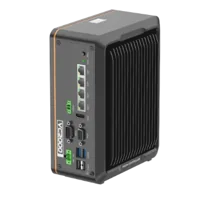
- LAN ports
- 3-4 LAN ports
- USB 3 ports
- 2 USB 3 ports
- Memory
- 16 GB
- Processor
- Intel N-series
If you are considering moving inspection onto a device, compare smart cameras through the camera finder. Confirm whether the required inspection tools and custom extension behavior are supported before changing the architecture.
The MV-SC3013XM-12M-ATN-H is a candidate for that device-selection review. Its catalog entry does not establish compatibility with your existing processing extension.
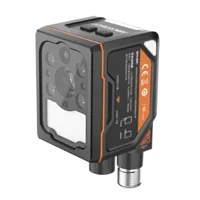
- Interface
- GigE
- Resolution
- Up to 3 MP
- Sensor format
- 1/1.45"
- Shutter
- Global
Changing where processing runs may remove one software boundary but introduce another. Document the revised path from trigger to image, inspection, result transfer, and downstream acknowledgement before committing to the redesign.
Verify recovery under idle and loaded conditions
A successful first request after reconnection is necessary, but not sufficient. Verify both connection health and result integrity.
Use this acceptance checklist:
- Repeat the original idle condition. Include pauses longer than those that previously produced the failure.
- Exercise normal production load. Observe callback duration, queue growth, and result latency.
- Check object ownership. Repeated recovery must not accumulate registrations or abandoned objects.
- Check request accounting. Identify missing, duplicated, late, or out-of-order results.
- Test documented restart behavior. Confirm that client and service recover in the supported sequence.
- Verify fault reporting. Operators should see a clear fault when bounded recovery fails.
- Record the configuration. Preserve versions, timeout settings, lifetime settings, and test results.
For an initial regression test, you might run 10 idle-and-resume cycles at each selected interval. That is a practical starting point, not proof of production reliability. Choose the final duration and repetition count from the application's risk and operating pattern.
Escalate with a small, reproducible incident package
If the cause remains unclear, prepare a minimal reproduction containing registration, one successful call, a measured idle period, and the failing call. Include synchronized logs, process identities, software versions, and the recovery action that restored operation.
Ask the software provider which lifetime mechanism applies and which reconnection sequence is supported. Do not infer an undocumented timeout from elapsed time alone.
For help selecting compatible inspection hardware, send your interface requirements and processing architecture through applications support. Keep the software failure evidence separate from the hardware specification so each decision addresses the right problem.
Questions
Does a callback failure after several idle minutes prove that a lease expired?
Possibly, but elapsed time alone cannot identify the cause. Remote-object expiry, application sessions, host sleep, and scheduled service activity can all produce repeatable timing. Compare the last qualifying communication with callback-entry logs, process start times, and transport events before changing lifetime settings.
Will a heartbeat keep a remote callback object alive?
A heartbeat helps only if the documented framework treats that operation as qualifying activity or explicitly renews the object's lifetime. Camera traffic, network reachability checks, and unrelated status calls may have no effect. Use the supported renewal mechanism and verify its behavior with controlled idle tests.
Why can restarting acquisition leave the callback disconnected?
Acquisition and callback registration can have separate lifetimes. Restarting image capture may leave the application holding the same invalid remote reference. Check the documented recovery procedure for recreating the processing connection, and account for outstanding requests before submitting new work.
Should a faster vision controller be the first fix?
A processor upgrade addresses demonstrated processing limits, not object ownership or session expiry. First measure callback duration, queue wait, and resource usage. If the failure occurs before callback execution after an idle period, investigate lifetime and registration behavior before specifying different hardware.
What should be checked after automatic reconnection?
Verify result accounting as well as connectivity. A request may have completed even when its response was lost, so retries can produce duplicates. Track request identities, classify uncertain work, and follow the integration's documented rules for duplicate handling and downstream acknowledgement.