
Operator buttons can request a vision project change without controlling the mouse or depending on window positions. The reliable approach is to connect your operator application to a documented runtime interface and supervise the complete changeover. This applies when an operator panel runs beside the vision runtime on a controller, or communicates with a separate inspection device. You will need to distinguish command acceptance, successful loading, inspection readiness and machine permission to resume.
Choose a documented control interface first
Local vision recipe switching should use the same supported control interface that an external supervisory application would use, when the runtime permits local clients. Running both applications on one computer changes the connection address, not the command semantics.
Before implementing buttons, obtain the interface documentation from the manufacturer or an authorized distributor. Confirm that your software version and license support the required operations. Look for documented methods to:
- Read the current project or recipe identity.
- Request acquisition or inspection to stop.
- Confirm that processing has stopped and pending work is handled.
- Close the current project, if the runtime requires that operation.
- Load or select another approved configuration.
- Read completion status and diagnostic information.
- Enable inspection through the normal machine-control sequence.
An acquisition API, feature browser or generic device connection does not automatically provide project management. The distinction matters when investigating feature-access errors: access to camera parameters is not evidence that the same interface can change a runtime project.
Avoid mouse-click automation for production changeovers. A dialog box, display scaling change or unexpected window can redirect an action without providing a trustworthy completion result. If no supported interface exists, retain the documented operator workflow or ask the vendor about an approved integration option.
Use loopback only when the runtime supports it
For a documented TCP/IP service running on the same computer as your operator application, the IPv4 loopback address is 127.0.0.1. Traffic to that address stays within the local host; it does not address another controller or smart camera.
Loopback is useful only if the service accepts local connections on the documented port. Your application must still follow the required authentication, message framing, encoding and session rules. Do not assume that opening a TCP connection means the runtime is ready to accept commands.
There are two different architectures:
| Runtime location | Appropriate connection | What to verify |
|---|---|---|
| Same host as the operator application | Documented local API or supported loopback service | Service binding, permissions, protocol and runtime version |
| Separate vision controller | Documented device or host network endpoint | Address, access controls, connection ownership and status reporting |
| Smart camera | Documented camera control interface | Whether recipe management exists and what its completion status means |
A loopback address on an operator computer cannot reach software running inside a separate smart camera. For that arrangement, use the documented device address instead.
Treat each button press as a supervised transaction
The button should select an approved target configuration and submit a change request. A separate transaction handler should own the connection, sequence operations and update the display. Do not put the entire changeover inside a button callback that freezes the interface.
Permit only one changeover transaction at a time. Disable competing recipe selections while it runs, or explicitly reject them with an explanatory message. Do not queue repeated presses unless a documented operating requirement calls for that behavior.
The following state names describe an application design, not commands for any particular product:
| Stage | Requested action | Evidence required before advancing |
|---|---|---|
| Validate | Resolve the selected recipe from an approved list | Valid target identity, operator permission and available runtime session |
| Quiesce | Request the normal controlled stop | Runtime and machine-control acknowledgments appropriate to the installation |
| Drain | Complete or discard pending work by the documented method | No outstanding work that could be mistaken for the new recipe |
| Close, if required | Close the active project | Confirmed closed state, not just accepted request |
| Load | Request the selected configuration | Successful completion with the expected identity |
| Verify | Check configuration and inspection readiness | Required devices and processing resources ready |
| Release | Report successful changeover to machine control | Normal resume conditions satisfied independently |
Some systems offer an atomic recipe-selection operation. Others require separate stop, close and load operations. Follow the documented sequence rather than adding a close operation that the runtime does not require.
Record the original recipe, requested recipe, transaction identifier and each transition. These records make an interrupted changeover understandable without reconstructing the operator's clicks.
Define readiness more carefully than a successful reply
A successful send means only that your application handed data to its communications layer. An accepted command can mean that the runtime queued the request. Neither necessarily means the requested recipe is active.
Define separate application states for connected, request accepted, configuration loaded and inspection ready. Display the current confirmed recipe separately from the requested target. During a changeover, the panel might show “Changing configuration” rather than prematurely replacing the active recipe label.
Where available, read back the project identity and revision after loading. A matching display name alone may not distinguish two configurations with different calibration or inspection settings. Use the identity fields the documented interface actually exposes.
Also establish how old results are handled. Depending on the runtime, pending images, queued jobs or previously published outputs may survive part of the transition. Use documented queue-clearing or completion mechanisms, and associate results with the applicable recipe or transaction where supported.
For installations that use external triggers, review hardware-trigger timing and frame-rate behavior. Resuming trigger traffic before the new configuration is ready can create missing or misidentified inspections.
Readiness from vision software must not be treated as a safety-rated permission for machine motion.
Budget changeover time from measured stages
Estimate the operator's waiting time by adding the stages that actually occur. Include communication, processing completion, loading and verification. If operations overlap, measure their combined duration rather than counting the same interval twice.
Consider an illustrative sequence measured on a development installation:
- Controlled stop: 0.15 s.
- Pending-work completion: 0.10 s.
- Project close: 0.20 s.
- Configuration load: 1.20 s.
- Readiness verification: 0.35 s.
The estimated changeover is:
These are application examples, not specifications for any controller or camera. Loading time can change with project size, device initialization and background activity.
Set deadlines from documented limits and representative measurements, including slower conditions. For example, if the longest observed complete transition is 2.8 s, adding an engineering allowance of 0.7 s gives a provisional supervisory deadline of 3.5 s. That value still needs validation; an observed maximum is not a guaranteed upper bound.
Use monotonic elapsed time for deadlines, and keep the display responsive while waiting. Prefer documented completion events; otherwise poll status at a supported rate.
Handle failures without guessing the active recipe
A timeout creates uncertainty, not proof that the operation failed. The runtime may have completed a load after your client stopped waiting. Automatically repeating the request can therefore create another transition or conflict with an operation already running.
Handle common failures explicitly:
- Connection rejected: report that control is unavailable; do not fall back to screen automation.
- Stop not confirmed: hold the changeover and diagnose pending work or machine-control conditions.
- Target rejected: retain the fault information and determine the actual active state.
- Load failed after close: show that no usable project has been confirmed; do not display the previous recipe as active.
- Connection lost during loading: reconnect through the documented procedure, then reconcile current identity and readiness.
- Operator application restarted: read runtime state before enabling another request.
If the protocol supports request identifiers or idempotent operations, use them as documented. Otherwise, serialize requests and reconcile state before considering a retry. Do not invent a retry scheme around commands with unknown side effects.
Automatic rollback is appropriate only when the interface supports it and the machine design permits it. Reloading the previous recipe may itself fail or require device initialization. A clearly indicated stopped fault state is preferable to an unverified recovery.
When problems extend beyond recipe management, use the separate acquisition-failure troubleshooting process rather than repeatedly reloading projects to conceal an underlying fault.
Choose hardware around the runtime location
Hardware selection follows the software architecture. For a host-based runtime, check supported operating systems, software licensing, interface compatibility and the resources required by the actual project. Catalog connectivity alone does not establish compatibility with a particular recipe-control protocol.
The MV-VC2101-128G40-NN vision controller is a hardware candidate to assess against those requirements. Its listing does not establish support for your runtime or local control service.
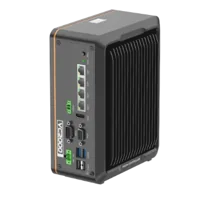
- LAN ports
- 3-4 LAN ports
- USB 3 ports
- 2 USB 3 ports
- Memory
- 16 GB
- Processor
- Intel N-series
For inspection performed on the device, evaluate smart cameras and vision sensors through the camera finder. Confirm recipe storage, selection methods and completion reporting in the applicable software documentation before selecting hardware.
The MV-SC3013XM-12M-ATN-H vision sensor illustrates that device-based hardware category. Do not infer project switching, authentication features or loopback access from its catalog entry.
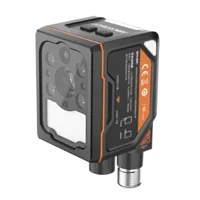
- Interface
- GigE
- Resolution
- Up to 3 MP
- Sensor format
- 1/1.45"
- Shutter
- Global
Compare vision controllers when the runtime must reside on a dedicated host with camera connections. Keep hardware suitability and application-interface support as separate acceptance checks.
Validate the controls and keep safety independent
Before production use, validate the panel with the machine in an approved commissioning condition. Recipe changes may affect inspection decisions, calibration, reject timing or downstream handling, even when the operator sees only a different project name.
Use this acceptance checklist:
- Approved mapping: every operator button resolves to the intended configuration and revision.
- Access control: operators can select only the configurations their role permits.
- Repeated input: rapid presses cannot start overlapping transitions.
- Busy runtime: pending inspection work produces a controlled outcome rather than an assumed stop.
- Invalid target: a missing or rejected configuration leaves an explicit, recoverable fault.
- Interrupted connection: the panel reconciles actual state before offering another changeover.
- Application restart: the display obtains the active identity from the runtime rather than a saved label.
- Result separation: outputs from the previous configuration cannot be mistaken for new inspections.
- Resume control: successful loading does not independently restart machine motion.
- Traceability: logs capture requests, confirmed identities, durations and diagnostic responses.
Emergency stops, guards and other protective functions must remain effective independently of the operator application and its network connection. A software stop command is not a substitute for a safety function. Recipe readiness may contribute to ordinary process control, but it must not replace the machine's validated protective design.
Re-run the relevant checks after changes to the runtime, protocol library or operator application. The software-upgrade validation checklist provides the closest companion process for checking those changes without confusing upgrade acceptance with runtime changeover control.
Take the next step with a defined interface contract
Before building the panel, write a short interface contract covering the target identity, command sequence, completion evidence, deadlines, fault behavior and resume authority. If any item depends on an undocumented assumption, resolve it before ordering hardware or deploying the buttons.
Use the system configurator to organize the hardware selection, or contact applications support with your documented runtime requirements and changeover sequence. The useful starting point is a verified control interface, not a particular button toolkit.
Questions
Can operator buttons control a vision runtime on the same computer?
Yes, if the runtime documents a local client interface or accepts supported TCP/IP connections through loopback. Confirm the required license, authentication and connection settings. Installing both applications on one host does not create project-control functionality that the runtime does not already provide.
Does 127.0.0.1 connect to a separate smart camera?
No. It identifies the local computer's IPv4 loopback interface. A smart camera or separate controller requires its own documented connection method and address. Loopback is suitable only when the control service runs on the same host as the requesting application.
What should happen when a recipe-change request times out?
Report an unresolved changeover and determine the runtime's actual state before retrying. The requested operation may have completed despite the missing response. Read back configuration identity and readiness through the documented interface, and leave machine resumption under its normal control authority.
Can a successful recipe load automatically authorize machine motion?
Not as the sole authority. Loading confirmation establishes a software condition, not safe machine operation. The machine controller must apply the normal resume sequence, process interlocks and protective design. A recipe change must not bypass guards, emergency stops or other safety functions.
Should recipe switching use a vision controller or a smart camera?
The deciding factor is documented runtime support, not hardware category alone. A controller suits software hosted separately from the imaging device, while a smart camera may execute inspection internally. Confirm project selection, status reporting and recovery behavior for the exact software before choosing either architecture.