
An edge image shows boundaries, but it does not tell your application which boundaries form circles. For that, you need a detector that returns center coordinates, radii and evidence supporting each result. This explainer is for engineers who already acquire live images and need reliable circle measurements rather than highlighted outlines. The practical approach is to control the image, constrain the expected radius, detect candidates and validate them before publishing coordinates to another process.
What a circle Hough transform adds after edge detection
A circle Hough transform groups edge evidence into candidate circles. Instead of reporting isolated bright edge pixels, it searches for a center and radius that explain many boundary points.
For a circle in image coordinates:
Each boundary point supports multiple possible circles. A Hough accumulator collects those votes, and peaks identify promising combinations of center and radius. Gradient-directed implementations use the local edge direction to reduce the possible center locations.
Different implementations organize this search differently. Some use explicit radius layers; others use multiscale or phase-based methods. Their scores and sensitivity controls are not necessarily interchangeable.
The processing chain is therefore:
- Acquire an image and its timestamp.
- Select a region of interest and prepare the intensity image.
- Run a circle detector with bounded radii and appropriate polarity.
- Reject geometrically or photometrically implausible candidates.
- Publish accepted centers, radii, validity flags and timestamps.
An existing edge-detection stage is not always the correct input. Some circle detectors accept grayscale intensity images and calculate gradients internally. Feeding them a binary edge image can discard useful contrast information. Check the detector's documented input format before connecting blocks.
Make the intended boundary visible
The detector cannot distinguish your intended boundary from a stronger circular reflection without additional evidence. Establish a repeatable image before adjusting detection sensitivity.
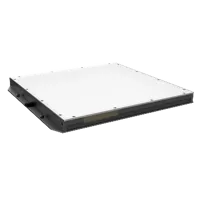
For opaque disks, washers or unobstructed holes, backlights can create a strong silhouette. A rear light does not reveal every internal feature, and a hole needs a clear optical path behind it. Compare suitable geometries in the lighting finder.
The LS-LBSS-H-150-150-R2 is a red flat backlight. Confirm illuminated coverage, mounting clearance and electrical requirements against your application.
- Size
- 100-200 mm
- Type
- Standard
- Voltage
- 24 V
For surface rings or printed circles, front illumination may be necessary. Avoid saturated highlights touching the measurement boundary. Saturation removes intensity detail, while changing reflections can create edges that move independently of the part.
Choose exposure according to motion, not preview brightness alone. As an illustrative calculation, an image velocity of 400 pixels/s during a 0.002 s exposure produces approximately 0.8 pixel of motion blur. Shortening exposure usually requires more illumination rather than simply increasing gain.
When selecting area scan cameras, consider shutter behavior, required sampling and acquisition timing. The LS-MV-133GM-GE is a mono, global-shutter, GigE candidate for the acquisition stage. Its suitability still depends on the required image coverage and processing budget.

- Sensor format
- 1/2.7"
- Interface
- GigE
- Resolution
- Up to 3 MP
- Shutter
- Global
Use the camera finder to compare acquisition options. During development, hold exposure and gain constant; the guide to verifying per-frame exposure and gain explains how to check that settings match delivered frames.
Convert physical size into a narrow radius range
Radius bounds are among the most effective controls for both false detections and processing time. Derive them from the expected part size and calibrated image scale rather than accepting the detector's widest search range.
For an approximately front-facing planar target with uniform local scale:
Suppose an illustrative setup covers 120 mm across 1200 pixels. The sampling estimate is:
A nominal 24 mm diameter would then have a radius of 120 pixels. These are application examples, not specifications for the products shown.
The camera resolution calculator helps relate field coverage to feature sampling. Resolution alone does not establish measurement accuracy; focus, contrast, calibration and edge stability also matter.
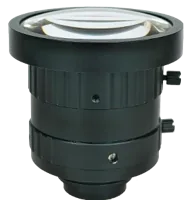
Select machine vision lenses around the required coverage, working distance and sensor compatibility. The lens focal-length selection guide explains that geometry, while the lens finder helps narrow candidates.
The LS-SMV2528P-6M is a C-mount machine vision lens. Verify its supported sensor coverage and focusing range before treating it as a match for your setup.
- Type
- Machine vision fixed
- Sensor format
- 2/3"
- Mount
- C-mount
- Resolution
- 6-10 MP
Leave radius margin for actual manufacturing variation, scale changes and calibration uncertainty. Do not make the bounds so tight that legitimate parts disappear when their position changes slightly.
Separate edge thresholds from circle acceptance
Two controls often get confused: the threshold deciding which image gradients count as edges, and the threshold deciding whether a collection of edges supports a circle.
An edge threshold that is too high removes weak sections of the true boundary. One that is too low admits texture, noise and reflections. A permissive circle threshold can then turn those unrelated edges into convincing-looking candidates.
| Control | Purpose | If too restrictive | If too permissive |
|---|---|---|---|
| Edge threshold | Select useful boundary evidence | Weak arcs disappear | Texture and noise contribute votes |
| Radius interval | Limit physical size candidates | Valid size variation is excluded | Unwanted sizes and extra work appear |
| Circle acceptance threshold | Require sufficient accumulated evidence | Partial or low-contrast circles are missed | Accidental edge arrangements are accepted |
| Minimum center separation | Suppress nearby duplicate detections | Adjacent real circles may be merged or rejected | Several candidates describe the same feature |
| Expected polarity | Select dark-on-bright or bright-on-dark boundaries | Reversed-contrast parts may disappear | Opposite-polarity distractors remain eligible |
Threshold direction and naming vary by implementation. A control called sensitivity may become more permissive as its value increases, while an accumulator threshold may behave oppositely. Read the documented definition rather than transferring settings between detectors.
Tune using saved images containing good parts, bad parts and empty backgrounds. Change one parameter at a time and record both missed detections and false accepts. A score is evidence under that algorithm, not automatically a calibrated probability of correctness.
Validate candidates instead of trusting the strongest peak
A detector usually returns hypotheses, not final measurements. Add acceptance tests reflecting the part and the inspection task.
First, check whether each center falls inside the allowed location region. Then check radius, expected count and relationships between features. A washer may produce legitimate inner and outer circles with nearly coincident centers; a blanket duplicate-suppression rule could remove the feature you need.
Next, measure boundary support around each candidate. Sample an annulus near the predicted circumference and examine whether edges occur at the expected radius. Divide the circumference into angular sectors so that one strong short arc cannot masquerade as a complete boundary.
For example, a validation rule might require support in at least 24 of 36 sectors. That represents approximately 67% angular coverage. It is an illustrative starting point, not a universal acceptance threshold. Occluded parts may need a different rule and additional location constraints.
Also evaluate radial residuals: the distances between observed boundary points and the candidate circumference. A subsequent circle fit can refine a Hough candidate, but refinement does not prove accuracy. Compare the resulting error against a calibrated reference and your inspection tolerance.
Check intensity inside and outside the boundary when the expected contrast is known. A dark silhouette should exhibit a consistent contrast direction over its visible perimeter. A glare ring often fails that test.
Finally, distinguish detection failure from a valid negative result. Publish an explicit invalid state when evidence is insufficient. Never reuse the previous center silently as though it belonged to the current frame.
Budget processing time and image age separately
A live display can look smooth while its coordinates are several frames old. Measure both processing duration and the age of the image used for the result.
Cropping usually helps because it reduces irrelevant pixels and edges. Keep enough margin for the entire boundary and permitted part movement. A crop that cuts through a circle changes the detection problem into partial-arc estimation.
Radius limits also reduce work. For a simple gradient-directed implementation that votes in both normal directions at every integer radius, an illustrative vote count is:
Here, searching integer radii from 100 through 150 gives 51 candidates. Actual implementations may use different voting schemes, so this estimates search work, not execution time.
Consider an illustrative input rate of 20 frames/s:
The stage times could represent acquisition handling, detection, validation and display preparation. Measure them on the intended runtime system; average timing alone can hide occasional overruns.
Five queued frames at that input rate add approximately 250 ms of waiting. For a live preview, processing the newest available frame can be preferable to draining an old queue. For traceable inspection, every required frame may instead need processing, with capacity and missed-frame handling designed accordingly.
Connect the detector to a block-based application
In a block-based model, place circle detection after image preparation and before overlay generation. The overlay is a consumer of the measurement, not the measurement itself.
Use a native circle-detection block where available, or a documented callable function supported by the target environment. Confirm supported image types, variable-size outputs and deployment restrictions. A function that works interactively may not support generated code or a real-time execution target.
Define the output contract explicitly:
- Center coordinates and radii, including their units.
- Number of valid detections and maximum output capacity.
- Per-candidate score and application acceptance status.
- Acquisition timestamp or frame identifier.
- Coordinate convention and region-of-interest offset.
If cropping begins at full-image coordinates (x0, y0), convert a crop-relative center with x_full = x_crop + x0 and y_full = y_crop + y0. Keep the same indexing convention throughout; mixing conventions creates a persistent coordinate offset.
After downsampling, account for the scale change before reporting results. If you retain every second pixel along each axis, coordinates and radii must be multiplied by 2 when returning to original-image units, with any crop offset applied correctly.
Use the camera preview overlay guide to display accepted centers, rejected candidates and search regions without changing the underlying image buffer.
Know when circles are the wrong model
A physical circle viewed obliquely generally projects as an ellipse. Increasing circle sensitivity will not correct that geometry. Use an ellipse detector or rectify the measurement plane with a suitable calibration before applying a circle model.
A fixed millimeters-per-pixel conversion also becomes unreliable when part height changes enough to alter magnification. If depth variation drives your error budget, review the telecentric gauging guide before committing to conventional imaging geometry.
Other difficult cases include:
- Short partial arcs: several centers and radii can explain nearly the same visible segment.
- Concentric boundaries: both edges may be real, requiring radius-specific classification.
- Transparent parts: refraction can create displaced or multiple apparent boundaries.
- Touching parts: merged silhouettes may not preserve complete circular outlines.
- Large blur or poor sampling: the detected edge depends strongly on threshold and preprocessing.
For well-separated binary silhouettes, connected-component analysis followed by contour checks may be simpler than Hough voting. For precision gauging, calibrated edge extraction and geometric fitting may be more appropriate. Choose the method around the acceptance requirement, not around which overlay looks most convincing.
Verify the result before selecting final hardware
Use a staged acceptance checklist before turning the detector into a production measurement:
- Save representative raw images, including glare, position extremes and empty scenes.
- Confirm radius bounds against known dimensions and calibrated scale.
- Compare reported centers and diameters with independent reference measurements.
- Move a reference part across the usable image area to expose distortion or illumination effects.
- Test permitted height, tilt, speed and contrast variation.
- Count false accepts separately from missed circles.
- Record timing distributions, queue growth and result age during extended operation.
- Confirm invalid outputs, detection overflow and dropped frames are handled explicitly.
Acceptance criteria should state allowable measurement error, missed detections, false accepts and latency. A stable center on a stationary reference does not establish dimensional accuracy across the full operating range.
Once those requirements are defined, use the camera configuration step to assemble acquisition candidates, or the lighting configuration step to develop the boundary contrast. For help matching the optical setup to your circle dimensions and motion, send the required field coverage, tolerance and representative images through applications support.
Questions
Should I feed my existing edge image into the circle detector?
Not necessarily. Many circle detectors expect an intensity image and perform their own gradient calculations. Supplying a thresholded edge map can remove information they need. Use the input representation specified by the detector, and keep a separate edge display if it helps diagnose image contrast.
What circle detection threshold should I use?
There is no universal score threshold because implementations use different scoring methods. Select a threshold using representative positive and negative images, then add size, position and boundary-support checks. Evaluate the resulting false-accept and missed-detection rates against the consequences of each error.
Can a detected radius give an accurate diameter in millimeters?
A radius in pixels becomes a physical dimension only through suitable calibration and controlled geometry. Lens distortion, target tilt, height changes and edge bias can affect the conversion. Validate diameter error against known references throughout the intended measurement area, not only at the image center.
How can I reduce delay without hiding missed frames?
Use acquisition timestamps to measure image age, then inspect buffering and processing overruns. Cropping the search area and narrowing the radius interval can reduce work. Decide explicitly whether the application should process every frame or prioritize the newest image, since those policies serve different inspection needs.