
A camera may offer automatic exposure and gain without supporting automatic iris adjustment. A host application may also write every available setting without providing a stable brightness-control algorithm. Those are different capabilities, and confusing them can produce oscillating brightness, blurred images or inconsistent inspection results.
For an inspection application, start by identifying who controls each actuator: the camera, the host or neither. Then establish optical and timing limits before enabling automatic adjustments. The workflow below explains how to check support, choose a control strategy and verify that brightness settles without sacrificing the image features your inspection needs.
Separate feature access from automatic control
GenICam feature access provides a way to discover, read and write features exposed by a device. It does not guarantee that a particular camera implements an iris actuator, automatic exposure or automatic gain.
A successful write proves that a setting can be commanded under the current conditions. It does not prove that an automatic controller exists or that the image has reached the requested brightness.
| Control approach | What adjusts the settings | What you must verify |
|---|---|---|
| Camera-side automatic control | An algorithm running inside the camera | Available modes, limits, measurement region and supported combinations |
| Host-side automatic control | Your application measures images and writes settings | Image-to-setting association, control timing, bounds and convergence |
| Fixed acquisition settings | Settings remain unchanged during inspection | Acceptable brightness across the full operating range |
| Supervisory control | A host coordinates camera automatic modes and fixed settings | Clear ownership, transition rules and documented device behavior |
Where implemented, features such as ExposureAuto and GainAuto may expose modes including Off, Once or Continuous. Discover the available entries rather than assuming that every mode exists.
Camera-side control usually reduces host round trips. Host-side control can use an inspection-specific brightness statistic, but it must handle acquisition delays and changing scenes.
For errors involving missing or inaccessible features, use the separate guide to diagnosing GenICam feature-access errors. First establish that the feature exists; then evaluate its control behavior.
Check the entire iris-control path
Automatic iris adjustment requires compatible optics, an actuator, an electrical interface and a supported command path. A camera lens mount alone establishes none of those capabilities.
Distinguish these arrangements:
- Manual iris: an aperture ring changes the opening mechanically. Software cannot move it without additional compatible hardware.
- Motorized iris: an actuator changes the opening, but its driver and command interface still need checking.
- Camera-managed iris: the camera supports a documented lens interface and exposes the relevant commands or automatic behavior.
- Separate lens controller: the host communicates with another device, which introduces an additional timing and ownership boundary.
Ask whether commands represent an f-number, an actuator position or a vendor-defined index. Do not convert position indices into f-numbers without a documented mapping. Also check initialization, travel limits, settling behavior and what happens after power loss.
The machine vision lenses category and lens finder support optical selection. They do not replace confirmation of electrical iris compatibility.
The LS-SMV2528P-6M is an optical-selection reference, not evidence of software-adjustable iris support. The supplied catalog information does not establish an iris actuator or control interface.
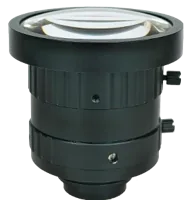
- Type
- Machine vision fixed
- Sensor format
- 2/3"
- Mount
- C-mount
- Resolution
- 6-10 MP
Establish limits before choosing a brightness target
Brightness is only one acceptance condition. Exposure time affects motion blur, aperture affects depth of field and diffraction, and gain affects the displayed or digitized signal without increasing the collected photons.
Set these limits before allowing an automatic controller to act:
- Maximum exposure time from permitted motion blur and acquisition timing.
- Aperture range from required depth of field and measured image detail.
- Maximum gain from acceptable noise, clipping and inspection repeatability.
- Brightness target and measurement region from the actual inspection features.
Increasing the f-number reduces the aperture opening. This generally increases geometric depth of field, but diffraction can eventually reduce useful detail. Verify near and far surfaces using representative parts rather than selecting the smallest opening automatically.
For a fixed scene, unchanged optical transmission and an approximately linear, unsaturated image signal, a useful brightness estimate is:
Here, B is the measured signal above the black level, L is scene illumination, t is exposure time, g is linear gain and N is f-number. Subscript 0 identifies the reference condition. Gain expressed in decibels must be converted to the appropriate linear ratio before using this expression.
This estimate excludes saturation, tone mapping, changing reflectance and actuator calibration errors. It is a planning tool, not a substitute for image measurements.
Work through the blur and brightness budgets
Consider a hypothetical inspection covering 120 mm across 2400 image pixels. These are application assumptions, not specifications of the catalog products shown here.
The camera resolution calculator helps evaluate field coverage and pixel sampling. Use actual image dimensions for the selected acquisition region, not a rounded megapixel label.
Suppose a satisfactory reference image uses an aperture of f/4, an exposure of 20 µs and linear gain of 1. You then select f/5.6 to obtain more depth of field.
That exposure exceeds the 25 µs blur limit. Allowing automatic exposure to reach the brightness target would therefore violate the inspection requirement.
At the permitted exposure, the approximate gain ratio needed to recover the reference signal is:
That result does not establish acceptable image quality. Test the resulting noise and detection repeatability. More illumination, less motion or a revised optical arrangement may be preferable to increasing gain.
For broader acquisition tradeoffs, see conveyor camera selection by pixels, speed and blur. Use the lens focal-length selection guide when changing field coverage or working distance.
Give the controls a hierarchy
Do not run an independent host brightness loop against a camera brightness loop that controls the same setting. Both can respond to the same error and repeatedly undo each other's corrections.
Separate ownership is necessary but not sufficient. An iris loop and an exposure loop still interact because both change image brightness. A supervisory policy should decide which setting moves, when it moves and which constraints have priority.
For many fixed inspection stations, a useful starting sequence is:
- Select and fix the aperture using depth-of-field and image-detail tests.
- Allow exposure adjustment only within the validated timing range.
- Permit gain adjustment only when exposure reaches its allowed limit.
- Freeze settings during the inspection interval when changing settings would compromise measurement consistency.
This is a proposed policy, not a claim about any camera's built-in algorithm. A camera may use a different exposure-and-gain priority. Check its documented behavior and available configuration.
When iris adjustment is necessary, treat it as a slower supervisory change unless documented response data supports another approach. Hold the other brightness actuators while evaluating its effect, or coordinate them through one controller.
A controller may also offer a one-time adjustment mode suitable for recipe setup. Verify that it completes successfully and leaves acceptable settings; reaching a limit can prevent the brightness target from being achieved.
Build host control around observed device behavior
A host application should discover capabilities at startup and construct its control policy from supported features. Avoid copying a feature list from another camera or assuming a C++ wrapper supplies identical functionality everywhere.
Use this implementation sequence:
- Open the device with the documented acquisition interface and obtain its feature map.
- Check whether each requested feature is implemented, available, readable and writable.
- Query enumeration entries, numeric units, ranges and increments.
- Disable competing automatic modes using supported settings.
- Apply limits and initial values, then read them back.
- Acquire images and associate measurements with the settings that produced them.
- Make a bounded correction, wait for its effect and measure again.
Some features become writable only when acquisition stops or a related selector changes. Recheck access after state changes. Handle rejected writes explicitly rather than continuing with an assumed value.
Do not assume that a setting write affects the next delivered image. Frames may already be exposing, transferring or waiting in buffers. Use documented timing behavior and per-image metadata where available.
The guide to verifying exposure and gain metadata covers that association in more detail. If metadata is unavailable, establish a conservative settling interval experimentally and avoid claiming exact per-frame attribution.
An application running on a host computer or vision controller needs the same ownership rules. Moving the application onto dedicated hardware does not automatically synchronize its brightness loop with the camera.
Measure convergence on the inspection region
A whole-image average can be misleading. Empty conveyor space, a bright label or an entering part may change the average without changing illumination on the inspected feature.
Choose a measurement region that represents the inspection, then record more than its average brightness. Useful measurements include:
- A median or percentile signal above the black level.
- The fraction of pixels clipped near saturation.
- Brightness in critical dark and bright features separately.
- The actuator settings associated with each measurement.
- The inspection result while the settings change.
As an example acceptance test, require the selected brightness statistic to remain within ±5% of its target for 10 consecutive valid images. Those values are starting criteria to validate, not universal limits.
Apply a controlled illumination change while holding the part stationary. Measure the number of images and elapsed time needed to settle. Then repeat with normal part movement and expected reflectance variation.
Look for alternating exposure values, repeated iris reversals, gain reaching its limit or brightness that never enters the target band. These observations distinguish oscillation, actuator limits and an unreachable target.
Check hardware and software before ordering
Start camera selection with area scan cameras and the camera finder, but request confirmation of the specific automatic-control features your application requires.
The LS-MV-133GM-GE is cataloged as a global-shutter, mono GigE camera. The supplied catalog information does not establish automatic exposure, automatic gain or iris-control support.

- Sensor format
- 1/2.7"
- Interface
- GigE
- Resolution
- Up to 3 MP
- Shutter
- Global
Before committing to a configuration, check:
- Lens interface: confirm the iris actuator, connector, driver and command mapping.
- Feature availability: obtain the documented modes and limits for the exact device and firmware.
- Acquisition timing: verify exposure limits under the intended trigger and readout conditions.
- Optical performance: inspect representative near and far features throughout the permitted aperture range.
- Image processing: identify gamma, black-level or other processing that changes the brightness measurement.
- Recovery: define behavior after a timeout, disconnected lens or unreachable brightness target.
- Persistence: verify which settings survive restart and which the application must restore.
- Change control: retain a baseline and repeat the tests after firmware or software changes.
The software upgrade validation checklist provides a useful framework for repeating those checks without changing several variables together.
Know when automatic brightness is the wrong choice
Continuous adjustment is often unsuitable when brightness itself is the measured property. A controller could brighten a dark defect or reduce the apparent difference between acceptable and unacceptable material.
It can also create problems in dimensional measurement when changing aperture alters edge contrast or depth of field. For stable lighting and repeatable fixtures, fixed settings may produce more consistent inspection data than continuous adaptation.
Triggered or strobed applications require particular care: changing exposure may not change collected light as expected when the illumination pulse already determines the effective exposure. Check the timing relationship using the external-trigger frame-rate guide.
Choose automatic control only after defining which variations it should correct and which variations the inspection must preserve. An unreachable brightness target should produce a reported condition, not unrestricted exposure or gain increases.
Start with the camera configurator for acquisition requirements and the lens configurator for coverage and optical constraints. For iris compatibility, send the proposed camera, lens, illumination and control sequence through applications support before ordering.
Questions
Does GenICam access guarantee automatic iris control?
No. A feature map exposes only capabilities implemented by the connected device and its supporting interfaces. Iris adjustment also requires a compatible actuator and driver. Confirm the complete camera-to-lens control path, then check feature availability and access conditions before designing an automatic brightness routine.
Which should change first: iris, exposure or gain?
Fix the aperture first when depth of field and optical detail determine inspection reliability. Then allow exposure changes within the motion and timing limits, using gain only within a validated noise budget. If the camera provides a combined automatic mode, verify its adjustment priorities rather than assuming this sequence.
Can host control run alongside camera automatic exposure?
They can coexist when the host acts as a supervisor rather than issuing competing corrections. For example, the host may configure exposure limits and monitor convergence while the camera performs exposure adjustment. Explicitly stop or suspend camera automation before the host takes direct ownership of that same setting.
Why can an image look bright enough but still inspect poorly?
Increasing gain raises the signal level but does not collect additional photons. The resulting image can meet a brightness target while retaining inadequate detail or excessive noise. Compare inspection results, clipping and feature contrast against a reference captured with sufficient illumination and acceptable exposure time.
How should automatic brightness control be validated?
Validate the result over the expected illumination, material and motion range, including transitions between conditions. Record settling time, setting limits and inspection outcomes. Also test restart and error recovery so the application reports an unsuccessful adjustment instead of silently accepting a brightness target it cannot reach.