
A stationary object can produce a moving measurement even when the camera and fixture remain still. Small brightness changes move threshold crossings, while a bounding box amplifies changes at the outermost contour pixels. This troubleshooting procedure helps you distinguish those effects from actual motion. You will record a controlled image sequence, isolate acquisition and illumination changes, compare position estimators, and set a repeatability requirement before replacing hardware.
Start with the likely causes, not a different threshold
Automatic exposure can make an image look consistent overall while changing the intensity profile around the edge you measure. A fixed threshold then selects a slightly different set of pixels. However, disabling automatic exposure does not eliminate illumination ripple, sensor noise, or unstable segmentation.
Use this order as a practical starting point, not a universal ranking:
| Suspected cause | What to inspect | Isolation test | Corrective action |
|---|---|---|---|
| Exposure or gain changes | Image brightness and acquisition metadata | Repeat with both controls fixed | Use validated manual settings during measurement |
| Illumination variation | Mean intensity in stationary reference patches | Fix acquisition settings and compare lighting conditions | Control ambient light and verify the light supply or timing |
| Noise near the threshold | Boundary pixels toggling between foreground and background | Inspect unfiltered edge profiles across frames | Improve signal and contrast before adding filtering |
| Bounding-box quantization | Discrete changes in the extreme contour coordinates | Compare box center with centroid and fitted edges | Select an estimator suited to the feature |
| Real motion or unstable image delivery | Rigid features elsewhere in the image | Track an independent reference and check frame identifiers | Correct mounting, vibration, or acquisition problems |
If reference features move together, investigate physical motion before tuning segmentation. If reference positions remain fixed but mask boundaries change, concentrate on image formation and measurement.
Record a baseline you can reproduce
Save images before display conversion, thresholding, filtering, or overlays. Display scaling can conceal intensity changes, and processed images alone cannot show where instability began.
For an illustrative baseline, acquire 3,600 frames at 120 frames/s:
Choose a longer recording when the symptom appears only after warming, machine cycling, or changes in ambient conditions. Keep the target, focus, aperture, camera position, and measurement region unchanged throughout each comparison.
Record the following with each frame where the acquisition system supports it:
- Frame identifier and timestamp, to reveal gaps and duplicated processing.
- Actual exposure and gain, rather than only the values requested by the application.
- Mean intensity in an object patch and a background patch away from the boundary.
- Segmented area, bounding-box center, and contour centroid.
- Component identity, so a change of selected object does not resemble position noise.
The guide to verifying per-frame exposure and gain explains how to check acquisition metadata. Here, the purpose is to correlate those values with segmentation changes, not merely confirm that a setting was accepted.
Test automatic exposure and gain separately
First, establish an exposure that avoids clipping while preserving useful contrast at the measurement edge. Disable automatic exposure and automatic gain using the camera's documented controls. Hold other image-processing controls constant, including gamma, black level, and any enabled corrections.
Do not assume that writing an exposure value disables its automatic control. Read back the operating mode and actual value, and verify their behavior during acquisition.
Change only one variable between sequences:
- Record the current automatic-exposure configuration.
- Fix exposure while retaining the same gain setting.
- Fix gain as well, if it was changing automatically.
- Repeat the sequence after the camera and illumination reach their normal operating condition.
Compare position variation against the reference-patch intensities. Correlation with exposure changes supports an acquisition-driven explanation, but does not prove that illumination is stable.
Automatic exposure can remain useful during setup. For measurement, a documented approach is to establish suitable brightness, switch to validated fixed settings, and reject images outside an acceptable intensity range. If continuous automatic control is necessary, validate the complete measurement across its permitted operating range.
Separate illumination flicker from camera noise
With exposure and gain fixed, inspect the brightness of broad, uniform patches. Coherent variation across multiple patches points toward changing illumination, although camera processing can also affect the entire image. Independent random variation is more consistent with noise.
Patch averaging reduces independent noise, making global changes easier to see. Avoid clipped areas and patches containing moving edges, shadows, or reflections.
As a hypothetical timing example, illumination ripple at 100 Hz has a period of 10 ms. Acquisition at 120 frames/s samples approximately every 8.33 ms. An exposure of 1 ms averages only part of each illumination cycle, so consecutive frames can integrate different brightness levels.
That example is not a diagnosis of any particular light. Determine the actual behavior from image measurements and, when necessary, suitable electrical or optical measurements.
Test these conditions separately:
- Reduce ambient illumination without disturbing the imaging geometry.
- Use the intended light supply and a fixed controller output setting.
- Compare exposure durations while accounting for brightness and motion requirements.
- Check whether other machine loads coincide with intensity changes.
Longer exposure can average periodic ripple, but it may introduce motion blur in production. A synchronized pulse can isolate ambient light, but only when the camera, controller, and light have compatible timing and electrical limits.
For pulse-driven acquisition, use the hardware-trigger timing guide to check the acquisition sequence. Do not infer correct synchronization from a bright preview image.
Check noise and segmentation before adding filters
Inspect intensity profiles perpendicular to the measurement edge. A shallow transition makes threshold position more sensitive to intensity variation than a steep transition.
For a locally linear edge and small intensity disturbances, a useful estimate is:
These estimates describe local threshold sensitivity, not the uncertainty of a complete inspection system. Optical blur, correlated noise, edge shape, and processing can change the result.
Improve the signal before applying stronger smoothing. Check focus, lighting angle, aperture, clipping, and whether unnecessary gain is increasing intensity variation. Preserve enough exposure for a useful signal without exceeding the production blur limit.
Then compare processing stages independently: original image, filtered image, binary mask, and cleaned mask. Morphological opening can remove isolated foreground pixels, but it can also erase narrow details or change extreme coordinates. Keep its structuring element fixed during a comparison.
A camera preview with diagnostic overlays helps display the measurement region and selected component. Save the underlying image separately so overlays never enter the measurement pipeline.
Compare bounding-box centers, centroids, and fitted edges
A bounding box depends on the most extreme foreground coordinates. A single boundary pixel can therefore change its center even when most of the object remains unchanged.
Using inclusive pixel-center coordinates:
Some libraries express a rectangle using an origin and width instead. Check that coordinate convention before comparing implementations; mixing conventions can introduce a fixed offset.
A binary area centroid uses every foreground pixel in the selected component:
A centroid can return fractional coordinates without requiring a subpixel contour. It often reduces sensitivity to an isolated extreme pixel, but remains sensitive to asymmetric mask changes, holes, occlusion, and component selection.
| Estimator | Appropriate use | Main limitation |
|---|---|---|
| Bounding-box center | Coarse localization or rectangular extents | Depends on extreme boundary pixels |
| Binary area centroid | Position of a consistently segmented region | Changes when the mask's area distribution changes |
| Fitted line, circle, or other geometric feature | Position defined by a known physical edge or shape | Depends on a valid geometric model and edge selection |
| Subpixel edge fitting | Measuring a well-resolved grayscale boundary | Sensitive to edge profile, reflections, blur, and model bias |
For subpixel fitting, sample grayscale profiles across the boundary and fit an appropriate edge model or local gradient position. Combine multiple valid edge samples using a justified geometric fit. Reject reflections, clipped profiles, and unrelated boundaries rather than forcing them into the model.
Fractional output is not proof of fractional-pixel accuracy. Compare each estimator on the same saved sequence, then test known displacements separately to evaluate scale and bias.
Convert image jitter into a measurement requirement
First define which physical position matters: object center, a locating edge, a hole center, or the center of an enclosing rectangle. These are different measurements and can respond differently to shape variation.
Suppose an application covers 40 mm across 2,000 horizontal pixels. The approximate object-space sampling is:
Conversely, a planning target of 0.02 mm/pixel across 40 mm requires 2,000 horizontal pixels. Use the camera resolution calculator to explore sampling requirements, without treating sampling as measurement accuracy.
For every estimator, report horizontal and vertical standard deviation, peak-to-peak range, and drift over time. State the frame count and test duration. A hypothetical acceptance limit of 0.2 pixel standard deviation would correspond to 4 µm at this scale; it would not establish overall accuracy of 4 µm.
Set acceptance limits from the process tolerance, then include calibration, distortion, temperature, fixture motion, and part variation in the uncertainty assessment.
Check hardware compatibility before ordering replacements
A camera replacement is not the first remedy for unstable threshold crossings. Start with exposure control, signal quality, repeatable lighting, and a position estimator matched to the feature.
When a replacement is justified, compare area scan cameras through the camera finder. Check the required sampling, exposure controls, triggering, software access, lens compatibility, and shutter behavior.
The LS-MV-133GM-GE is a mono camera with a global shutter and C-mount. It is a candidate for a compatibility review, not a demonstrated cure for contour instability. A global shutter does not remove threshold noise or illumination ripple.

- Sensor format
- 1/2.7"
- Interface
- GigE
- Resolution
- Up to 3 MP
- Shutter
- Global
For illumination control, compare light controllers using the light-controller finder. Match the light's electrical requirements, connectors, trigger signaling, and permitted operating conditions.
The LS-3DPC24200-4C lists a strobe feature. Confirm its documented pulse behavior, trigger interface, and compatibility with the intended light before selecting it for synchronized illumination.
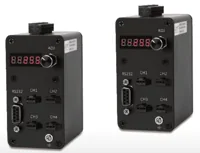
- Output
- Constant voltage 24 V
- Channels
- 4 channels
- Control
- Digital
- Feature
- Strobe
Do not infer pulse timing, overdrive permission, or light compatibility from a model name or feature label. Use the controller configuration step only after those requirements are documented.
Verify the correction and prevent recurrence
Repeat the original baseline after each meaningful change. Use identical regions, component-selection rules, and reporting metrics. Otherwise, an apparent improvement may simply reflect a different measurement.
Run the final configuration under representative production conditions, including normal warm-up, ambient-light changes, and machine operation. A stationary bench test establishes only stationary repeatability under the tested conditions.
Before accepting the result, check that:
- Exposure, gain, and image-processing settings remain as intended throughout the sequence.
- Reference-patch intensity stays inside the validated range without clipping.
- The same physical feature and connected component are measured in every frame.
- Position statistics meet a documented requirement over the required duration.
- Known displacements produce the expected measurement change, not just a stable output.
- Temporal averaging has not hidden unacceptable lag or genuine motion.
- The saved configuration can be restored after a restart.
Avoid judging a correction from a rounded display value. Likewise, adaptive thresholding can compensate for some brightness changes but cannot establish a stable physical edge by itself.
If the usual answer—fixed exposure and controlled lighting—does not work, return to the grayscale edge profiles and independent reference features. Investigate changing reflections, focus drift, vibration, or a mismatch between the chosen estimator and the position the process actually needs.
For the next step, send representative original images, acquisition settings, intensity traces, and position statistics through applications support. That evidence helps determine whether the remaining limit is illumination, imaging hardware, segmentation, or the measurement definition.
Questions
Why does a stationary object's bounding-box center move?
A bounding-box center depends on the outermost segmented pixels. Noise or brightness variation can add or remove a boundary pixel without moving the object. Check the original grayscale images, selected component, and extreme coordinates before treating the reported change as mechanical motion.
Should adaptive thresholding replace a fixed threshold?
Adaptive thresholding may help when illumination varies across the image, but its result depends on neighborhood size, local contrast, and object geometry. Validate it against known positions and representative brightness changes. It should not substitute for identifying unstable acquisition settings or illumination.
Is a contour centroid always better than a bounding-box center?
No. A centroid spreads the influence of boundary changes across the segmented region, which can improve repeatability for some objects. However, missing material, holes, shadows, or asymmetric threshold changes can move it. Choose the estimator according to the physical feature that defines position.
When is a strobe controller worth considering?
Consider synchronized illumination when ambient light or motion prevents stable continuous-light imaging. Check camera exposure timing, controller trigger behavior, and the light's permitted pulse conditions together. First verify that illumination variation is actually contributing to the position error.
Can averaging position measurements solve the jitter?
It can reduce random variation in a stationary measurement, but it also introduces delay and can conceal real motion. Establish the behavior of individual frames first. Then validate the averaging window against the maximum acceptable response time and report whether results are filtered.