
A detailed building model can make a thermal survey easier to interpret, especially around windows, roof edges, and recessed entrances. The difficulty is placing each thermal measurement on the correct surface without presenting visible-camera detail as measured temperature detail. For building inspection and reconstruction work, the reliable approach separates geometry, radiometry, and presentation. You can then produce a textured model that preserves original measurements, identifies uncertain boundaries, and makes registration errors visible rather than hiding them behind a sharp overlay.
Decide what the fused model must preserve
Thermal RGB image fusion should improve the location and interpretation of thermal measurements, not silently invent finer measurements. An RGB reconstruction can provide detailed geometry and visible texture. The thermal camera contributes measurements with its own sampling, optical blur, calibration limits, and viewing conditions.
Keep these outputs separate:
| Model layer | What it represents | What it must not imply |
|---|---|---|
| Geometry | Reconstructed or surveyed surface position | Accurate geometry without scale and validation |
| RGB texture | Visible appearance and fine surface detail | Temperature measurements at every visible edge |
| Thermal values | Original radiometric samples or documented conversions | Independent measurements at every mesh vertex |
| Quality layer | Coverage, occlusion, registration error, and sample provenance | Certainty simply because a surface has a color |
A dense mesh might contain many vertices covered by the same thermal sample. Those vertices do not become independent temperature observations.
For inspection, provide a temperature-only view alongside the fused view. Let the reader disable RGB texture, inspect the original thermal frame, and identify which measurements support a selected surface region.
Select cameras by data access, not display appearance
Start with the infrared cameras category, but verify the spectral band and measurement capability individually. An infrared camera is not automatically a radiometric building-survey instrument. Short-wave infrared imaging and long-wave thermal imaging are not interchangeable ways of measuring ordinary building-surface temperatures.
The LS-MV-GLF480 thermal camera is listed with a GigE interface. The supplied catalog information does not establish calibrated temperature output, measurement accuracy, or accessible radiometric data.
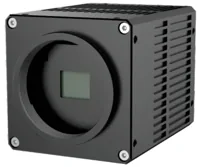
- Interface
- GigE
- Resolution
- Up to 3 MP
The LS-LM64019 module is listed as an LWIR thermal camera module with a USB3 interface. Confirm its measurement output and required integration before selecting it for a quantitative workflow.
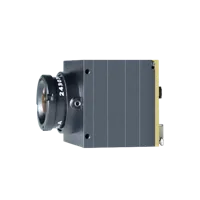
- Interface
- USB3
For the visible channel, the MV-CU020-90GC color camera has a global shutter and a GigE interface. Optical coverage, acquisition timing, and software access still require application-specific checks.
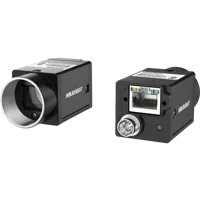
- Sensor format
- 1/1.7"
- Interface
- GigE
- Resolution
- Up to 3 MP
- Shutter
- Global
Use the camera finder to narrow interface and imaging requirements. Compare visible-channel options under area scan cameras, rather than assuming every camera listed there provides color images.
Before ordering a thermal camera, request documentation confirming the available data format, conversion procedure, calibration conditions, and handling of invalid samples. Obtain software and documentation through authorized channels. A palette image alone is insufficient evidence that temperatures can be recovered reliably.
Establish geometry and cross-spectral calibration
Obtain building geometry from a scaled RGB reconstruction, an existing survey, or a separately validated depth measurement. If you consider 3D sensors, check working range, outdoor illumination limits, surface behavior, and required accuracy. A category listing does not establish suitability for an entire building façade.
For an RGB reconstruction, establish scale using measured dimensions or surveyed control points. Check independent distances and recessed features, not just the apparent alignment of a flat wall.
Calibrate the camera system in three parts:
- Intrinsics: Determine focal parameters and lens distortion for each camera at the settings used during acquisition.
- Relative pose: Estimate the rotation and translation between the thermal and RGB cameras when using a rigid rig.
- World pose: Locate each acquisition viewpoint relative to the building model.
Cross-spectral calibration requires features visible in both channels. A printed checkerboard may have strong visible contrast but little useful thermal contrast. Use a stable target with known geometry and verified contrast in both images. Avoid calibrating against moving shadows, reflections, or changing heat patterns.
Distribute observations across the image and across relevant target orientations. Use separate observations to validate calibration rather than reporting only the error on the images used to fit it.
Camera coverage and viewing distance determine where those calibration observations are needed:
Keep focus and mechanically adjustable settings consistent after calibration. If the rig moves, flexes, or changes focus, repeat the relevant checks. Save the calibration identity with each acquisition session.
Use depth-aware projection when viewpoints differ
A single image warp can align an approximately planar wall. It generally cannot align the wall, projecting window frames, recessed glazing, and a nearby downpipe simultaneously.
For a three-dimensional model, project each world point into the thermal camera using its calibrated pose:
Here, X_W is a world-coordinate surface point, X_T is that point in thermal-camera coordinates, and K_T contains the thermal camera's intrinsic parameters. Apply lens distortion consistently: either project into distorted raw images or use matching rectified images and calibration.
Projection alone is insufficient. Reject points behind the camera, outside its image, or hidden by a nearer surface. Use a depth comparison or equivalent visibility test. A surface visible from the RGB viewpoint may be hidden from the thermal viewpoint.
A simplified rectified-camera estimate illustrates the problem with one-plane alignment:
For hypothetical values of f_px = 500 pixels, baseline b = 0.10 m, reference depth Z_ref = 10 m, and feature depth Z = 8 m:
This estimate assumes parallel, rectified views. Real systems need the full camera model. Even this modest residual can move a thermal boundary onto the wrong building element.
Calculate sampling before choosing texture resolution
Thermal pixel count, optical performance, viewing angle, and distance constrain useful spatial detail. Increasing the exported texture dimensions changes the display grid, not those limits.
For a near-front-facing planar surface, estimate object-space sampling with:
Consider a hypothetical thermal image spanning a wall width of 12 m with 640 horizontal samples:
Suppose your preliminary design target is three samples across that feature:
Three samples are a planning assumption, not a guarantee of reliable temperature measurement. The optics and measurement spot size may require a larger target. Oblique surfaces also have nonuniform sampling, so evaluate the projected footprint locally.
Use the camera resolution calculator to explore sampling requirements before selecting hardware.
Registration error adds another spatial uncertainty. At the example sampling pitch, a measured registration residual of 0.8 pixel corresponds approximately to:
This converts an image residual into an approximate surface displacement. It is not a complete uncertainty bound: geometry, pose, distortion, and thermal optical blur contribute separately.
Preserve radiometry through the mapping pipeline
Store the original thermal measurements before applying palettes, contrast adjustment, or RGB blending. Depending on the camera, valid source data might be calibrated temperatures or measurement counts requiring a documented conversion. Counts are not automatically temperatures, and a high-bit-depth image is not automatically radiometric.
Retain the acquisition information needed to interpret those values. Relevant settings may include emissivity, reflected apparent temperature, atmospheric assumptions, measurement range, timestamps, and calibration state. Record these only as supported by the actual camera and software.
Keep these processing stages distinct:
- Read and preserve the original measurement data and invalid-value flags.
- Convert measurements using the documented calibration and environmental settings.
- Associate valid samples with visible model surfaces.
- Generate a display texture from the mapped values.
- Add RGB texture, contours, or annotations as separate presentation layers.
Palette colors should come last. Automatically scaled palettes can give identical colors to different temperatures in different frames. Save the displayed temperature range and units with every exported view.
Resampling also needs an explicit policy:
| Method | Useful behavior | Main limitation |
|---|---|---|
| Nearest-neighbor sampling | Selects an existing source sample without numerical averaging | Produces stepped boundaries and does not remove mixed-pixel effects |
| Bilinear interpolation | Produces a smoother visualization | Creates interpolated values rather than additional observations |
| Footprint-aware mapping | Records which surface region a sample covers | Requires geometry, visibility handling, and a defined overlap policy |
| RGB-guided edge sharpening | Can improve visual interpretation | Can create apparent thermal edges unsupported by measurements |
Do not assume averaging temperature values is equivalent to combining measured radiance. For quantitative aggregation, use the camera's documented radiometric model and a justified method.
Where multiple frames cover the same surface, retain the source observations. View angle, reflections, capture time, and sampling footprint can differ. Do not merge conflicting values merely because they project onto the same triangle.
Validate boundaries, timing, and measurement conditions
Use independent check features distributed across the model. Report registration residuals in pixels and approximate surface units, including their spatial distribution. A single average can conceal poor alignment near image corners or depth discontinuities.
Overlay thermal contours on the RGB image and inspect original frames alongside the result. The practices discussed in camera preview overlays for debugging motion tracking are useful when designing these diagnostic views. Do not judge alignment from a blended image alone; transparency can conceal doubled edges.
At thermal boundaries, compare:
- A relatively uniform region away from the edge.
- Samples whose footprints cross the edge.
- Adjacent surfaces at different depths.
- A feature observed from another viewpoint.
A pixel covering two surfaces contains a mixture of radiance influenced by the optics. A sharper RGB outline cannot determine the separate temperatures of those surfaces from that observation alone.
Timing matters when the camera rig moves or the scene changes. If the selected devices support coordinated acquisition, review camera hardware trigger frame rate with external pulses before designing the timing arrangement. A common trigger does not, by itself, prove matching exposure intervals.
Keep frame identifiers and settings attached to saved data. The checks in per-frame exposure and gain metadata provide a related approach to verifying what acquisition software actually records. Thermal-specific metadata still needs its own documented interpretation.
Finally, distinguish registration accuracy from temperature accuracy. Correctly positioned measurements can still be misleading when emissivity, reflected radiation, glazing, atmospheric path, or changing environmental conditions are poorly characterized.
Recognize when the usual fusion approach is wrong
A planar homography may be sufficient for a flat façade captured from a stable viewpoint, provided independent checks pass. Building a complex mesh does not automatically improve that case.
Conversely, a façade with balconies, deep reveals, or substantial viewpoint changes needs depth-aware visibility handling. If geometry is unreliable, a carefully qualified image overlay may be more honest than a fully textured model.
Fusion is also the wrong remedy when the thermal target is too small. Reduce coverage, move closer where access permits, or select a more suitable thermal imaging configuration. Reconstructing visible detail cannot repair an inadequate thermal measurement footprint.
Glazing and reflective metal need particular care. The measured radiation may be dominated by reflected surroundings rather than the surface behavior you intend to assess. Better registration does not resolve that physical ambiguity.
Check the deliverable before committing to hardware
Use this acceptance checklist before purchasing or processing a full survey:
- Measurement access: Confirm documented radiometric output rather than palette-only export.
- Coverage: Calculate thermal sampling at the greatest distance and most oblique required view.
- Calibration: Validate intrinsics and relative pose using independent observations.
- Geometry: Check scale, recesses, projecting features, and thermal-view occlusions.
- Data retention: Preserve original frames, metadata, calibration records, and invalid-value masks.
- Resampling: State which values are original, selected, interpolated, or aggregated.
- Boundary quality: Flag mixed footprints and regions with unacceptable registration residuals.
- Presentation: Allow RGB texture to be disabled and display the thermal scale clearly.
- Traceability: Connect a mapped region back to its supporting thermal observations.
For a first trial, choose a small building area containing a flat wall, a recessed feature, and a clear thermal boundary. Define acceptable spatial and temperature uncertainty before processing it.
Start hardware selection with the camera configurator. If radiometric access or calibration requirements remain unclear, send your coverage, distance, target size, and measurement requirements through application support before ordering.
Questions
Can thermal RGB image fusion increase thermal resolution?
No. RGB images can provide sharper geometry and more recognizable surface detail, but they do not add independent thermal measurements. Preserve the original thermal sampling and identify interpolated regions. If a feature is smaller than the usable thermal measurement footprint, change the acquisition arrangement rather than relying on visible-image sharpening.
What thermal data should be saved for quantitative mapping?
Use documented radiometric output, such as calibrated temperatures or measurement counts accompanied by an authorized conversion procedure. Preserve invalid-value flags and relevant acquisition settings. An automatically scaled palette image generally cannot recover the original measurements reliably, even when its colors appear to represent temperatures.
When is a homography sufficient for thermal and RGB alignment?
A single homography is appropriate when the relevant scene is approximately planar, or under other suitably constrained imaging conditions. Recessed windows and projecting structures can retain parallax errors. Validate those features separately and use calibrated three-dimensional projection when depth differences affect the required alignment accuracy.
How should a temperature-textured building model be validated?
Check independent features across the image, especially corners, recesses, and temperature boundaries. Report image residuals and their approximate surface displacement. Examine original thermal samples separately from the RGB overlay, and distinguish geometric registration error from the camera's temperature uncertainty and the effects of surface emissivity or reflections.
Does a thermal camera interface confirm radiometric temperature output?
No. Camera interfaces describe communication, not measurement capability. Before selecting a device, verify the spectral band, accessible measurement format, calibration documentation, software support, and stated measurement conditions. The catalog descriptions provided here do not establish radiometric output or temperature accuracy for the listed thermal products.