
A conveyor vision warning that appears only during startup needs a different investigation from a fault that repeats throughout production. The useful clue is the transition into operation: which subsystem becomes ready first, what happens to encoder position, and when the first camera event arrives. This troubleshooting procedure helps you compare stationary-start and already-moving startup sequences, separate electrical faults from timing problems, and verify a correction without treating an unfamiliar warning code as a wiring diagnosis.
1. Classify the warning before changing anything
Read the warning definition in the equipment manufacturer's documentation for the installed software version. Record its complete text, source subsystem, severity, and timestamp. A numeric code without that context does not establish whether the problem concerns acquisition, conveyor position, event association, or communication.
First distinguish between these startup cases:
- Acquisition and tracking are enabled while the conveyor is stationary; motion begins afterward.
- The conveyor is already moving when acquisition and tracking are enabled.
- Acquisition is restarted while conveyor motion and tracking remain active.
These are different operating transitions. An already-moving conveyor can deliver an encoder edge or camera trigger immediately after an input becomes active. A stationary conveyor may deliver no edges until well after initialization.
Also determine whether the warning accompanies a missed image, an incorrect object position, or no measurable inspection error. An apparently harmless first warning still deserves verification, especially when its event could enter downstream tracking.
For problems that continue after startup, use the separate intermittent acquisition troubleshooting procedure. Do not assume a startup-only symptom has the same cause.
2. Build a timeline around the first event
Capture the order of encoder initialization, camera acquisition readiness, tracking readiness, trigger enablement, and the first accepted image. Include any documented signal that indicates the camera can accept a trigger.
Use a common time reference where possible. Host log timestamps can include queueing and scheduling delays, so they may not represent the electrical edge time. Camera timestamps, controller timestamps, and host timestamps must not be subtracted unless their relationship is known.
Record these events:
| Event | What to establish |
|---|---|
| Encoder state becomes valid | Position source and direction are available |
| Acquisition becomes ready | The camera can accept the intended trigger |
| Tracking becomes ready | A valid position reference exists for new objects |
| Trigger path is enabled | Production events may now enter acquisition |
| First trigger and exposure occur | The request actually produces an image |
| First object is accepted | Image and conveyor position are associated correctly |
For a constant-speed estimate, a timing mismatch translates directly into conveyor displacement:
Suppose conveyor speed is 400 mm/s and an event is associated 6 ms late. The displacement estimate is 400 × 0.006 = 2.4 mm. At an illustrative effective scale of 100 counts/mm, that represents 2.4 × 100 = 240 counts.
These are application examples, not equipment specifications. During acceleration, use recorded encoder displacement rather than multiplying the final speed by the entire startup interval.
The external-trigger timing guide explains sustained trigger constraints. Here, concentrate on readiness and the first event rather than maximum steady-state throughput.
3. Check wiring without assuming it is the cause
Inspect connectors, strain relief, shielding, supply stability, and signal-reference arrangements against the documented wiring drawings. Make wiring changes only with equipment isolated according to the machine's approved procedure. Live signal measurements require suitable equipment and qualified personnel.
Check the encoder path and camera synchronization path separately. Depending on the architecture, the encoder may terminate at a motion controller while a separate output triggers the camera. Good images do not prove that encoder position is reaching tracking correctly.
For an incremental encoder, verify the documented signal type, channel assignment, direction convention, and receiving input compatibility. Differential and single-ended interfaces are not interchangeable merely because connector pins fit. Verify quadrature decoding settings when both channels are used.
For the camera trigger, check polarity, idle state, pulse width, and the receiver's electrical requirements. A trigger line that becomes active during initialization may produce a first event that is unlike subsequent production pulses.
A stationary encoder naturally produces no motion transitions. Their absence while stopped is not evidence of failed wiring. Conversely, a clean steady-state waveform does not rule out a startup transient.
Review camera and I/O cables by connector and intended duty, not appearance alone. The accessories finder can help narrow replacement candidates after the required interface is established.
4. Compare startup sequences under controlled conditions
Use an approved test mode and prevent uncertain inspection results from entering production decisions. Keep safety functions active throughout testing.
- Establish a stationary-start baseline. With the conveyor stopped, initialize the encoder reference, acquisition, and tracking according to the documented sequence. Then begin permitted motion and record the first accepted event.
- Test the already-moving sequence. Where the machine design permits it, start acquisition and tracking while the conveyor is moving at the same repeatable speed. Record identical signals and logs.
- Repeat both conditions. Use an initial set of 10 starts per condition to expose a repeatable difference. This is a diagnostic sample, not a production reliability qualification.
- Change only one variable. Test a documented readiness condition, filter setting, or event-order correction separately. Avoid changing wiring and software settings together.
- Record the consequence. Count warnings, rejected triggers, missing images, and incorrect first-object positions. A quieter log alone does not prove success.
Keep camera settings, speed, object spacing, and application version unchanged between paired tests. Record whether the warning occurs before motion, at the first encoder transition, or at the first camera event.
If controlled timing records show that the acquisition request is rejected before readiness, investigate startup sequencing first. If the electrical trace contains extra transitions while the intended signal remains unchanged, investigate the signal path first.
5. Qualify acquisition and tracking before accepting objects
A useful startup design establishes a valid encoder state and confirms acquisition and tracking readiness before accepting production events. The exact order must follow the equipment's documented integration requirements.
Where supported, distinguish between enabling acquisition and accepting objects into production tracking. Acquisition may need to run before the application has enough information to accept the first object. Do not create that distinction by suppressing safety-related signals or ignoring fault states.
Consider this illustrative timeline:
- Acquisition becomes ready at 120 ms.
- Tracking becomes ready at 145 ms.
- The first production trigger arrives at 160 ms.
The available readiness margin is 160 − 145 = 15 ms relative to the later-ready subsystem. If a trigger instead arrives at 110 ms, it precedes acquisition readiness by 120 − 110 = 10 ms.
A fixed delay may hide this race during a warm restart and fail during a slower cold start. Prefer documented readiness handshakes where available. If the equipment requires a timed sequence, validate its margin under the permitted operating conditions and define what happens when readiness is late.
Check the treatment of queued events and retained objects after a stop. Clear or reject stale data only through documented procedures. Resetting encoder position while objects remain tracked can invalidate their coordinates.
6. Examine event filters in their actual units
A synchronization filter may reject events based on elapsed time, conveyor distance, encoder counts, or another criterion. Its name alone does not establish which behavior applies.
Before changing a setting, document:
- Which input or event stream it filters.
- Whether the threshold uses time, distance, or counts.
- Whether it applies to camera triggers, object detections, or tracking messages.
- How the first event is treated after initialization.
- Whether the filter retains state across an acquisition restart.
For a distance-based example, suppose valid objects are separated by 20 mm and an event-separation threshold is 25 mm. A valid subsequent event could be rejected because 20 mm is below 25 mm. At 400 mm/s, those distances correspond to 50 ms and 62.5 ms respectively.
That calculation does not justify selecting a particular threshold. The correct value depends on what the input represents and which unwanted events the filter is intended to reject.
Do not adopt a zero threshold as a universal camera-conveyor setting. In some documented implementations it may be appropriate; elsewhere it may remove useful rejection or have a different meaning. Confirm the parameter definition and test the first accepted event after each startup path.
7. Interpret results and verify the correction
Use the evidence to choose the next action rather than replacing parts in sequence.
| Observed result | Leading explanation to test | Verification |
|---|---|---|
| Trigger arrives before acquisition readiness | Startup ordering race | Compare trigger edge with documented ready state |
| Image exists but its position is wrong | Position association or reference error | Compare exposure event with latched encoder position |
| Extra input edges occur during initialization | Electrical transient or output initialization behavior | Inspect the relevant waveform and documented output state |
| Warning follows a retained tracking entry | Stale event or object state | Check documented restart and queue handling |
| Only closely spaced first events fail | Filter threshold or initial filter state | Compare event spacing with the configured rule |
| Failures continue throughout operation | Broader acquisition or transport problem | Investigate steady-state operation separately |
After a correction, repeat the paired startup tests and inspect the first object from each run. Verify image count, position association, direction, and downstream handling. Check warm restart, cold startup, and other supported recovery paths separately.
Retain the original configuration and a record of the change. If a software update is proposed, follow the software upgrade validation checklist rather than assuming a newer version resolves the cause.
When logs remain ambiguous, provide the equipment vendor with the software version, warning text, startup timeline, wiring revision, and controlled-test results. Avoid presenting a suspected cable fault as a confirmed diagnosis.
8. Check equipment requirements before ordering replacements
Replacement hardware is justified when measurements identify an interface mismatch, damaged connection, or missing required capability. It is not the first response to a warning that disappears after initialization.
For area scan cameras, verify documented trigger acceptance behavior, exposure timing, available status signals, and position-latching arrangements. Use the camera finder to narrow the physical interface before confirming detailed integration requirements.
The LS-MV-133GM-GE is a GigE monochrome area scan camera with a global shutter. Treat it as a camera candidate, not proof that a particular conveyor synchronization method is supported.

- Sensor format
- 1/2.7"
- Interface
- GigE
- Resolution
- Up to 3 MP
- Shutter
- Global
For vision controllers, verify encoder reception, timestamp handling, application compatibility, and required synchronization features separately. Camera connectivity alone does not establish encoder or tracking support.
The MV-SVC2506-16G60-128G is a vision controller with camera GigE ports. Confirm the required software and synchronization interfaces before selecting it for a conveyor application.
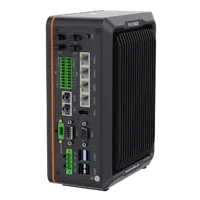
- LAN ports
- 5+ LAN ports
- USB 3 ports
- 2 USB 3 ports
- Light outputs
- 4 built-in channels
- Memory
- 16 GB
The LS-ACP-M8A8M-OPEN-HF-7M is a camera power and I/O cable intended for drag-chain use. It is only a candidate when the connector, pin assignment, electrical requirements, and installation duty match the connected equipment.

- Type
- Power and I/O cables
- Length
- 6-8 m
These examples are not a verified compatible bundle. Confirm each connection against the relevant equipment documentation before ordering.
9. Close the investigation with a startup checklist
Before returning the system to normal operation, confirm the following:
- Warning meaning is documented. The diagnosis uses the installed version's definition rather than the code alone.
- Both startup paths were compared. Stationary-start and already-moving results have separate records.
- Encoder position is valid. Direction, scaling, and the reference agree with actual conveyor motion.
- The first trigger is measured. Its timing and electrical characteristics satisfy documented requirements.
- Readiness is demonstrated. Accepted production events do not precede required acquisition and tracking states.
- Filter behavior is understood. Units, threshold, retained state, and first-event handling are recorded.
- The first object is verified. Correct image capture is matched by correct conveyor position and downstream handling.
- Safety and recovery remain intact. Testing has not changed protective functions or hidden unresolved faults.
If the sequence is correct but the interface remains uncertain, use the camera configuration starting point or send the measured startup sequence and connection requirements through application support. Select replacement equipment against the demonstrated requirement, not the warning code.
Questions
Does a conveyor warning at startup prove a wiring fault?
No. A startup-only warning can result from readiness timing, retained events, invalid position references, filtering, or electrical behavior. Establish the warning's documented meaning and compare signal timing with acquisition and tracking readiness before deciding that a cable or connection is faulty.
Why can starting with the conveyor already moving change the result?
A moving conveyor can present an encoder edge or camera trigger immediately after an input becomes active. When starting from rest, initialization may finish before the first event arrives. Comparing both paths helps reveal a readiness race, but electrical transitions and retained tracking state still need checking.
Should a synchronization separation filter always be set to zero?
Only use that value when the equipment documentation specifies it for the relevant input and operating mode. First identify the parameter's units, the events it filters, and its startup behavior. Removing separation filtering without understanding its purpose can allow duplicate or unwanted events into tracking.
What evidence should be collected before replacing hardware?
Capture the first trigger, acquisition readiness, tracking readiness, encoder position, image identifier, and the resulting object position. Use a common time reference or document the relationship between clocks. Repeat stationary-start and already-moving tests with unchanged settings so the results support a meaningful comparison.