
A camera acquisition example can compile successfully and still fail before an executable exists. Headers describe interfaces, but the linker must also find their implementations and dependencies. This troubleshooting procedure is for developers integrating a camera SDK into a C++ application. You will learn to classify unresolved symbols, inspect the actual link command, and verify a minimal acquisition program before changing camera addresses, cables, or discovery settings.
1. Confirm which build stage failed
An undefined reference diagnostic usually means compilation produced object files, but linking could not resolve a required definition. Start with the first failed build command, not the last line of a long error report.
| Failure stage | Typical diagnostic | First investigation |
|---|---|---|
| Compilation | Header missing, unknown type, invalid expression | Include paths, declarations, language settings |
| Linking | Undefined reference, unresolved external symbol | Linked objects, libraries, dependencies, binary compatibility |
| Program loading | Shared library cannot be loaded | Runtime library search paths and deployed dependencies |
| Acquisition | Device unavailable, timeout, no frames | Transport configuration, camera state, connectivity |
These stages require different evidence. A successful include operation does not establish that the corresponding library is linked. Likewise, successful linking does not establish that the operating system can load every shared library.
Do not troubleshoot packet size or camera power while the executable still fails to link. Neither can supply a missing C++ implementation.
2. Capture the final link command
Build the failing target with verbose output. For a CMake project, a separate build directory helps distinguish current configuration from cached settings:
cmake -S . -B build-linkcheck
cmake --build build-linkcheck --verbose
Supply the same documented toolchain, SDK location, options, and build configuration used by your application. A new directory configured without those settings is not a controlled comparison.
Find the command that combines object files and libraries into the executable. Check these items:
- The failing executable is the target receiving the SDK libraries.
- The expected acquisition components appear, directly or through target dependencies.
- Library paths point to the intended SDK installation.
- The compiler driver and architecture match the configured toolchain.
- Static archives appear in an order suitable for the linker.
- Debug or release dependencies match the SDK's documented requirements.
If the command uses a response file, inspect its contents too. An @ argument can hide most of the library list.
3. Group unresolved symbols by ownership
Treat the error report as a dependency map, rather than fixing every line independently. Group symbols by the component expected to define them.
| Symbol family | Likely explanation | Useful test |
|---|---|---|
| Device creation and SDK constants | Core SDK implementation missing or mismatched | Inspect the core target and its actual binary |
| Frame acquisition and buffer operations | Acquisition component absent or incompatible | Compare selected components with the installed example |
| Image allocation and image methods | Image-processing dependency missing | Check direct usage and exported dependencies |
| Logging and command-line support | Support library absent or not propagated | Inspect dependency targets and static-link requirements |
| Vtables and type information | Missing implementation, incompatible build, or application definition omitted | Identify which object or library should own the definition |
For example, suppose a log contains 48 unresolved references: 30 acquisition references, 10 image references, and 8 logging references. The grouping is 48 = 30 + 10 + 8, but the useful result is three component families to investigate—not 48 independent source edits.
An inline function or template in an SDK header may call functions implemented elsewhere. Seeing the error attributed to your source file does not prove that your source contains the underlying defect.
Missing exported constants also remain linkage problems. Do not replace them with invented values merely to make the error disappear.
4. Link the executable to documented SDK targets
Adding an include directory only helps compilation. Adding a library search directory only tells the linker where it may search. Neither operation requests a particular implementation library.
Use the package discovery and imported targets documented for the installed SDK release. In CMake, find_package() discovers package information; target_link_libraries() attaches dependencies to a target. Confirm that the latter names the executable you are building, rather than an unrelated example or helper library.
Imported targets can carry more than a library filename:
- Include directories and compile definitions.
- Configuration-specific library locations.
- Required dependency targets.
- Platform-specific link options.
Those properties are why copying a bare library filename from another project can fail unexpectedly. However, an imported target only propagates requirements that its package actually declares.
If your application directly uses an image-processing or logging API, declare that dependency as documented for that library. Do not assume it will always arrive indirectly through the camera SDK.
Use the manufacturer's example shipped with the same SDK release as your baseline. Obtain SDK packages and supporting documentation only from the manufacturer or its distributors. An example from a different release may use different components or target names.
5. Inspect transitive dependencies and static-library order
Once the main SDK library appears on the command line, inspect what its implementations require. Static linking often exposes dependencies that were less visible in a shared-library configuration.
With common Unix-style linkers, a static archive is searched when encountered. Definitions needed by objects already processed can be extracted from that archive. An archive placed too early may not be revisited when a later object introduces new references.
This schematic command shows a consumer before its provider. The filenames illustrate dependency direction; they are not SDK package names:
c++ main.o libacquisition.a libtransport.a -o acquisition_demo
Here, main.o calls acquisition functions, while the acquisition archive needs transport functions. The example does not establish the correct library list for any particular camera SDK.
For circular archive dependencies, use the build system's documented dependency model or the linker's supported grouping mechanism. Avoid repeating every library indiscriminately. Also avoid treating whole-archive loading as a general fix: it can increase executable size and expose duplicate definitions.
Shared-library builds need care too. Do not rely on every indirect shared dependency satisfying symbols used directly by your executable. Declare the libraries that your application actually uses.
6. Check headers, symbols, architecture, and C++ ABI
If the expected library is linked but definitions remain unresolved, verify that the binary contains the exact symbols requested by the object file.
On an ELF-based toolchain, commands of the following form can inspect unresolved and defined symbols. Replace the illustrative filenames with the actual files from the verbose build:
nm -C --undefined-only main.o
nm -C --defined-only libacquisition.a
nm -D -C --defined-only libacquisition.so
readelf -h libacquisition.so
The archive command inspects static-library definitions. The dynamic-symbol command checks exported definitions in a shared library. Use the corresponding inspection tools for other binary formats.
Compare complete signatures, including namespaces, parameter types, qualifiers, and ABI tags. A similarly named function is not necessarily the definition the linker needs.
Check compatibility in this order:
- Headers and binaries belong to the same supported SDK release.
- The selected library contains the required component.
- Object files and libraries target the same architecture.
- Compiler, standard library, and runtime settings meet SDK requirements.
- ABI-affecting definitions agree across the linked components.
A std::__cxx11 name or [abi:cxx11] annotation is a clue, not proof of an ABI mismatch. It may simply identify an unresolved symbol whose library was never linked. Do not globally change _GLIBCXX_USE_CXX11_ABI until you have established what the SDK requires.
For architecture-specific checks, use the related ARM64 acquisition binary compatibility guide. That investigation complements linkage diagnosis without replacing it.
7. Verify a minimal executable before connecting
Reduce the application to the smallest documented example that still makes a real SDK call. An executable containing only header includes and an empty main() does not demonstrate that SDK linkage works.
Use a staged test:
- Build an executable that calls a documented SDK version or initialization function, where available.
- Add the documented device-opening operation.
- Add acquisition and the required frame-buffer types.
- Add image conversion, logging, and application processing separately.
If no initialization-only operation exists, first link the smallest documented device-opening example without running it. Compilation and linking do not require a camera connection.
After each stage, record the target configuration, link result, and new dependencies. For an illustrative four-stage test, successful linking at stages 1 and 2 followed by failure at stage 3 narrows the change to acquisition-related code and its dependencies. It does not prove which individual library is wrong.
Once linking succeeds, run the executable and check that its required shared libraries load. Only then investigate discovery, opening, and frame delivery.
A device discovered but not opened belongs to a different investigation; see camera open failures after successful discovery when that acquisition interface applies. Failures after acquisition starts are covered separately in intermittent camera acquisition troubleshooting.
8. Know when adding another library is wrong
Not every undefined reference is caused by a missing third-party dependency.
If the unresolved symbol belongs to your own class, check that its implementation file is part of the target. A declared virtual destructor without a definition can produce linkage failures. Changing SDK libraries cannot supply an application-owned definition.
If the installed binary lacks a function declared by the selected header, suspect mixed installations, an unavailable optional component, or a release mismatch. Adding more search directories can make that ambiguity worse.
If a C API implementation is compiled as C while its declaration receives C++ linkage, the expected symbol names may differ. Use the vendor's headers and documented language linkage rather than editing declarations experimentally.
Finally, a missing shared library reported when launching the program is a loader problem, not the original link failure. Correct runtime deployment through the documented installation or packaging method. Do not copy arbitrary binaries into system directories.
9. Check software support before changing hardware
An unresolved reference is not evidence that a camera needs replacement. If you are selecting hardware for a new application, check SDK support separately from optical and interface requirements.
The LS-MV-133GM-GE is a GigE monochrome area scan camera. It is relevant when comparing area scan cameras for intensity-image acquisition.

- Sensor format
- 1/2.7"
- Interface
- GigE
- Resolution
- Up to 3 MP
- Shutter
- Global
The MV-DT01WMU is a ToF sensing camera. It belongs to the 3D sensors selection path when the application requires depth sensing.
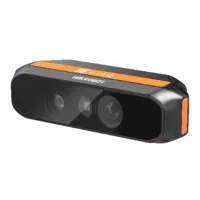
- Type
- Depth / ToF camera
These hardware categories do not establish compatibility with a particular SDK, compiler, or operating system. Confirm those requirements against current manufacturer documentation before choosing a part. The camera finder helps compare catalog hardware, while the GigE Vision software compatibility checks explain why an interface label alone does not settle software integration.
10. Keep a reproducible build checklist
Before handing the project to another developer or deployment team, retain the evidence needed to reproduce a successful build:
- SDK release and source: record the manufacturer package and installation method.
- Compiler and architecture: retain the toolchain configuration, not just the source code.
- Target dependencies: identify core, acquisition, conversion, and support components actually used.
- Resolved library locations: preserve verbose output showing which installation was selected.
- Minimal link test: keep a small executable that exercises a real SDK call.
- Runtime test: separately record library loading, device opening, and frame acquisition results.
- Change control: repeat the checks after SDK, compiler, or dependency updates.
Use the machine-vision software upgrade checklist to turn the working configuration into a repeatable regression test.
For a new acquisition system, start with the camera configuration step. For help assessing a catalog camera against your integration requirements, send the SDK release, operating system, toolchain details, and a sanitized link log through technical support.
Questions
Why does a camera SDK example compile but fail to link?
Compilation checks your source against declarations in headers. Linking must then locate the corresponding definitions in object files or libraries. A project can therefore compile with correct include paths while failing because its executable lacks the SDK library, an acquisition component, or a required dependency.
Does an abi:cxx11 annotation prove an ABI mismatch?
No. The annotation identifies an ABI-tagged symbol, but that symbol can also remain unresolved because its implementation library is absent. First confirm that the correct library is linked and exports the required definition. Then compare the SDK's documented compiler, standard-library, and ABI requirements.
Must the camera be connected to resolve linker errors?
Ordinary compilation and linking do not require a connected camera. They operate on source files, object files, and libraries. Hardware becomes relevant when you run code that discovers, opens, or acquires from a device. Keep those runtime checks separate from the build investigation.
Can changing static-library order fix undefined references?
With many Unix-style linkers, a static archive is searched when encountered, so a provider archive normally follows its consumers. Other linkers and dependency arrangements behave differently. Prefer the SDK's documented build targets, and inspect the generated command before manually changing archive order.
What should a linker-error support request include?
Provide the SDK release, operating system, compiler and architecture, build configuration, first unresolved symbols, and complete final link command. Include a minimal reproducible example where possible. Remove credentials and confidential paths, but preserve the dependency names and argument order needed to understand the failure.