
A vision-guided cell that works locally but loses communication after its plant uplink connects needs a controlled network diagnosis, not an immediate switch replacement. The uplink can introduce broadcast traffic, a redundant path, conflicting addresses or different routing behavior. Each requires a different fix.
Start by comparing the isolated and connected states under an approved maintenance plan. This procedure helps you collect switch counters, packet evidence and application timestamps, then choose between correcting the network, separating broadcast domains or adding a dedicated interface.
1. Establish the symptom and a safe test boundary
Record exactly what fails: camera acquisition, controller communication, application responsiveness or all three. A frozen display does not prove every network connection stopped. Conversely, a responsive application can still be missing time-critical messages.
Build a simple topology showing the cell switch, cameras, vision controller, machine controllers and plant uplink. Include secondary Ethernet connections, wireless adapters, maintenance laptops and any approved redundant paths. An unnoticed bridge can matter more than the nominal uplink speed.
Before disconnecting anything, determine whether that connection carries safety-related communication, supervisory control or other services the machine needs. Place equipment in the approved maintenance state and coordinate with the plant network owner. Do not defeat safety functions to keep production running during a test.
Write down three observations:
- Does the fault start immediately when the uplink connects, or only during production activity?
- Does removing the uplink restore communication without restarting applications?
- Do all devices fail together, or only devices sharing a particular link or address range?
If the problem occurs even while the plant uplink is absent, investigate local acquisition and processing separately. The guide to camera-transfer congestion covers bandwidth contention and transfer faults rather than broadcast-domain isolation.
2. Collect evidence before changing settings
Synchronize diagnostic clocks where supported, or record their offsets. Preserve application logs, interface settings and switch configuration before making changes. Without aligned timestamps, an application timeout and a switch event may appear unrelated.
For each relevant switch port, collect link speed, duplex status, received and transmitted traffic, broadcast and multicast counters, errors, discards and link transitions. Counter names differ between switches; confirm what each field measures.
Take counter snapshots at the beginning and end of a defined observation window. Cumulative totals since the last reboot do not tell you what changed when the plant connection appeared.
For packet evidence, use an authorized endpoint capture or a documented switch-mirroring arrangement. An endpoint capture shows traffic delivered to that endpoint, not every conversation on the switch. A mirror can reveal more traffic, but an oversubscribed mirror destination may drop packets itself.
Capture only the traffic needed for diagnosis. Restrict access to captures because they can contain production data and authentication material. Follow the site's retention and handling requirements before sharing them.
3. Run controlled connection tests
Use one change per test. Keep exposure settings, inspection recipes and production load unchanged where practical, so that network changes remain distinguishable from application changes.
- Measure the local baseline. With the approved plant connection absent, run a representative workload and record communication errors, processing load and port counters.
- Connect only the approved uplink. Confirm that no maintenance laptop or secondary cable creates another path between the networks.
- Record the failure transition. Note the connection time, first application error and corresponding counter changes. Capture the same interfaces as the baseline.
- Return to the approved baseline. Disconnect only if the maintenance plan permits it. Record whether recovery is automatic or requires an application restart.
- Repeat the comparison. Reproduce the transition before attributing the result to a particular traffic source.
- Test a proposed correction separately. An approved VLAN change, address correction or routing change should be evaluated independently of a hardware replacement.
Choose a window long enough to include normal production and the relevant plant activity. For example, a 60-second quiet interval cannot rule out a fault associated with an hourly data transfer. Record what the window actually covered.
Do not inject broadcast floods or create a loop to see whether the equipment survives. Existing traffic, passive captures and approved switch diagnostics should provide the initial evidence.
4. Separate likely causes by their signatures
The plant connection can expose several faults at once. Use the evidence to rank them rather than assuming that every communication failure means excessive bandwidth.
| Likely cause | Evidence to look for | Confirmation and corrective direction |
|---|---|---|
| Broadcast or unwanted multicast traffic | A repeatable increase delivered toward cell devices when the uplink connects | Identify the source and traffic purpose; consider approved segmentation and appropriate multicast controls |
| An unintended Layer 2 loop | Rapid traffic growth, repeated frames, MAC-address movement or topology-change events | Trace redundant paths against the approved design; remove unintended bridging and correct loop prevention |
| Duplicate addresses | Conflicting address announcements or inconsistent address-to-MAC mappings | Check address ownership against the approved plan and any documented redundancy behavior |
| Routing or subnet overlap | Failures depend on destination; packets leave the wrong interface or fail to return | Review masks, connected routes, gateways and interface metrics |
| Link or physical-layer fault | CRC errors, link transitions, unexpected speed or duplex behavior | Inspect the cable path and connectors; verify negotiation and port configuration |
| Host or application overload | Delayed processing or growing queues without a matching link fault | Correlate network arrival rates with processor load, callbacks and application logs |
MAC movement alone is not proof of a loop. Similarly, changing address mappings can be legitimate in documented high-availability or proxy arrangements. Compare observations with the intended topology before changing configuration.
If traffic arrives normally but the application stops consuming it, investigate callbacks and buffer queues. Segmentation cannot repair a blocked processing thread, although it may reduce the load that exposes one.
5. Quantify traffic without inventing a universal limit
Report both frames per second and bits per second. A stream of small packets can impose substantial packet-processing work without approaching the link's nominal bit rate.
For an approximate receive-rate calculation, multiply the observed frame rate by the average captured frame length. Use full frame lengths rather than a truncated capture length.
Suppose the observed traffic averages 8,000 frames per second, with an average captured length of 1,000 bytes:
- Bit rate = 8,000 × 1,000 × 8 = 64,000,000 bit/s, or 64 Mb/s.
- On a 100 Mb/s link, the approximate share is 64 / 100 = 64%.
- On a 1 Gb/s link, it is 64 / 1,000 = 6.4%.
This estimate excludes physical-layer overhead and does not describe short bursts. It also says nothing about whether the receiving device can process that frame rate while meeting its application deadlines.
A low average rate therefore does not clear the network. Check shorter observation intervals, discard counters and timeout timestamps. Conversely, high utilization on an unrelated port does not establish that traffic reached the failing endpoint.
There is no universal broadcast rate at which every vision cell fails. Establish an acceptable operating envelope using the actual endpoints, workload and communication deadlines. Avoid configuring storm-control thresholds from an arbitrary percentage alone.
6. Choose isolation that addresses the measured cause
A managed switch is useful because it can expose counters, support traffic mirroring and provide segmentation or loop diagnostics. It is not automatically a traffic filter simply because it is managed.
| Arrangement | What it can help with | What it does not establish |
|---|---|---|
| Managed switch in one shared VLAN | Visibility, documented loop controls and targeted traffic policies | Separation from plant broadcasts in that same VLAN |
| Dedicated cell VLAN with controlled routing | A separate broadcast domain and defined inter-network access | Correct endpoint addresses, sufficient processing capacity or application discovery across routing |
| Separate physical cell network | Separation from the plant's Layer 2 traffic | Safe data exchange unless the connecting host or gateway is deliberately configured |
| Separate host interfaces on distinct subnets | Keeping cell and plant traffic on different local interfaces | Isolation if bridging, forwarding or subnet overlap reconnects the networks |
For a VLAN design, ask the network owner to define access-port assignments, permitted trunks and the routed boundary. Document which systems need to exchange data and allow only the required services through the approved gateway or firewall.
For a separate-interface design, assign distinct, non-overlapping subnets. Review default gateways, connected routes and application interface binding. Multiple default gateways can create unexpected path selection; use the site's documented routing design rather than adding gateways experimentally.
Do not enable bridging, connection sharing or IP forwarding merely to make a test connection work. Any forwarding between plant and cell networks should be intentional, reviewed and controlled.
Broadcast-based discovery may not cross a routed boundary. Verify whether the application supports configured device addresses, a documented discovery mechanism or another approved method. Where filtering becomes relevant, use the checks in firewall troubleshooting for missing images, not a blanket firewall shutdown.
7. Know when the usual answer is wrong
A VLAN is not the first correction for duplicate addresses. It may hide the conflict temporarily while leaving an invalid addressing plan ready to fail at the next integration change.
A faster switch is not a correction for an unintended loop. It can move the same faulty traffic faster without making the topology valid. Preserve documented redundant-network designs rather than removing approved paths indiscriminately.
Quality-of-service settings may help a defined traffic class compete for constrained resources, but they do not repair address conflicts or every source of broadcast overload. Application support, switch behavior and the actual bottleneck must be understood first.
Multicast filtering also requires care. Enable snooping or related controls only according to the network design, including any required querier behavior. A configuration that suppresses needed traffic can resemble the original fault.
Finally, a separate interface is not isolation if both interfaces use overlapping subnets or the host bridges them. Verify effective routing and forwarding behavior, not just the number of sockets on the enclosure.
8. Review hardware only after identifying the requirement
If new hardware is justified, start with the required topology and diagnostic features. Specify port roles, traffic paths, managed-switch functions, environmental requirements and application compatibility before selecting equipment.
The vision controllers category is relevant when the vision host itself needs replacement. Multiple ports alone do not prove independent interfaces, internal switching behavior or suitability as a network boundary.
The MV-SVC2506-16G60-128G catalog identifies camera, configuration and communication GigE ports. Confirm their documented architecture and software behavior before assigning plant and cell roles.
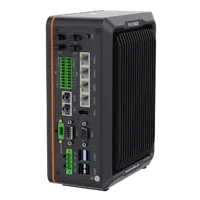
- LAN ports
- 5+ LAN ports
- USB 3 ports
- 2 USB 3 ports
- Light outputs
- 4 built-in channels
- Memory
- 16 GB
The MV-VC2101-128G40-NN is listed as a basic vision-controller version without I/O or light functions. A replacement assessment must include those application requirements, not just network connectivity.
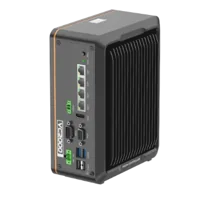
- LAN ports
- 3-4 LAN ports
- USB 3 ports
- 2 USB 3 ports
- Memory
- 16 GB
- Processor
- Intel N-series
Neither product listing establishes managed-switch diagnostics, routing or firewall functionality. Obtain the relevant manufacturer documentation before designing around those capabilities.
For a physical-link fault, review the cables category and accessories finder against the actual interface and installation requirements. Verify connector type, supported link standard, cable length, shielding and motion requirements. Do not select a camera data cable merely because its connectors appear similar.
9. Verify the correction and record the boundary
Acceptance testing should include the original failure condition, not just a quiet bench connection. Repeat the same captures, counter intervals and application measurements used for the baseline.
Use this closeout checklist:
- Communication: No unexpected timeouts during the agreed representative workload; application deadlines remain satisfied.
- Traffic: Plant connection does not introduce unexplained traffic growth, repeated frames or excessive discards toward cell devices.
- Addressing: Every endpoint has documented ownership, subnet information and any required address reservation.
- Topology: Intended redundant paths are documented; unintended bridges are absent.
- Routing: Plant and cell destinations use the intended interfaces, with only approved forwarding between them.
- Recovery: Approved restart and reconnection tests restore communication without undocumented manual intervention.
- Configuration: Switch settings, host routes and application interface selections are saved and included in change control.
- Rollback: The previous configuration and a safe restoration procedure remain available.
State the observation duration and workload in the acceptance record. Zero errors during a short test is evidence for that test, not a guarantee for every future plant condition.
Before ordering replacement hardware, send the topology, interface requirements, counter changes and sanitized failure timeline through application support. Those details help distinguish a switch requirement from an addressing, segmentation or host-processing correction.
Questions
Will replacing an unmanaged switch stop the communication failures?
A managed switch can provide the visibility and controls needed to diagnose the fault, but replacement alone is not a reliable correction. Confirm whether the problem involves unwanted traffic, a loop, conflicting addresses or routing. Select management features against that finding, then validate the configured result under the original workload.
Should a vision cell use a VLAN or a separate network interface?
A dedicated VLAN is often appropriate when the plant supports a managed, documented routed boundary. Separate interfaces can suit a host that must communicate with both networks, provided the subnets do not overlap and unintended forwarding is absent. Application discovery and required services must be checked with either approach.
Is there a safe broadcast traffic threshold for every vision cell?
No single rate is safe for all devices. Packet size, burst duration, endpoint processing capacity and application deadlines affect the result. Compare measured frame rates and discard counters with a healthy baseline, then establish acceptance limits for the actual cell rather than adopting a generic broadcast percentage.
Does a clean packet capture prove the network is healthy?
Not necessarily. A local capture may miss traffic on another port, while a mirrored capture can lose packets if its destination is overloaded. Some faults involve routing or application processing rather than malformed traffic. Correlate captures with port counters, host load and application timestamps before excluding the network.