
A vision-picking project can stop during startup because a work-area reference never became valid, even though the reported fault looks like an ordinary array error. For controls and integration teams, the useful question is not simply which subscript failed. It is which configuration or startup operation should have supplied that subscript. This troubleshooting sequence follows destination assignment, queue creation and mapping initialization so you can correct the upstream fault without inserting guessed values into application arrays.
Separate the array fault from its upstream cause
An out-of-bounds error identifies where execution failed, but it does not necessarily identify what caused the failure. A downstream routine might receive an unresolved work-area reference and then use it as an array subscript. Alternatively, the mapping could be correct while a loop or conversion generates an invalid subscript later.
Start by recording these separately:
- The array's declared lower and upper bounds.
- The actual subscript used at the failing operation.
- The configuration object that should supply the reference.
- The startup operation responsible for resolving that reference.
Do not assume every interface uses the same indexing convention. Some arrays begin at zero, while others begin at one. A queue identifier, destination identifier and array position can also represent different things, even when all are integers.
For an array whose inclusive bounds are known, the immediate validity check is:
Passing this check proves only that the access is within the array. It does not prove that the selected entry represents the correct destination.
Keep automatic operation inhibited through the machine's documented procedures while diagnosing initialization. An application readiness check does not replace a safety function.
Trace the startup dependency chain
Use the application's documentation to identify the actual startup sequence. A useful diagnostic model is that each enabled position source needs its intended destination relationship, each required work area needs a successfully created queue, and the mapping routine must resolve those objects before consumers use them.
The exact relationships depend on the application. Several sources might share a destination, and one source might distribute targets among several destinations. Therefore, do not assume that source count, destination count and queue count must match.
Build an expected-configuration table before comparing runtime values:
| Configuration item | Evidence to collect | Question it answers |
|---|---|---|
| Enabled position source | Active project configuration | Should this source participate in this recipe? |
| Destination assignment | Distribution or routing configuration | Where should its targets go? |
| Required work area | Destination-to-work-area relationship | Which runtime object must exist? |
| Queue creation | Success status and object identity | Was the required object created successfully? |
| Mapping result | Documented mapping status and resolved reference | Can the consumer identify the intended object? |
Treat this as an evidence chain, not as a requirement to rename your application's fields. Use the terminology and diagnostic views supplied by its documentation.
For the broader sequencing problem, use the related vision startup synchronization troubleshooting guide. Here, the narrower objective is proving that each required work-area mapping exists and refers to the intended destination.
Check likely causes in dependency order
Check upstream dependencies before changing downstream array handling. The following order minimizes repeated work because each row relies on the previous conditions being satisfied.
| Likely cause | Distinguishing test | Corrective direction |
|---|---|---|
| Missing destination assignment | Compare each enabled source against the intended routing configuration | Restore the documented source-to-destination relationship |
| Work-area queue creation failed | Find the creation result for the exact required work area | Correct the reported creation failure before mapping |
| Mapping ran too early | Compare successful creation events with mapping start and completion | Gate mapping on documented completion or readiness |
| Mapping belongs to another project instance | Compare active project identity, recipe and object references | Reload through the supported lifecycle and rebuild references |
| Consumer retained an old reference | Compare current mapping output with the value used at the fault | Refresh consumer references through the documented initialization path |
| Genuine array calculation error | Mapping is valid, but a later calculation exceeds declared bounds | Correct loop limits, conversions or index arithmetic |
Intermittent behavior alone does not prove a timing race. A failed creation operation, a partial reload or a recipe-dependent assignment can also appear intermittent.
Likewise, a visible destination in an editor does not prove its runtime queue exists. Collect runtime success evidence rather than relying on configuration appearance.
Follow a repeatable diagnostic sequence
-
Capture the failing state before restarting. Save the fault text, active project identity, recipe selection and startup log. Record the failing consumer and attempted subscript. A restart may remove the evidence without removing the cause.
-
List every enabled position source. For each source, record its intended destination or distribution relationship. Include sources that are enabled but rarely produce targets. If a source is intentionally unused, disable or remove it only through the documented configuration workflow.
-
Derive the required work areas. Follow the configured routing relationships rather than counting sources. Mark shared destinations and distinguish required destinations from optional ones. This gives you a concrete list of runtime objects to verify.
-
Find a creation result for each required queue. Record success, failure or unresolved status. Include the object identity where the interface exposes it. A request being sent is not the same as successful creation. Investigate the earliest relevant failure before rerunning mapping.
-
Locate mapping execution in the same startup attempt. Determine whether it ran before or after all required queue-creation operations completed successfully. Prefer a shared monotonic event trace when available. Unsynchronized clocks on separate devices can make timestamp ordering misleading.
-
Inspect mapping output before the consumer starts. Check both its documented validity state and its destination identity. Do not infer success merely because an array contains nonzero values. A populated array may still contain references from a previous project instance.
-
Compare the consumer's value with the current mapping. If mapping is correct but the consumer uses another value, investigate retained state, conversion or refresh order. If both values agree and violate the array bounds, examine the documented relationship between the reference and the array position.
-
Change one upstream condition and repeat. Correct the destination assignment, creation failure or sequencing defect supported by the evidence. Repeat the same startup path and compare the event chain. Keep unrelated configuration changes out of that test.
If the project changes ownership between application components, consult project changeover ownership troubleshooting. A mapping from the wrong project instance requires a different correction from a missing destination in the right instance.
Work through an incomplete mapping example
Consider a hypothetical project with three required destinations. Its consumer uses an array with valid positions from 1 through 6. The documented mapping interface in this example reports zero when a destination remains unresolved; that convention is illustrative, not universal.
| Required destination | Queue creation result | Resolved array position |
|---|---|---|
| Feed area | Successful | 2 |
| Inspection area | Successful | 4 |
| Output area | Still pending | 0 |
The readiness count is:
The immediate array check also fails because zero is below the lower bound of one. However, assigning position 6 manually would not establish that the output queue exists or belongs at that position.
Now examine an illustrative event trace from a shared clock:
- At 40 ms, the feed queue reports successful creation.
- At 90 ms, the inspection queue reports successful creation.
- At 120 ms, mapping runs.
- At 150 ms, the output queue reports successful creation.
Mapping started 30 ms before the last required queue became available: 150 - 120 = 30. This supports an ordering diagnosis for this particular attempt.
The correction is not simply to add a delay of 30 ms. Creation time may change on another startup. Use the documented completion condition to establish readiness, then run mapping and verify its output before releasing the consumer.
If the output queue instead reports failure, waiting longer is not the solution. Correct the creation failure and repeat the supported initialization sequence.
Recover through supported initialization and verify
After correcting the cause, use the application's documented stop, load and initialization procedures. Do not edit generated arrays, alter undocumented runtime memory or repeatedly rerun initialization against active consumers. Those approaches can leave apparently valid references attached to the wrong runtime objects.
A useful application readiness condition is:
This expresses a diagnostic requirement, not a safety-rated implementation or a claim that every platform exposes those exact flags.
Verify more than the absence of an exception. In a controlled commissioning mode, confirm that a known test target reaches the intended work area and is not duplicated elsewhere. Follow the machine's risk assessment and documented commissioning procedure for any motion test.
Exercise the relevant lifecycle paths separately:
- A full application startup.
- A supported stop and restart without reloading.
- A supported project reload.
- Each recipe that changes destination assignments.
- Recovery after a documented, controlled initialization failure.
For example, testing five relevant recipes across four lifecycle paths creates 5 × 4 = 20 cases. That is a coverage matrix, not a reliability guarantee. Record mapping identities and creation results for each case rather than counting only successful starts.
Where operator selections change the active routing, the local recipe switching guide helps separate a requested recipe from a completed, acknowledged changeover.
Decide whether hardware is relevant
A missing work-area mapping is not, by itself, evidence that you need a faster controller or a different camera. First prove whether configuration, object creation or startup ordering failed. More processing capacity cannot supply an absent destination assignment.
If the investigation becomes a system redesign, compare vision controllers against the application's documented runtime and interface requirements. The MV-SVC2506-16G60-128G is a vision-controller candidate, not a confirmed software-compatibility recommendation.
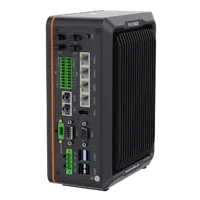
- LAN ports
- 5+ LAN ports
- USB 3 ports
- 2 USB 3 ports
- Light outputs
- 4 built-in channels
- Memory
- 16 GB
For an architecture using on-device inspection, review smart cameras through the camera finder. The MV-SC3013XM-12M-ATN-H is a vision-sensor candidate; verify the required inspection and communications support separately.
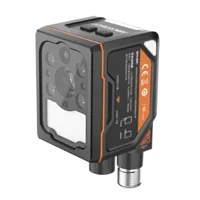
- Interface
- GigE
- Resolution
- Up to 3 MP
- Sensor format
- 1/1.45"
- Shutter
- Global
Neither candidate establishes compatibility with an existing picking application. Retain functioning hardware unless measurements or documented requirements justify a change.
Use a handover checklist before releasing operation
Close the investigation with evidence that another technician can reproduce:
- Assignments: Every enabled source has its intended routing relationship, including rarely used recipes.
- Creation: Every required work area has an explicit successful queue-creation result.
- Ordering: Mapping follows successful creation rather than a guessed elapsed delay.
- Identity: Resolved references belong to the active project and intended destinations.
- Bounds: Consumer subscripts satisfy their declared ranges without masking unresolved mappings.
- Recovery: Failed initialization prevents consumption and produces a useful diagnostic message.
- Verification: Controlled tests confirm correct destination routing across the relevant lifecycle paths.
When the mapping is demonstrably valid, stop treating the problem as initialization. Investigate the downstream array calculation or object-lifecycle defect instead.
For help selecting vision hardware around a documented application requirement, use the system configurator or contact the applications team. Bring the routing table, creation results and startup trace so the next decision follows evidence rather than a manually patched array.
Questions
Should I manually fill an empty work-area index array?
Only use a value-setting procedure if the application's documentation explicitly requires it. An unresolved mapping may indicate that its destination queue does not exist. Substituting an in-range number can conceal the original fault and associate vision targets with an unintended work area.
Does a zero work-area reference always mean an array error?
Not necessarily. Separate interfaces can use different indexing conventions, and some applications use zero as an unresolved-reference indicator. Check the documented meaning of the value and the declared array bounds. Also verify whether the value represents an identifier or an actual array position.
Why can the error disappear after restarting the project?
A restart can change completion order, clear retained references or recreate an object that previously failed. That makes restart behavior useful evidence, but not a diagnosis. Compare successful and unsuccessful startup traces, including destination assignments, queue-creation outcomes and mapping execution order.
What evidence should I collect before requesting support?
Provide the active project and recipe identities, the expected source-to-destination relationships, queue-creation results, mapping output and the exact failing array bounds. Include event ordering from the same startup attempt. Avoid sharing credentials or sensitive production data that the investigation does not require.