
A controller can respond on the network and accept a file while still rejecting a vision-project transfer. Those tests prove individual communication paths, not that the project points to the intended controller. This troubleshooting procedure is for commissioning teams facing that gap. You will separate an unresolved controller association from discovery, interface, compatibility and permission faults, then verify recovery without changing unrelated settings.
Locate the failure boundary before changing anything
Start with the transfer application's complete diagnostic message and the controller's corresponding event log. Record the project revision, selected target, timestamp and operation that failed. A connection test, project validation and project deployment may use different services and authorization checks.
Do not interpret successful file transfer as proof that the complete deployment path works. It establishes only that the tested service accepted that operation using those credentials and that interface.
Use the following table to choose the next test. These are diagnostic patterns, not universal error-code definitions.
| Observation | First question | Useful next test |
|---|---|---|
| Controller responds, but project target details are blank | Does the logical target resolve to an online device? | Compare saved and online controller identities |
| Online target list is empty | Can this application discover or directly address the controller? | Check documented discovery and interface requirements |
| Target resolves, but deployment reports access denied | Does the deployment account have the required rights? | Check authorization and controller logs |
| Transfer starts, then fails during validation | Is the project compatible with the target software and options? | Compare supported versions and installed capabilities |
| Transfer completes, but the intended controller remains unchanged | Was the correct physical target selected? | Verify identity and deployed revision on the target |
If the failure concerns a project already running through changeovers, use the separate guide to project-changeover ownership faults. Initial controller association and runtime project ownership require different evidence.
Compare the saved reference with the actual controller
A project may contain a logical controller object rather than a live connection. Its saved address, identity and compatibility information must resolve to the intended online target.
Open the application's documented controller-association view. Compare its information with the controller's own supported identification screen or management utility.
Record these fields where the platform exposes them:
- Logical target name: the project object receiving the deployment.
- Controller identity: a documented unique identifier, not merely a friendly display name.
- Network address: the endpoint currently assigned to the intended controller.
- Software version: the controller software and any required application components.
- Association status: resolved, unavailable, unassigned or the platform's equivalent.
Missing identity fields are evidence to investigate, not proof of a particular defect. The application might lack a saved association, fail to discover the device, or be unable to retrieve its properties.
Likewise, a matching address alone is insufficient. An address can be reassigned after equipment replacement or network changes. Confirm identity through the manufacturer's documented method before deploying anything.
Separate discovery and interface problems from mapping problems
When the application's online-controller list is empty, first determine how that application finds targets. Supported mechanisms may include local discovery, a configured endpoint or a vendor-managed connection. Do not assume another utility uses the same mechanism.
Check the documented requirements for the service interface and production network interface. Successful communication through one does not establish that every engineering service is supported there. Conversely, an unresolved association does not prove that another physical interface is required.
Compare the engineering workstation's active adapters, route to the controller and selected application interface. A service cable, wireless connection and production connection can create multiple possible paths. Record the path actually used rather than changing addresses experimentally.
Keep firewall protection enabled. If a documented service is blocked, arrange a narrowly scoped rule through the authorized network administrator. Avoid broad port changes, subnet scans or security changes as exploratory fixes.
Inspect camera and I/O cables only where physical communication is unstable or the connection type is uncertain. The accessories finder helps identify cable options, but connector shape alone does not establish electrical or protocol compatibility.
Reassociate the target using the documented workflow
Once the intended controller is visible and its identity is confirmed, repair the project association through the manufacturer's supported procedure. Menu names and required controller states vary between platforms.
- Preserve the current configuration. Save a separate project copy and obtain any controller backup required by the documented deployment procedure.
- Establish the required maintenance state. Follow the machine's approved operating and safety procedures before making changes. Do not bypass an interlock to permit deployment.
- Select the existing logical controller. Confirm that it is the object referenced by the project's cameras, tasks and communication settings.
- Use the documented association command. Select the verified online controller and review every identity or compatibility warning before accepting the change.
- Validate dependent references. Check that tasks, devices and communication endpoints still reference the intended logical object.
- Save and verify persistence. Close and reopen the project, or use the platform's documented reload procedure, then inspect the association again.
Do not invent a recovery sequence involving duplicate targets, internal identifier edits or deletion of project objects. Such actions can disturb dependent references even when the controller becomes visible afterward.
If the supported association workflow cannot find a controller that another authorized utility can identify, preserve both tools' diagnostics. That difference is useful evidence for vendor support; it is not a reason to edit protected project data.
Check authorization and compatibility as separate branches
Once the mapping resolves correctly, an authorization failure becomes more meaningful. Confirm which account the deployment service actually uses. It may differ from the account used for manual file transfer.
Check the documented rights for the deployment operation and its destination. Grant only the permissions required for that role. Do not give unrestricted disk access simply because a transfer failed, and never substitute shared administrative credentials as a permanent fix.
Apply account changes, session refreshes or controller restarts only as the documentation requires. Schedule any restart through the machine's maintenance process.
For compatibility, compare the engineering application's supported target versions with the controller's installed software and required options. A readable controller identity does not establish project-format compatibility or deployment entitlement.
If a required license or option is absent, obtain it through the manufacturer or an authorized distributor. Use only their supported software, firmware and documentation sources. The software upgrade validation checklist provides a separate framework when a supported version change is necessary.
Verify recovery with a repeatable commissioning test
Use a small evidence matrix rather than accepting a single successful transfer. The following example checks persistence across three project states:
| Test state | Identity resolves | Address matches | Compatibility passes | Deployment verified |
|---|---|---|---|---|
| Immediately after reassociation | Record result | Record result | Record result | Record result |
| After saving and reopening the project | Record result | Record result | Record result | Record result |
| After restarting the engineering application | Record result | Record result | Record result | Record result |
The arithmetic is straightforward: 3 states × 4 checks = 12 recorded results. This is a commissioning example, not a requirement to restart the controller or repeat a disruptive deployment unnecessarily.
Use the manufacturer's supported validation or non-running transfer mode where available. If deployment can alter machine behavior, perform it only under the approved maintenance procedure.
Verify completion from both ends. The engineering application should report success, and the intended controller should report the expected project identifier or revision through its documented interface. File presence alone may not establish successful import or activation.
Also confirm that the transfer has not started an application or changed the machine's operating state unexpectedly. Deployment success and permission to resume production are separate acceptance decisions.
Check hardware requirements without treating replacement as a fix
Replacing hardware is rarely the first response to a stale project association. Additional memory, network ports or processing capacity cannot repair an incorrect logical target reference.
If commissioning also requires a machine-vision host, review the vision controllers against the application's documented requirements. Catalog inclusion does not establish compatibility with a particular deployment tool, controller family or proprietary integration.
The MV-VC2101-128G40-NN is a catalog vision-controller option to assess against those requirements.
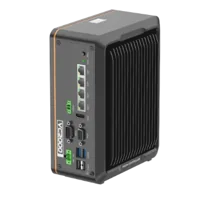
- LAN ports
- 3-4 LAN ports
- USB 3 ports
- 2 USB 3 ports
- Memory
- 16 GB
- Processor
- Intel N-series
The MV-VC4512-256G10-2TH is another catalog vision-controller option, not a verified substitute for the target controller.
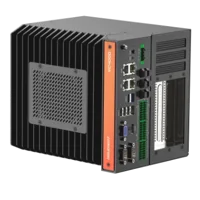
- LAN ports
- 3-4 LAN ports
- USB 3 ports
- 2 USB 3 ports
- PoE
- PoE camera ports
- Light outputs
- 6 built-in channels
Before ordering, confirm supported operating software, application licensing, required interfaces, electrical connections and environmental conditions. Obtain written compatibility confirmation where the application supplier requires qualified hardware.
Recognize when controller mapping is not the answer
Stop changing the association when identity, address and compatibility remain correct after reopening the project. Move to the failing deployment stage instead.
A repeatable access-denied response points toward authorization. A project validation error points toward project content or supported features. A transfer that stops partway through may require investigation of transport stability, storage capacity or the deployment service's own logs.
If image acquisition also fails intermittently, keep that investigation separate. The guide to intermittent camera acquisition failures addresses capture-path evidence rather than controller identity binding.
Avoid combining an address change, permission change, software update and reassociation into one attempt. Even if deployment succeeds, you will not know which change mattered. Change one diagnostic variable at a time unless the documented recovery procedure explicitly groups them.
Final commissioning checklist and next step
Before closing the issue, check the following:
- Correct target: the online identity matches the intended physical controller.
- Persistent association: the saved project resolves that same controller after reopening.
- Supported path: the selected interface and deployment service match the documentation.
- Compatible software: project format, target version and required options are supported together.
- Appropriate access: the deployment account has the required rights without unnecessary privileges.
- Verified result: the target reports the expected deployed project or revision.
- Controlled return to service: machine checks and production authorization are complete.
- Useful records: backups, diagnostics and the corrected association details are retained under your site's access rules.
For help selecting machine-vision hardware, use application support with the required interfaces and software compatibility requirements. For a deployment-specific fault, provide the manufacturer's support channel with sanitized diagnostics and the saved-versus-online identity comparison.
Questions
Does successful file transfer prove the controller mapping is correct?
No. File transfer verifies a particular service, destination and account. Project deployment may require a separate controller association, different permissions and a compatible project format. Confirm the intended controller's identity within the deployment application, then check the specific stage reported as failing.
What should you check when controller identity fields are blank?
Blank fields can indicate an unassigned target, unsuccessful discovery or failure to retrieve controller properties. Compare the saved project reference with the controller's documented identification view. If the application cannot list the target, investigate its discovery and interface requirements before attempting reassociation.
Should project deployment always use the production network interface?
Use the interface supported by the manufacturer for the required engineering operation. Communication through a service connection does not automatically establish deployment support, but a mapping failure alone does not justify moving interfaces. Confirm the documented connection method and preserve the existing network configuration before changing it.
Should you delete and recreate a controller object to repair its association?
Only do this when the manufacturer's documented recovery procedure explicitly requires it. Deleting a logical controller can break task, device or communication references. Prefer the supported reassociation workflow, preserve a project backup and verify dependent references before accepting the repaired configuration.