
A rejected target-set request can stop a vision-guided cell even when images, communications and individual input signals look normal. The missing evidence is often the selection pair actually sampled when the request was triggered. This troubleshooting procedure helps you compare that pair with the destination work area's recipe mapping, check grouped-input decoding, and separate selection errors from startup or project-state problems. Use the application's documented diagnostics and perform signal tests with production motion inhibited through approved controls.
Identify which stage rejected the request
Start with the request diagnostic, not the live input display. Record the destination work area, active project, requested selection values and any operation-set identifier. Preserve the wording and timestamp before changing settings.
A rejection associated with an unconfigured selection combination points toward mapping or sampling. It does not, by itself, prove that image acquisition or target detection failed. Likewise, a negative operation-set identifier may be an unresolved-selection indicator rather than a selectable recipe. Its meaning depends on the application's documentation.
Use this order to avoid changing unrelated settings:
| Likely cause | Discriminating test | Corrective action |
|---|---|---|
| Sampled pair has no destination mapping | Compare the event values with that work area's mapping | Correct the requested pair or its configured entry |
| Wrong selection signal assignment | Trace the assigned group back to its source | Correct the documented signal binding |
| Grouped-input decoding differs | Compare raw bits with the displayed integer | Correct bit significance or group definition |
| Request arrives before selection is valid | Capture selection transitions beside the request | Correct sequencing and readiness handling |
| Another project or work area is active | Read runtime identity and configuration revision | Activate and verify the intended configuration |
If runtime identity or ownership is wrong, follow project changeover ownership diagnostics. Do not treat every request rejection as a selection-mapping fault.
Capture the values at the request instant
The selection displayed after a rejection may differ from what the application sampled. A controller can update its inputs before the diagnostic screen refreshes, hiding the original mismatch.
Capture these fields together, using documented trace, event or application logging facilities:
- Request identifier and destination work area.
- Active project and configuration revision.
- Raw product-selection bits and their decoded value.
- Raw format-selection bits and their decoded value.
- Request transition, selection-valid state and documented readiness signals.
- Acceptance, rejection and queue-related responses, where available.
Prefer a trace taken where the selection is consumed. A source-controller trace alone cannot prove when the receiving application observed an update. If separate devices generate logs, do not assume their clocks are synchronized.
Repeat one known selection without changing configuration. Compare several failed requests with a successful request if one is available. Consistent sampled values suggest a mapping or assignment problem; changing values around the request suggest sequencing.
The local recipe switching guide covers operator-driven changeover controls. Here, the narrower question is what selection the request actually consumed.
Decode grouped inputs and verify signal assignment
Check the configured signal names for the destination work area. Similar names can point to another station, an unused group or an earlier project revision. Trace each assignment through the receiving application's configuration and the source controller's I/O map.
For an unsigned binary group, the decoded value follows bit significance:
This formula applies only when the documented encoding is unsigned binary. Confirm whether the implementation instead uses another encoding, inversion, a bit offset or a wider grouped field.
For example, reversing the significance of the same four physical signals can turn the intended binary pattern 0101 into 1010. The decoded result changes from 5 to 10 without any individual input appearing defective.
During an approved diagnostic test, change one source bit at a time and observe its receiving-side weight. An unsigned group should show weights of 1, 2, 4 and 8 for its first four bits. Unexpected weights identify a definition mismatch.
Compare complete mappings for the destination work area
Treat selection as a lookup using the complete set of fields documented by the application. For this diagnostic, the useful comparison is the active project, destination work area, product value and format value.
Checking product and format values independently is insufficient. A project might contain product 5 and format 2 somewhere, yet have no entry for their combination at the requested destination.
Build a small comparison table from the deployed configuration:
| Destination | Product value | Format value | Mapped operation set | Selection status |
|---|---|---|---|---|
| Work area A | 5 | 2 | Inspection recipe A | Configured |
| Work area A | 5 | 3 | None | Unconfigured |
| Work area B | 5 | 3 | Inspection recipe B | Configured |
These are illustrative entries, not required identifiers. Their purpose is to expose destination-specific differences that a project-wide search can miss.
Check whether the relevant entry is enabled and available in the running project. An offline edit does not prove that the runtime has received or activated it. Record the deployed revision alongside the mapping evidence.
Zero is not inherently an invalid selection. A pair of 0 and 0 succeeds only if the documented selection scheme and destination configuration accept it. Do not add an arbitrary zero-valued recipe simply to suppress an error; it could select the wrong inspection behavior.
Test startup timing and selection stability
After verifying assignments and mapping, inspect the order of events. Product selection, format selection and request generation may travel through different update paths. Even correct final values can produce an incorrect sampled pair.
Use the documented selection-valid or request/acknowledgment sequence where one exists. Do not assume that adjacent writes in source code become visible simultaneously at the receiver.
A sound sequence generally requires the source to establish the intended selection, confirm the required readiness conditions, and issue the request according to the supported interface. How long values must remain stable depends on that interface's sampling and acknowledgment rules.
Startup deserves a separate test. The source controller may begin requesting work before the destination project has initialized its selection mapping or received its first valid input update. A warm restart can behave differently from a full power cycle.
For related sequencing faults, use vision startup synchronization troubleshooting. If acquisition settings are also restored at startup, trigger overlap configuration verification explains why configuration writes need their own readback checks.
Avoid fixing startup with an unexplained delay. A delay may hide the race during one test while failing under a slower initialization. Prefer documented readiness and acknowledgment conditions.
Work through a captured failure
Consider a hypothetical destination configured for product 5 and format 2. Its request log reports product 0 and format 0, with no mapping for that pair.
A receiving-side trace shows the following sequence:
| Time from trace start | Observed event |
|---|---|
| 0 ms | Project becomes active |
| 12 ms | Request transition is observed |
| 18 ms | Product selection becomes 5 |
| 22 ms | Format selection becomes 2 |
The product update arrives 18 − 12 = 6 ms after the request. The format update arrives 22 − 12 = 10 ms after it. Those measurements explain why the later live display looks correct while the request was rejected.
The evidence supports a sequencing fault, not a need to try more integer values. Correct the request sequence using the documented interface, then repeat the capture. The next accepted request should show the intended pair already valid when selection is sampled.
Now consider a different trace: the request samples 10 and 2, while the source intends 5 and 2. The timing is stable, but the product group's bit significance is reversed. Changing startup timing would not repair that fault.
Finally, if the request samples 5 and 2 correctly but the destination has no corresponding entry, correct the deployed mapping or the requested destination. Each outcome needs a different fix.
Verify the correction and investigate exceptions
Use a controlled acceptance matrix rather than one successful cycle:
- Request every intended product-and-format combination for each relevant destination.
- Confirm the selected operation set matches the expected entry, not merely that the request was accepted.
- Under an approved test procedure, check an unsupported combination and verify the documented rejection behavior.
- Repeat startup, project activation and normal recipe changeover tests.
- Confirm request and response identifiers remain associated through acceptance or rejection.
- Archive the trace, mapping export and deployed configuration revision together.
If the sampled pair and destination mapping agree but rejection continues, stop changing selection values. Check the application's documented operation-set availability, runtime readiness, request lifecycle and destination state. Escalate with the captured evidence through the appropriate support channel.
A request that succeeds but produces stale targets is a different symptom. Use scene timing diagnostics for stale pick data rather than rewriting a mapping already proven correct.
After a runtime or application update, repeat the relevant checks from the software upgrade validation checklist.
Check hardware responsibilities before replacing equipment
A mapping rejection does not establish a hardware fault. First identify which device captures images, which executes the selection lookup, and which owns the destination queue. These responsibilities can reside in different components.
For a new installation, compare vision controllers with the processing and interface requirements of the application. The MV-SVC2506-16G60-128G is a vision-controller option to assess during that review.
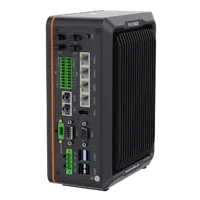
- LAN ports
- 5+ LAN ports
- USB 3 ports
- 2 USB 3 ports
- Light outputs
- 4 built-in channels
- Memory
- 16 GB
For inspection performed on the device, review smart cameras and vision sensors through the camera finder. The MV-SC3013XM-12M-ATN-H is a vision-sensor option to assess against the inspection requirements.
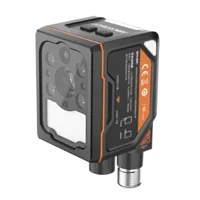
- Interface
- GigE
- Resolution
- Up to 3 MP
- Sensor format
- 1/1.45"
- Shutter
- Global
These parts are not presented as a verified pair or as confirmed implementations of a particular target-request protocol. Before ordering, confirm software compatibility, licensing, supported signal interfaces, diagnostic access and the documented selection handshake. A camera interface alone does not establish compatibility with an external application's recipe mapping.
Close with a commissioning checklist
Before returning the process to production, record the following evidence:
- Runtime identity: the intended project and configuration revision are active.
- Destination binding: the request addresses the correct work area.
- Signal assignment: product and format groups reference the intended source signals.
- Group interpretation: encoding, width, significance and inversion match at both ends.
- Selection coverage: every permitted pair has the required destination-specific mapping.
- Request timing: selection is valid at the documented sampling instant.
- Startup behavior: readiness prevents premature requests after restart or project activation.
- Verification: accepted requests select the intended operation set, while unsupported requests follow documented handling.
Keep the corrected mapping and trace with the commissioning record so later changes can be compared against a known baseline. If the evidence still disagrees with runtime behavior, use application support with the sampled values, destination, configuration revision and request timeline.
Questions
Why do the live inputs look correct after a rejected request?
They may be read at different times. The diagnostic can preserve the values sampled for a request, while the live display shows a later update. Capture selection transitions and the request event together at the receiving application before changing the recipe mapping.
Does a product and format selection of zero always mean a fault?
No. Zero can be a valid configured selection, an initialization value or an unsupported combination, depending on the application. Compare the complete pair with the active destination mapping. Adding an arbitrary recipe for zero values can hide a sequencing problem and select unintended behavior.
How can grouped-input bit order be checked?
In an approved commissioning state, observe the receiving group's decoded value while changing one source bit at a time. Compare each bit's weight with the documented encoding. Also check group width, starting offset and inversion; a correct-looking source integer does not prove correct receiving-side interpretation.
When should a controller or smart camera be replaced?
Investigate hardware only after confirming signal assignments, sampled values, deployed mappings and request timing. Replacement is justified by evidence of an interface or device fault, not by a selection rejection alone. For new equipment, verify the application's documented software, licensing and handshake requirements before ordering.