
Repeated cable replacements usually mean the installation needs attention, not just another cable. On a moving robot arm, the same route can expose a camera connection to bending, twisting, abrasion and connector loads during different parts of the program. This troubleshooting procedure helps you locate the mechanical cause, specify a suitable replacement and verify the revised installation. For faults that also occur while the robot remains stationary, use the broader camera acquisition failure troubleshooting guide alongside these checks.
1. Establish whether the failure follows motion
Start by recording the symptom and the robot pose when it occurs. A dropped image, camera restart and missing trigger are different failures, even when the operator sees the same inspection alarm.
Capture the camera connection state, acquisition errors, robot program position and recent maintenance history. Record whether the fault clears after movement, reconnection or replacement. Avoid repeatedly disturbing a damaged assembly just to reproduce an intermittent connection.
The following observations help prioritize inspection; they do not prove a particular cause.
| Observation | First mechanical suspect | Useful distinguishing check |
|---|---|---|
| Fault repeats near the same wrist orientation | Torsion or insufficient free cable length | Review how the cable twists through that motion |
| Fault appears near maximum reach | Cable tension or a pulled connector | Inspect the route at its greatest extension |
| Outer jacket wears at one location | Abrasion, pinching or a snag point | Look for a matching contact surface |
| Failure develops beside a clamp | Abrupt stiffness transition or excessive compression | Inspect the clamp exit and supported length |
| Several cameras fail simultaneously | Shared power or communications fault | Compare fault timing across channels |
If simultaneous failures do not depend on arm position, investigate shared infrastructure before replacing individual cables. The machine-vision network congestion guide addresses transfer faults that can resemble a bad data cable.
For a camera that stays connected but stops responding to triggers, check the signal path separately. The trigger common-reference troubleshooting guide explains an electrical cause that rerouting alone will not resolve.
2. Inspect safely across the complete motion envelope
Physical inspection and motion observation require different conditions. Use the machine's documented isolation procedure before touching cables, clamps, connectors or dress-pack components. An emergency stop alone is not an isolation procedure.
Only authorized personnel should perform motion checks using the machine's approved operating procedures and safeguards. Observe from outside the safeguarded space where possible. Never hold a cable, reach toward a moving arm or defeat an interlock to see where the route catches.
- Inspect the isolated installation. Photograph existing routing and locate jacket damage, flattened sections, displaced clamps and connector strain.
- Identify critical program positions. Include maximum extension, wrist rotation, approach, retract, home and recovery positions.
- Observe approved controlled motion. Use remote observation or recorded video where appropriate to track cable movement without approaching it.
- Return to an isolated state before adjustment. Change routing or hardware only after applying the required isolation procedure again.
Check all approved operating sequences, not only the normal production loop. A route can survive inspection movements but become taut during homing or recovery.
Label photographs with the program position and cable location. A simple record such as “wrist return, outer bend beside clamp” is more useful than an unlocated photograph of a broken jacket.
3. Check bend radius and clamp transitions first
Repeated bending concentrated in a short section is a common fatigue mechanism. Look where the cable leaves a clamp, enters a carrier, passes a bracket or approaches the camera connector.
Use the cable supplier's documented dynamic minimum bend radius for the intended installation. A static installation limit does not establish suitability for repeated motion. Where both bending and torsion occur, a bending specification alone is insufficient.
Bend-radius conventions can differ. Confirm whether the documentation measures radius to the cable centerline, inside surface or carrier geometry before comparing measurements.
For a centerline-radius specification expressed as a multiple of cable diameter:
This is an illustrative calculation, not a universal cable requirement. If a proposed cable documents that multiplier and diameter, its minimum centerline radius would be 96 mm. A semicircular bend would then need a centerline diameter of 192 mm.
Measure the tightest bend throughout the route's movement, not only at rest. A generous loop can collapse into a sharp bend when the wrist changes orientation.
Inspect the transition out of each clamp. The cable should not hinge repeatedly against a sharp clamp edge. Use suitable supports, edge protection and the cable or dress-pack supplier's mounting instructions to distribute movement appropriately.
Do not assume that a larger loose loop solves the problem. Additional slack may clear a bend-radius problem while creating a snag, pinch or whipping hazard elsewhere.
4. Separate torsion from bending and abrasion
A cable suitable for a linear carrier is not automatically suitable for twisting around a robot wrist. These are different mechanical loading conditions, and the replacement must match the actual motion.
| Loading condition | What to inspect | Documentation to request |
|---|---|---|
| Repeated bending | Tightest radius, flexing length and reversals | Dynamic bend limits and relevant flex-life test conditions |
| Torsion | Angular travel and length over which twist occurs | Permitted torsion per unit length and associated test conditions |
| Abrasion | Contact with brackets, adjacent cables and carriers | Jacket suitability and routing or protection requirements |
| Tension | Maximum reach and connector loading | Permitted pulling loads and strain-relief instructions |
| Combined motion | Bending and twisting occurring together | Explicit suitability for the combined loading |
Where a torsion limit is stated per unit length, the length available to distribute twist matters:
These values describe average twist density only. Actual twist can concentrate near clamps, friction points or transitions. Do not treat the calculation as proof that a route meets its torsion limit.
Look for corkscrewing, repeated jacket rubbing and cable sections that rotate while adjacent sections remain trapped. Check whether other hoses or cables force the camera cable to carry their movement.
Inspect contact marks in pairs: damage on the jacket and a corresponding mark on a bracket often reveal the interference point. Protective sleeving may reduce abrasion, but it cannot correct excessive bending or trapped torsion.
5. Check strain relief, connectors and false mechanical clues
The connector should not serve as the cable's main restraint. At maximum extension, the route must not transfer pulling or twisting loads into the camera receptacle.
Inspect connector retention, backshell support, seals where fitted and the cable exit direction. Confirm compatibility and installation requirements from the documented interface information. Matching connector shapes do not establish matching pinouts or electrical suitability.
Check clamps for two opposite problems:
- Insufficient restraint: the cable slides until the connector carries the load.
- Excessive compression: the clamp deforms the jacket or creates a rigid hinge beside its exit.
Cable ties and clamps need appropriate positioning and tightening. Do not use an arbitrary tightening value without the relevant hardware instructions.
A continuity test on an isolated cable can identify an open conductor, but passing continuity does not establish reliable high-speed data transmission. Similarly, a stationary camera test cannot establish dynamic cable life.
After isolation and inspection, an approved temporary replacement route can help distinguish the original cable path from the camera or communications system. Keep it clear of all movement and safeguards, and use it only under the machine's authorized test procedure.
Avoid returning a taped or solder-spliced moving cable to normal service without an explicitly approved repair method. A splice changes local stiffness and may alter shielding, geometry and sealing. Replacing the damaged moving assembly is generally the appropriate path when no approved repair procedure exists.
6. Specify the replacement by interface and motion
Use the cables category and accessories finder to identify possible assemblies, then verify suitability against the complete application. Neither connector appearance nor a flexible jacket establishes robot compatibility.
Prepare a replacement specification covering:
- Both connector interfaces, keying, pinout and retention method.
- Camera data interface and required transmission performance.
- Power, trigger and other I/O requirements where applicable.
- Installed route length, service allowance and supported sections.
- Repeated-bend requirements, torsional travel and combined motion.
- Speed, acceleration, temperature, fluids and other environmental exposure.
- Required strain relief, carrier or dress-pack compatibility.
- Documented life-test conditions and their relationship to the application.
The LS-ACP-M8A8M-OPEN-HF-7M is listed for drag-chain use. That description does not, by itself, establish suitability for robot-wrist torsion or compatibility with your camera.

- Type
- Power and I/O cables
- Length
- 6-8 m
The LS-ACC-MFM-MFM-ST-10M is a camera data cable. Its supplied catalog listing does not establish a robot-motion rating, so treat it as an interface candidate rather than a confirmed moving-arm replacement.
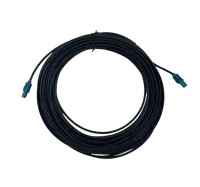
- Type
- Camera data cables
- Length
- 10 m
These examples identify different cable functions; they are not interchangeable recommendations. If the documented motion requirements cannot be confirmed, request a suitable assembly rather than selecting solely by length and connector.
7. Validate the installation against a measurable duty cycle
Confirm the revised route first, then check electrical performance during authorized machine operation. Do not use an extended endurance run to compensate for an obviously unsuitable installation.
Before testing, define acceptance criteria: no interference, no connector loading, compliance with documented motion limits and no unexplained camera or I/O failures. Record the initial condition so later changes can be compared objectively.
Use staged testing under the machine's approved procedures. Begin with controlled observation of critical positions, then evaluate the intended production sequence with its safeguards active. Include approved startup, shutdown and recovery sequences.
For endurance planning, translate the machine rate into exposure:
This example assumes one tracked bend event per machine cycle. If the route reverses several times during each cycle, count those events separately and document the convention.
A pilot of 1,000 machine cycles at 8 cycles per minute lasts 125 minutes. That can reveal immediate routing problems, but it does not demonstrate survival over the example's 40-day interval.
Log completed cycles, communication errors, camera disconnects and physical inspection findings. Compare photographs taken at consistent positions after isolating the machine. If wear reappears, inspect the contact or load concentration rather than simply extending the test.
8. Close the fault with a repeatable installation record
The usual answer—fit a more flexible cable—is wrong when the route remains pinched, taut or torsionally trapped. A better assembly cannot compensate for mechanical loading outside its documented limits.
Use this closeout checklist before returning the installation to routine service:
- [ ] Failure location recorded: retain evidence of where and how the previous assembly failed.
- [ ] Interface confirmed: verify connector, pinout, data, power and I/O compatibility.
- [ ] Motion limits checked: compare the installed route with documented bending and torsion requirements.
- [ ] Complete envelope observed: include normal operation, home and approved recovery movements.
- [ ] Strain relief verified: keep connector loads controlled without crushing or sharply hinging the cable.
- [ ] Performance baseline saved: retain error logs, cycle counts and route photographs.
- [ ] Maintenance instructions updated: record clamp positions, routing and inspection locations for future replacements.
For installation hardware and cable selection, start with the accessories configuration step. If motion suitability is unclear, send the interface requirements and routing evidence through technical support before ordering a replacement.
Questions
Why does a robot camera cable keep failing beside a clamp?
A repeated failure near a clamp usually warrants inspection of the clamp exit, compression and local movement. The cable may be bending over a short length or rubbing against an edge. Inspect under the machine's isolation procedure, then review the complete motion path using approved observation methods.
Can a drag-chain cable be used on a rotating robot wrist?
Not automatically. Drag-chain service and robot-wrist torsion impose different loads. Confirm documented torsion limits, bending requirements and suitability for combined movement. Also verify the camera interface and pinout; a motion-suitable cable can still be electrically incompatible with the equipment.
Is a taped or soldered repair suitable for a moving camera cable?
An electrical connection restored by a splice does not establish mechanical endurance or data integrity. Unless the equipment or cable supplier provides an approved repair method for that moving assembly, replace the damaged section with a suitable assembly and correct the routing cause before returning it to routine service.
How many test cycles should a replacement cable complete?
There is no universal cycle count that proves service life. Define the intended duty, count relevant bend or twist events and compare them with applicable documented test conditions. A short pilot identifies immediate installation problems; longer monitoring and periodic physical inspection are needed to evaluate developing wear.