
Adding another conveyor to a vision-guided picking cell is not just a matter of increasing a conveyor count in the application. Each independently moving line needs a supported position reference, a correctly configured tracking resource, and an unambiguous connection between images and conveyor coordinates. This explainer helps you separate those requirements before ordering interfaces or changing the project. The objective is to establish what the motion controller supports, what requires a licensed option, and what the vision application merely selects.
Separate the configuration into four layers
Conveyor tracking configuration spans hardware, motion-control configuration, application mapping, and timing. A setting at one layer does not establish readiness at the others.
| Layer | What you must establish | Evidence to collect |
|---|---|---|
| Encoder acquisition | Each independent conveyor position can be measured through a supported interface | Interface specifications, wiring drawings, channel allocation |
| Motion controller | The required tracking resources and licensed functions are available | Installed-option report, controller manuals, project configuration |
| Vision application | Each image and target belongs to the correct conveyor coordinate system | Conveyor definitions, calibration assignments, target records |
| Timing and capacity | Targets remain usable through processing, communication, and robot motion | Timestamp logs, conveyor speed measurements, acceptance results |
Selecting another conveyor in the vision application may expose resources already configured elsewhere. It does not, by itself, create an encoder input or grant a motion-controller license.
Likewise, an available electrical input does not prove that the controller can use it for conveyor tracking. Confirm the supported acquisition method and tracking function together.
The related guide to conveyor encoder sharing addresses distributing position information across a cell. Here, the first decision is different: how many independently tracked conveyor resources the cell actually needs.
Define the motion topology before counting boards
Start with a diagram of the physical conveyors, encoders, robot controllers, cameras, and vision processing equipment. Label every connection by function rather than connector appearance.
For each conveyor, record:
- Whether its speed or direction can change independently.
- Which encoder measures its motion and where that encoder is mechanically coupled.
- Which controller acquires the encoder position.
- Which robots must access that conveyor's tracking reference.
- Which camera views and inspection recipes generate targets for it.
Two independently moving conveyors need separately maintained position references. However, that does not automatically mean purchasing two interface boards. An interface may support several channels, or a controller may require a different supported arrangement. Count documented tracking channels and their limitations, not circuit boards alone.
Conversely, two inputs on a connector do not necessarily represent two independent encoder channels. They might be signal phases belonging to the same encoder.
Mechanically linked conveyors require additional care. A shared drive does not prove that one position reference accurately describes both transport surfaces. Gear ratios, belt slip, transfer gaps, and different coordinate origins can still require separate treatment.
Check encoder compatibility and scale
Verify the encoder interface against the motion controller's official documentation before connecting it. Relevant details include signal type, electrical levels, supported frequency, counting convention, direction handling, isolation, shielding, and cable routing.
Review camera and I/O cables and the accessories finder only after defining the required connections. A matching connector shell is not evidence of a matching pinout or electrical interface.
For planning, conveyor displacement follows the position-count change and the calibrated distance per count:
Here, s is distance per count, and C represents position counts using the controller's documented direction and rollover handling. This is a planning relationship, not a substitute for the controller's supported tracking implementation.
Suppose a measured reference travel of 1,000 mm produces 4,000 counts on the first conveyor:
- Distance per count = 1,000 mm / 4,000 counts = 0.25 mm/count.
- A subsequent change of 600 counts represents 600 × 0.25 mm = 150 mm.
- At 500 mm/s, the resulting count rate is 500 / 0.25 = 2,000 counts/s.
If the second conveyor produces 5,000 counts over the same reference travel, its scale is 0.20 mm/count. Applying the first conveyor's scale would introduce a systematic position error.
Check the interface's documented frequency convention separately. Encoder pulse frequency, edge rate, and decoded count rate may use different definitions, so a count-rate calculation alone does not establish electrical compatibility.
Confirm licensed functions and controller resources
Before modifying the vision project, establish the supported motion-controller configuration. The required option may depend on controller generation, software version, robot configuration, and the number of accessible tracking resources.
Use the manufacturer's documented licensing and configuration process. Obtain software, firmware, manuals, and licensed options from the manufacturer or an authorized distributor.
A practical review follows this order:
- Identify the installed controller and software release. Use the actual system information, not an older project description.
- Read the installed-option report. Confirm that the necessary conveyor-tracking function is present and valid for this system.
- Check supported capacity. Distinguish configured conveyors, simultaneously active tracking resources, and resources accessible to each robot.
- Verify interface compatibility. Confirm the supported encoder hardware and any required communication configuration.
- Follow the documented project-change procedure. Back up the working configuration and identify any required restart or commissioning steps.
Ask the manufacturer or integrator to resolve ambiguous option names before purchasing hardware. An application integration package and a motion-tracking option may serve different purposes; their relationship is system-specific.
An accepted configuration file is not sufficient proof. The controller must expose the expected tracking resources without option, interface, or resource-allocation faults.
For changes involving software versions, use the machine-vision software upgrade validation checklist to structure backups, compatibility checks, and rollback planning.
Map images and targets to the correct conveyor
After the controller prerequisites are established, configure the vision application's conveyor definitions. Each definition must refer to the intended tracking resource and calibration, rather than simply carrying a convenient display name.
A useful target record identifies the conveyor, coordinate frame, acquisition reference, and detection result. The implementation depends on the supported software interface, but the meaning must remain unambiguous throughout the pipeline.
Check these assignments explicitly:
- Camera or image stream to inspection recipe.
- Inspection recipe to conveyor identity.
- Conveyor identity to tracking resource.
- Image coordinates to the appropriate conveyor coordinate frame.
- Target queue to the robot permitted to consume it.
If one camera sees both belts, classify the conveyor before publishing a target. Separate regions of interest may help, but test the boundary and reject ambiguous detections. If cameras are dedicated to individual belts, retain the conveyor identity in downstream records rather than relying only on which camera produced the image.
The MV-SVC2506-16G60-128G is a vision-processing candidate with camera GigE ports and separate configuration and communication GigE ports. Those connections do not establish motion-controller tracking capacity or encoder compatibility.
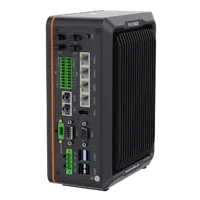
- LAN ports
- 5+ LAN ports
- USB 3 ports
- 2 USB 3 ports
- Light outputs
- 4 built-in channels
- Memory
- 16 GB
Browse vision controllers for acquisition and processing requirements, while reviewing robot tracking resources separately. A vision controller's camera connectivity is not a replacement for a supported motion-control interface.
For target age and coordinate-history problems after mapping, see conveyor vision scene timing.
Choose acquisition hardware without confusing camera and encoder ports
Camera selection follows the inspection task: required detail, motion during exposure, contrast, color information, and acquisition timing. It does not determine how many independently tracked conveyors the motion controller supports.
Use the area scan cameras category and camera finder to compare acquisition interfaces and shutter types. Keep the camera network diagram separate from the encoder-interface diagram, even when both communicate with equipment in the same cabinet.
The LS-MV-133GM-GE is a monochrome GigE camera with a global shutter. Consider a monochrome acquisition path when the inspection depends on shape or brightness contrast rather than color.

- Sensor format
- 1/2.7"
- Interface
- GigE
- Resolution
- Up to 3 MP
- Shutter
- Global
The MV-CU020-90GC is a color GigE camera with a global shutter. Consider a color acquisition path when color contributes directly to distinguishing valid targets.
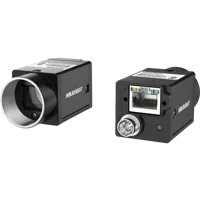
- Sensor format
- 1/1.7"
- Interface
- GigE
- Resolution
- Up to 3 MP
- Shutter
- Global
These are acquisition candidates, not a requirement to use different cameras on the two conveyors. Identical cameras may simplify maintenance when the imaging tasks match. Different optics, lighting, or cameras may be justified when the parts and viewing conditions differ.
Before selecting either candidate, confirm the required image dimensions, trigger behavior, host software support, and connection details. The GigE Vision software compatibility checks explain why an Ethernet connection alone does not establish application compatibility.
Budget timing separately for each line
Tracking capacity and picking capacity are different questions. A controller may support both conveyor references while the robot lacks enough time to service the incoming targets.
Estimate the time from the inspection location to the last usable pickup location for each conveyor. For constant speed:
Suppose the usable downstream distance is 300 mm and the conveyor travels at 500 mm/s:
- Available travel time = 300 mm / 500 mm/s = 0.60 s.
- If acquisition, processing, queuing, and communication consume 0.15 s, the remaining time is 0.45 s.
That remaining time is not automatically an achievable robot cycle. Pickup geometry, acceleration limits, tool state, competing targets, and collision-free motion still constrain execution. Changing conveyor speed also invalidates a constant-speed estimate unless the supported tracking system accounts for that change.
When both conveyors share a robot, test competing arrivals rather than validating each line only in isolation. Define supported prioritization and target-expiration behavior before production.
The guide to conveyor target availability helps distinguish missing usable targets from motion or scheduling delays.
Know when application-only changes are sufficient
An application-level change may be sufficient when the required interfaces, licensed tracking functions, and controller resources already exist. Even then, verify calibration and resource assignments rather than assuming unused resources are ready.
| Existing condition | Appropriate next action |
|---|---|
| Both tracking references are commissioned and available to the robot | Configure and validate the application's conveyor mappings |
| Interface hardware is present, but tracking resources are not configured | Complete the documented controller configuration first |
| Required tracking functionality is not licensed | Obtain the appropriate vendor license before commissioning |
| Two belts move independently but share an unsuitable position reference | Redesign position acquisition using a supported arrangement |
| A single robot cannot service simultaneous demand | Revisit target scheduling, throughput requirements, or cell architecture |
For indexed conveyors that stop before imaging and picking, continuous tracking may not be necessary. That is a different operating concept, requiring verified stop position, sequencing, and application logic. It should not be treated as an informal workaround for missing tracking capability.
Standard vision and tracking functions are not substitutes for a validated machine-safety system. Commission changes through the responsible integrator, preserving required safeguarding throughout testing.
Verify the configuration before ordering and commissioning
Use the following checklist to turn the design into an acceptance plan:
- Independent references: Each independently moving conveyor has an appropriate, separately identifiable position reference.
- Documented capacity: The controller supports the required configured and simultaneous tracking resources.
- Valid licensing: Required functions appear in the installed system and follow the vendor's licensing terms.
- Compatible interfaces: Electrical characteristics, counting conventions, connectors, and channel assignments are documented.
- Correct identity: Images, calibration results, and target records retain the intended conveyor assignment.
- Measured scale: Reference travel confirms the position scale and direction for each conveyor.
- Independent-motion test: Moving either conveyor does not advance the other conveyor's reported tracking position.
- Combined-load test: Both lines operate together without unexplained target reassignment, queue growth, or expired picks.
- Recovery test: Supported restart and fault-recovery procedures preserve or deliberately re-establish the required mappings.
Commission with the documented safe procedure and controlled conditions. Record commanded actions, reported positions, target identities, and faults so failures can be assigned to the correct layer.
Once those prerequisites are verified, the conveyor vision startup synchronization guide covers subsequent startup sequencing rather than hardware capacity.
Prepare the topology drawing, installed-option report, interface specifications, and timing budget before ordering. Then use the camera configurator for acquisition hardware, or contact the applications team to review the vision-side requirements.
Questions
Do two conveyors always need two encoder interface boards?
Not necessarily. Board count depends on the supported interface architecture and the number of independent channels each interface provides. Establish the required position references first, then check controller compatibility and resource limits. Two electrical signal inputs may belong to one encoder rather than represent separate conveyor channels.
Can a vision application enable an unlicensed tracking function?
Adding a conveyor definition does not grant a missing motion-controller license. Check the installed options and the manufacturer's requirements for the specific controller release. If an additional entitlement is required, obtain and activate it through the documented vendor process before commissioning the tracking function.
Can camera network ports accept conveyor encoder signals?
Do not assume that they can. An ordinary camera network connection is not an encoder input. Some systems support approved networked position interfaces, but their compatibility and configuration must be documented. Select encoder acquisition hardware according to the receiving motion controller, not the camera connector type.
What changes when one robot picks from both conveyors?
The robot must have supported access to both tracking references, and every target must retain its conveyor identity. You also need a validated policy for competing arrivals and expired targets. Confirm shared-load performance because successful tests on each conveyor separately do not establish combined throughput.