
A camera can be discoverable, readable, and still reject a feature write. This is especially confusing when a prerequisite setting appeared to succeed immediately before the failure. For engineers configuring acquisition or imaging modes, the useful question is what changed between those operations. The checks below separate operating-state restrictions, control ownership, and reconnection effects, then show how to verify an ordered configuration sequence without defeating device protections.
Separate write protection from other feature errors
A write-protect response means the attempted write was rejected; it does not, by itself, identify the reason. A feature may be read-only in the current operating state, unavailable under another selection, or inaccessible through the current control connection.
Start by recording the exact operation that failed. Distinguish opening the camera, locating the feature, selecting an enumeration entry, and writing its value. These failures require different tests.
| Observation | First hypothesis to test | Useful evidence |
|---|---|---|
| Feature cannot be found | Wrong feature map, spelling, or unsupported feature | Feature list from the connected device |
| Feature exists but reports read-only | Operating-state restriction or insufficient control access | Access status and prerequisite readback |
| One selection is unavailable | Dependency or unsupported operating combination | Available entries under the current selectors |
| Write succeeds before reconnecting but fails afterward | Prerequisite state changed across the session boundary | State snapshots before and after reconnection |
| Write reports success but later readback differs | Another client, startup routine, or device transition changed it | Timestamped writes and subsequent reads |
Follow the guide to GenICam feature-access errors when the feature is absent rather than protected. If the connection itself fails, use camera-open failure diagnostics before investigating configuration order.
Check prerequisites inside the connection that fails
The first check is whether the required state exists in the same control session as the rejected write. A successful command in an earlier process does not prove that its effect survived closing and reopening the device.
Some devices retain a setting across connections. Others reset selected operating states when control is released, reacquired, or transferred. Treat this as device-specific behavior: establish it from documentation and readback rather than assuming either persistence or reset.
Use this diagnostic order:
- Read the dependent feature's documented prerequisites.
- Open the camera using the documented control-access mode.
- Read the current operating state before changing anything.
- Apply the prerequisite through its documented feature or command.
- Wait for documented transition completion, where applicable.
- Read the prerequisite state again immediately before the dependent write.
Also check acquisition state, active selectors, and enabled operating functions when the documentation identifies them as dependencies. A host application that has stopped displaying images may still have acquisition running on the device.
Do not substitute a fixed delay for a documented completion condition. If the API exposes a command-completion check or state indicator, use it with a timeout. A delay can hide a race without proving that the camera reached the required state.
Apply dependent settings in one ordered control session
When a prerequisite is session-scoped, the remedy is to keep the documented operations within one connection. This is ordinary configuration sequencing, not a change to the camera's access protections.
A suitable sequence is:
- Open and establish control. Confirm device identity and the access level actually granted by the API.
- Reach the permitted configuration state. Stop acquisition or select the documented setup state if required.
- Verify the prerequisite. Read its current value after the transition completes.
- Apply dependent settings in order. Follow the documented dependency chain, checking results after each write.
- Read back the result. Verify the selected value and any settings that the change can affect.
- Return to the required operating state. Restart acquisition only after configuration verification succeeds.
- Release control normally. Close the connection using the supported API lifecycle.
A command-line utility may accept several settings in one invocation, but that alone does not prove it uses one connection or preserves argument order. Check its documentation. If those guarantees are unclear, use the supported SDK or another documented configuration interface that exposes explicit sequencing.
Treat mode changes carefully. They may alter the available features, valid ranges, or acquisition configuration. Refresh affected feature information as the API requires rather than reusing assumptions from the previous mode.
For applications that fail only during initialization, startup feature-write verification explains how to check ordering and rejected writes instead of assuming that loading a recipe applied every setting.
Confirm ownership without forcing access
If the prerequisite remains correct but writes still fail, inspect control ownership. Discovery and read access do not necessarily mean that your application holds permission to change configuration.
An engineering utility, operator interface, background acquisition service, or supervisory application may already control the camera. On installations using vision controllers, include controller-side services in this check rather than examining only the workstation running the test.
Close competing applications through their normal shutdown procedures. Then reopen the camera in the documented access mode and inspect the returned status. Where the API provides control-loss events or ownership information, record them alongside configuration failures.
Do not clear access flags, write directly to protected registers, or attempt to take ownership through undocumented mechanisms. If a disconnected client leaves ownership temporarily active, follow the documented timeout or recovery procedure. A restart should be a controlled maintenance action, not the first troubleshooting step.
A connection that repeatedly opens and closes also makes ownership harder to reason about. Keep configuration under one component, and have other application components request changes through that owner.
Run a controlled reconnection experiment
Use a small experiment to distinguish session-state loss from an invalid setting. Keep the camera, software version, requested value, and acquisition conditions unchanged between tests.
Test A: one session. Open the device, establish the prerequisite, read it back, apply the dependent setting, and verify the result before closing.
Test B: separate sessions. Establish and verify the prerequisite, close the connection, reopen it, and read the prerequisite before attempting the dependent write. Continue only when the device documentation permits the test.
Suppose an illustrative test produces these results:
- Test A: 10 attempts, with 10 verified dependent writes.
- Test B: 10 attempts, with the prerequisite changed after every reconnection.
- In Test B, no dependent write is attempted while its prerequisite is false.
The useful arithmetic describes observed retention, not a hardware reliability specification:
These observations support using a single ordered session for that tested configuration. They do not prove that every feature resets, that all devices behave alike, or that production reliability is established.
If both tests retain the prerequisite but the write still fails, investigate another dependency or access restriction. If failures vary between repetitions, record acquisition state, ownership events, and other configuration writers before adding retries.
Verify readback at meaningful boundaries
A successful API return is useful evidence, but it is not the whole acceptance test. Read the selected value after writing it, then verify it again at the boundary where the application previously failed.
For a reconnection problem, useful checkpoints are immediately after configuration, immediately after reopening, and after acquisition restarts. Read any prerequisite state alongside the dependent setting so the log shows their relationship.
Use symbolic enumeration values where supported, rather than assuming that an integer has the same meaning across devices. For numeric settings, allow only the documented rounding or increment behavior; do not silently accept an arbitrary difference.
Record at least:
- Device identity and software version.
- Session open and close times.
- Requested access mode and reported access status.
- Prerequisite values before and after transitions.
- Requested values, write results, and readback values.
- Acquisition start, stop, and control-loss events.
If the application caches feature metadata or values, use its documented refresh behavior. A stale display is not proof of the camera's current state.
Do not confuse persistence with successful configuration. Saving a user configuration, retaining a value through reconnection, and restoring a value after power cycling are separate behaviors that require separate documentation and tests.
Choose hardware by the inspection task, not this error
A protected feature is not, by itself, a reason to replace the camera. First establish whether the requested operating combination is supported and whether the application follows its documented prerequisites.
When selecting replacement hardware, compare area scan cameras and 3D sensors according to the inspection task. Use the camera finder to narrow hardware requirements, then verify configuration behavior in the applicable documentation.
The MV-CU020-90GC is a GigE color area scan camera with a global shutter.
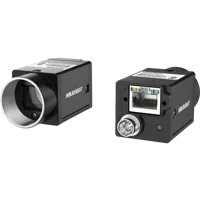
- Sensor format
- 1/1.7"
- Interface
- GigE
- Resolution
- Up to 3 MP
- Shutter
- Global
The MV-DPS200P-02 is a projected structured-light 3D camera.
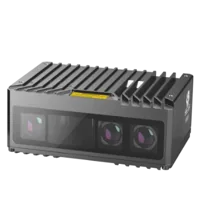
- Type
- Stereo / structured light
These are different acquisition categories, not evidence that either exposes a particular setup-state feature. Their catalog descriptions do not establish session persistence, control-access behavior, or compatibility with a specific software stack.
Before ordering, request confirmation of the required interface, feature dependencies, supported control software, and configuration-retention behavior. Do not transfer feature names or operating assumptions from the existing device to a proposed replacement.
Prevent the same failure at startup and changeover
Put prerequisite handling in the application's configuration layer rather than distributing writes across scripts and operator actions. A repeatable startup should establish the required state explicitly instead of depending on the previous session.
Where a documented state can be safely reapplied, make configuration repeatable: inspect the current state, perform only required transitions, and verify the final result. Do not assume that commands which start operations are safe to execute repeatedly.
Use this release checklist:
- One configuration owner: competing components cannot interleave dependent writes.
- Explicit prerequisites: startup reads and establishes the required operating state.
- Ordered dependencies: each transition completes before the next dependent operation.
- Bounded waiting: transition checks have a timeout and a clear failure message.
- Verified results: requested settings are checked against readback.
- Reconnection recovery: reconnecting runs the approved configuration sequence before acquisition resumes.
- Separate persistence tests: reconnect and power-cycle behavior are validated independently when required.
- Controlled failure handling: a configuration error blocks use of unverified inspection results.
Include these cases in the software upgrade validation checklist. Changes to an SDK, device description, firmware, or startup service can affect assumptions that previously went unnoticed.
Escalate with a minimal, reproducible sequence
If documented prerequisites, ownership, and ordered writes are all verified, prepare a short reproduction for the manufacturer's support channel. Include the exact error, supported software versions, state readbacks, and whether failure occurs within one session or only after reconnection.
Avoid attaching unrelated production recipes or credentials. Obtain software, firmware, and documentation only through the manufacturer or its authorized distributors, and use documented recovery procedures.
The right next step is evidence, not repeated blind writes. For help selecting compatible acquisition hardware or reviewing configuration requirements before ordering, send the test sequence and inspection requirements through applications support.
Questions
Does a write-protect error mean the camera is faulty?
Not necessarily. A write-protect response can result from the current operating state, an unmet dependency, or the access granted to the connection. Check the device's documented prerequisites and current access status before treating the error as evidence of a hardware fault.
Why can separate configuration commands behave differently?
A prerequisite may belong to the earlier control session rather than persist after it closes. The next command may reopen the camera in a different state. Read the prerequisite immediately after reopening, then compare that result with an ordered test performed entirely within one connection.
Can multiple settings in one command guarantee correct ordering?
Only rely on that behavior when the utility documents both connection reuse and execution order. Multiple arguments do not automatically establish those guarantees. When sequencing is uncertain, use a supported interface that lets the application explicitly open, configure, verify, and close the device.
When should a protected feature lead to camera replacement?
Replace hardware only after confirming that it cannot support the required inspection or operating combination. A state-dependent rejection may be resolved through documented sequencing. For a replacement, confirm feature dependencies, control-software compatibility, and configuration retention rather than assuming another camera behaves identically.