
A camera example can compile successfully yet fail when the linker assembles the executable. Adding another library sometimes removes the immediate error while leaving conflicting dependencies underneath. This troubleshooting sequence is for a standalone C++ acquisition application on an otherwise compatible platform. You will separate package discovery, target dependencies and runtime loading, then verify the result without treating an absolute shared-library filename as a portable solution.
Identify which stage actually failed
Start with the earliest meaningful error, not the final build-system message. Configuration, compilation, linking and execution use different information, so each needs a different test.
| Symptom | First suspect | Useful evidence |
|---|---|---|
| Package configuration cannot be found | Missing development package or wrong installation prefix | Package discovery log |
| Header cannot be found | Missing include usage requirements | Verbose compiler command |
| Undefined reference during executable linking | Missing dependency, wrong library or incompatible binary | Verbose linker command and symbol inspection |
| Warning about conflicting shared-library versions | Mixed installations or inconsistent dependency builds | Resolved library paths and dependency records |
| Executable builds but cannot load a shared library | Runtime loader configuration | Executable dependency records and loader trace |
| Application starts but cannot open the camera | Acquisition configuration or access problem | SDK acquisition logs |
A working scripting-language example does not prove that a standalone C++ project has the required development files or link dependencies. Its binding may bundle libraries, load them from another location or initialize a different environment.
If architecture or binary format is uncertain, first follow the platform and binary compatibility checks. The procedure below assumes those checks pass.
Check package discovery before editing library lists
Use the SDK manufacturer's documented installation and standalone-example instructions. Obtain development packages, examples and updates only from the manufacturer or its authorized distributors.
A source directory, build directory and installation prefix are different locations. A successful SDK build does not necessarily install its package configuration where another project can discover it.
Check these items first:
- Confirm that the installed SDK includes its development headers and CMake integration.
- Identify the documented package name and exported target names. Their spelling and capitalization matter.
- Determine whether integration uses an exported package configuration or a supplied find module.
- Check which installation CMake actually selects, rather than assuming it selects the newest one.
For an SDK that exports a package configuration, point discovery at its installation prefix. The following prefix is illustrative, not a required directory:
cmake -S . -B build-clean -DCMAKE_PREFIX_PATH=/opt/acquisition-sdk
cmake --build build-clean --verbose --parallel 1
Using a fresh build directory removes cached discovery results from this comparison. It does not remove or repair conflicting installations.
To investigate discovery, configure another fresh directory with diagnostic output:
cmake --debug-find -S . -B build-find -DCMAKE_PREFIX_PATH=/opt/acquisition-sdk
Look for the selected package configuration and its dependency searches. With configuration packages, a cached variable ending in _DIR commonly identifies the selected configuration directory.
If the SDK documents a find module instead, use that integration method. Do not force configuration-package mode when the installed SDK does not provide it.
Prefer exported targets over bare library names
An imported target can describe more than a library filename. Its usage requirements can carry include directories, compile definitions, configuration-specific binary locations and dependencies required by consumers.
A bare name passed to target_link_libraries usually leaves much more to the linker's search paths. Calling find_package beforehand does not automatically make unrelated bare names equivalent to exported targets.
This schematic layout illustrates the intended structure. AcquisitionSDK and AcquisitionSDK::Capture are example identifiers, not names promised by any catalog product. Replace them with the exact package and target names documented by your installed SDK.
cmake_minimum_required(VERSION 3.20)
project(camera_capture LANGUAGES CXX)

find_package(AcquisitionSDK CONFIG REQUIRED)

add_executable(camera_capture main.cpp)

target_link_libraries(camera_capture
    PRIVATE
        AcquisitionSDK::Capture
)
The example assumes that your application source is main.cpp. Select the C++ language standard and any additional modules according to the application and SDK documentation.
PRIVATE is appropriate here because the dependency belongs to this executable. For a reusable library, dependency visibility depends on its public interface and linking requirements. Do not change every dependency to PUBLIC merely to silence errors.
If the SDK exports only documented variables, use those variables as instructed. An older integration can be valid without imported targets, but its include paths and dependency lists need closer inspection.
Trace the missing symbol to its owner
Investigate likely causes in this order: an undeclared dependency, a raw library name that bypasses package metadata, mixed installations, then symbol or ABI differences.
First, capture the complete undefined-reference message. A readable C++ symbol can identify the subsystem involved, such as logging, transport or image conversion. It does not establish which installed binary should provide it.
For an ELF-based system with the relevant inspection tools installed, inspect the application's object file:
nm -C build-clean/CMakeFiles/camera_capture.dir/main.cpp.o
An undefined symbol in an object file is normal when another object or library supplies its definition later. Use nm -D -C --defined-only on candidate shared libraries to check their exported definitions. For static archives, use the appropriate non-dynamic symbol inspection instead.
Consider an illustrative dependency graph:
camera_capture -> capture module -> logging library
camera_capture -> device module
There are two distinct cases:
- If the application calls the logging API directly, the application needs the documented logging dependency.
- If logging is entirely internal to the capture module, investigate the module's exported dependency metadata and supported installation requirements.
Static libraries need particular care because their dependencies are resolved when the final executable is linked. Shared-library builds can also expose dependency problems, especially when public headers generate references in the consuming application.
A library's presence on the command line is not sufficient proof. Verify its full path, exported symbol and position where archive ordering matters. Avoid repeatedly appending libraries without understanding which reference each one satisfies.
If the supported exported target omits a required dependency, check for a documented correction or compatible SDK update. A local packaging problem should not become an unexplained library list copied into every application.
Resolve conflicting versions as an installation problem
A warning about two shared-library versions deserves investigation even when the executable is produced successfully. Different filenames alone do not prove incompatibility, but a successful link does not prove compatibility either.
Common sources of mixed installations include:
- A distribution package alongside a locally installed SDK.
- An old dependency left under a different installation prefix.
- Headers from one installation and libraries from another.
- A container build stage that differs from the runtime image.
- Cached CMake paths from an earlier installation.
For ELF binaries, inspect the executable's recorded dependencies:
readelf -d build-clean/camera_capture
Inspect the relevant SDK shared libraries in the same way. Compare their NEEDED entries, embedded search paths and SONAME information with the files selected during linking. Check package ownership or installation records before changing anything.
An absolute library pathname can make a local build select a particular file. It does not establish a portable dependency relationship. If that file carries a SONAME, the executable may record that name rather than preserving the pathname as a runtime instruction.
Choose one supported SDK and dependency set. Remove obsolete packages only through their documented package-management or uninstall procedure. If rebuilding the SDK is supported, rebuild its affected components against that consistent dependency set.
When an update is the appropriate repair, use the software upgrade validation checklist to preserve a repeatable acceptance test.
Test runtime resolution separately from linking
The linker and runtime loader answer different questions. The linker assembles an executable using the inputs available during the build. The loader locates shared libraries when the executable starts and when additional libraries are loaded.
On an ELF-based system, these commands provide complementary evidence:
readelf -d build-clean/camera_capture
ldd build-clean/camera_capture
LD_DEBUG=libs ./build-clean/camera_capture
Use ldd only on a trusted executable you built or obtained through a trusted source. The loader-trace command executes the application, so use a camera-only test without machine-control actions.
readelf shows recorded requirements without launching the program. ldd reports resolution in the current environment. The loader trace shows searches during execution and may expose libraries loaded later.
A terminal launch, desktop launcher, service and container can inherit different environments. A temporary library-search environment variable can help test a hypothesis, but a global setting can hide an inconsistent installation.
Prefer the SDK's documented deployment method: supported installation locations, loader configuration or application-specific runtime paths. On ELF systems, do not assume an executable's RUNPATH automatically supplies search paths for every indirect dependency.
For a deployment validation example, compare two environments and two launch methods:
Build-host and deployment-host environments, each launched from a terminal and the intended service, produce four cases. Record the resolved SDK paths and acquisition result for each applicable case.
Verify acquisition without confusing hardware and build faults
After linking and loader checks pass, run the smallest supported acquisition example against the same installed SDK. Then test the standalone application with equivalent camera settings. Change one variable at a time.
For networked acquisition, review the camera software compatibility checks. If discovery succeeds but opening fails, use the camera-open failure diagnostic sequence. Those are later-stage investigations, not fixes for unresolved symbols.
Hardware selection remains separate from CMake integration. Compare area scan cameras and 3D sensors in the camera finder according to the inspection task. Catalog listings alone do not establish compatibility with a particular SDK package or exported target.
The LS-MV-133GM-GE is an area scan hardware reference.

- Sensor format
- 1/2.7"
- Interface
- GigE
- Resolution
- Up to 3 MP
- Shutter
- Global
The MV-DT01WMU is a depth-sensing hardware reference.
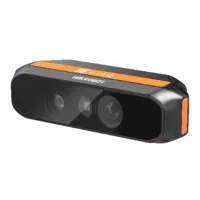
- Type
- Depth / ToF camera
If deployment uses a vision controller, verify its supported operating environment and SDK requirements before transferring the application. A different host does not repair an incomplete dependency graph.
Close the fault with a reproducible checklist
Before accepting the fix, confirm that:
- A fresh build directory discovers the intended installation.
- Documented exported targets or integration variables supply the dependencies.
- The verbose link command contains the expected library paths.
- Every unresolved symbol has an identified provider and compatible definition.
- Conflicting-version warnings are explained and resolved.
- The intended runtime launcher selects the expected shared libraries.
- A minimal acquisition test works outside the development terminal.
- The installation procedure reproduces the result without undocumented global search paths.
Keep the package versions, configuration command, compiler identity and deployment procedure together. These records make the next SDK update a controlled comparison rather than another search-path experiment.
For hardware planning, start with the camera configuration step. If you need help checking the acquisition requirements, send the relevant SDK version, selected package paths and complete error log through technical support, excluding credentials and other sensitive information.
Questions
Why does a scripting-language camera example work while C++ linking fails?
A language binding may include private binaries or use a different installation from your C++ project. Its success demonstrates that one acquisition path works, not that standalone development headers, exported CMake targets and link dependencies are installed correctly. Compare the actual package locations used by both applications.
Does adding find_package automatically fix missing SDK dependencies?
Not necessarily. Package discovery makes the SDK's documented integration information available, but your executable must still use the correct exported targets or variables. Bare library names can bypass dependency metadata. Inspect the selected package configuration and verbose link command before adding more libraries.
Should I link directly to an absolute shared-library filename?
An absolute filename can help establish which binary resolves a particular symbol during diagnosis. It is usually unsuitable as a portable repair because installation layouts differ and runtime loading may use the library's SONAME. Prefer documented package targets and a supported, consistent dependency installation.
Should I replace the camera when its SDK example will not link?
Do not use hardware replacement as the first response to a linker error. Undefined references occur before camera communication begins. Identify the missing symbol, dependency provider and selected installation first. Reconsider hardware only when documented platform support or the inspection requirements establish a separate mismatch.