
A camera beside a conveyor can be close to the robot base yet too late to support reliable picking. Another installation can place the camera farther away and work well because its field of view, coordinate calibration and timing budget are correct. The useful question is not a single minimum distance: it is which physical constraints determine the camera location.
For a fixed-camera conveyor-tracking installation, separate the optical layout from the upstream detection distance and the robot's reachable picking region. You can then calculate an initial layout, check its uncertainty and validate it against measured production timing.
Separate the three placement distances
The distance from the lens center to the robot base origin does not, by itself, specify an acceptable installation. There is no universal minimum that applies across cameras, robots, conveyors and tracking software. Follow the equipment documentation wherever it specifies calibration, tracking or installation limits.
Three distances answer different questions:
| Distance | What it determines | What it does not establish |
|---|---|---|
| Camera to robot base | Physical layout and the coordinate relationship between the camera and robot | Image coverage, usable resolution or sufficient processing time |
| Lens working distance | Focus, field of view and mechanical clearance above the inspected plane | How long the robot has before the object arrives |
| Detection position to pick-zone entrance | Travel time available for image processing, communication and robot preparation | Calibration accuracy or safe robot clearance |
Lens working distance normally uses a mechanical reference defined by the lens documentation. Do not substitute camera housing height or distance to the robot base. For a tilted camera, the distance to the conveyor also varies across the image.
Measure upstream spacing along the conveyor's direction of travel. The shortest straight-line distance between the camera housing and robot pedestal is not the timing distance.
Set working distance from the inspection image
Start with the conveyor region that must be visible. Include the full range of lateral object positions, the largest permitted object and clearance for localization near image edges. Define the required object plane, especially when objects have different heights.
Suppose the usable conveyor width is 260 mm and you allow 20 mm on each side. The required transverse field of view is:
These are illustrative application requirements, not specifications for the products below. Sampling is also not measurement accuracy: blur, contrast, lens distortion and calibration can dominate the final result.
Use the camera resolution calculator to explore the sampling requirement before choosing a sensor.
Next, choose a lens and working distance that cover the required area with the selected sensor. The lens focal-length selection guide explains this relationship. Check both image dimensions; a suitable width does not guarantee enough coverage along the conveyor.
A higher mounting position may clear equipment but require a different focal length. A lower position may improve packaging but obstruct lighting or create collision risks. Changing height without changing the optics changes the image coverage and calibration.
Use the machine vision lenses category and lens finder after defining sensor size, field of view, mount and available working distance. Do not select a lens from its mount alone.
Control installation geometry and calibration uncertainty
A fixed overhead view is often a useful starting point for flat parts because the image plane can be approximately parallel to the conveyor. This simplifies the geometry but does not eliminate lens distortion, perspective error or mounting movement.
A rigid camera-to-robot transformation can represent a camera located away from the robot base. However, uncertainty in that transformation still affects the reported object position. Moving the camera closer does not automatically correct a poor calibration.
For a small angular uncertainty, a useful first-order estimate is:
This estimate describes a rotational error contribution, not a complete accuracy specification. The relevant lever arm depends on the coordinate transformation and the location being evaluated; it is not necessarily the camera-to-base distance.
Check calibration at several locations across the actual picking region. A low residual near the calibration target's center can hide larger errors at distant positions. Include the object heights and lateral positions expected in production.
The image-marker calibration guide explains image-to-distance mapping. The calibration target flatness guide covers another installation variable that can affect the result.
Mounting stiffness matters after calibration. Cable tension, conveyor vibration or adjustment of a support can change the camera pose. Mount to a stable reference and provide cable strain relief without transmitting cable forces into the camera.
Calculate upstream spacing from measured latency
Place the detection region far enough upstream that an object does not reach the first usable pick position before the system can act. Use the object's position at the exposure reference time, not the position where a trigger sensor happens to be mounted.
For constant conveyor speed, an initial sizing relationship is:
The time budget can include image completion, transfer, processing, communication, controller scheduling and robot approach. Some operations overlap. Add them serially for an initial conservative estimate, then replace that estimate with measured end-to-end timing.
Use a validated upper bound under the intended operating conditions, not only the average processing time. Include the relevant object orientations, image content, system load and robot starting poses.
The conveyor scene-timing troubleshooting guide helps distinguish an old image from a correctly timed image processed later. The distinction matters: predictable latency can be compensated, while an incorrect exposure position corrupts the target coordinates.
For variable speed, use conveyor displacement over the interval rather than multiplying the current speed by an assumed fixed delay. Confirm that the tracking implementation handles acceleration and the required motion range.
Work through a timing and reach example
Consider an illustrative conveyor running at 500 mm/s. The proposed exposure reference position is 200 mm upstream of the first usable interception position.
Assume the preliminary serial budget is:
| Operation after the exposure reference | Budget |
|---|---|
| Remaining exposure and image completion | 1 ms |
| Image transfer and acquisition handling | 15 ms |
| Localization and inspection processing | 35 ms |
| Target communication | 10 ms |
| Controller scheduling | 20 ms |
| Robot approach to the selected interception | 180 ms |
| Total | 261 ms |
The robot approach value must come from the intended path, payload, starting condition and interception geometry. It is not a general robot capability.
Rounding the proposed spacing to 200 mm provides more room than this preliminary requirement. Check the equivalent time:
The controller must schedule the interception for the object's arrival; finishing preparation early does not mean picking outside the reachable region.
Now suppose the usable picking region extends another 200 mm downstream. The object remains in that region for 200 mm / 500 mm/s = 0.400 s. That interval is a separate picking opportunity, not permission to ignore preparation time or target expiration rules.
Validate the entire region for gripper orientation, object height, joint configuration and obstacles. A point inside nominal reach may still be unusable for a particular approach. The target-availability troubleshooting guide addresses targets that are detected but cannot be picked in time.
Treat timing uncertainty separately from processing delay
A longer, known processing delay mainly consumes upstream spacing. Uncertainty in the exposure-to-encoder relationship creates a position error even when the camera is sufficiently far upstream.
At constant speed:
Moving the camera farther upstream does not remove that error. Check the relationship among exposure timing, encoder position and target coordinates using the controller's documented synchronization method.
A software timestamp taken when an image callback executes may describe delivery time rather than exposure time. Likewise, a trigger command does not necessarily identify the exact exposure instant.
For installations sharing conveyor position among devices, use the encoder-sharing guide to identify where position references can diverge. Keep encoder scaling, direction and coordinate conventions consistent throughout the installation.
Separate the acceptance criteria for optical localization, static coordinate calibration and moving-target tracking. Otherwise, an apparent calibration error may actually be a timing error that increases with conveyor speed.
Choose placement and hardware together
Compare candidate locations against the same optical and timing requirements rather than preferring whichever is nearest the pedestal.
| Placement choice | Useful when | Main check |
|---|---|---|
| Overhead, upstream of the picking region | Parts are visible from above and need preparation time | Field coverage, upstream travel and support clearance |
| Closer to the picking region | Object pose changes during travel or space is restricted | Processing and approach still finish before the pick opportunity closes |
| Farther upstream | Processing or robot preparation needs more time | Objects remain identifiable and predictably related to conveyor motion |
| Oblique view | Overhead access is unavailable or side features matter | Perspective, occlusion, height sensitivity and calibration coverage |
Review area scan cameras through the camera finder once sampling, exposure and interface requirements are known. The conveyor camera-selection guide covers the motion-blur side of this decision.
For a monochrome, global-shutter camera candidate, review the LS-MV-133GM-GE. Confirm its detailed acquisition and synchronization capabilities against the intended controller before selecting it.

- Sensor format
- 1/2.7"
- Interface
- GigE
- Resolution
- Up to 3 MP
- Shutter
- Global
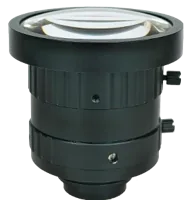
The LS-SMV2528P-6M is a C-mount lens candidate. Check sensor coverage, focus range and the required field of view before treating it as a suitable optical match.
- Type
- Machine vision fixed
- Sensor format
- 2/3"
- Mount
- C-mount
- Resolution
- 6-10 MP
For a bench layout, the LS-SYJ-BZ is a portable optical test stand to consider. Production suitability still depends on mounting geometry, load, vibration and the installation environment.

- Type
- Portable optical test stand
Compare camera stands in the accessories finder after defining the support envelope. These parts illustrate separate hardware choices; they are not a validated combination for the numerical example.
Verify the layout before ordering and commissioning
Record the proposed geometry on a dimensioned layout, then check it against the following items:
- Optical coverage: Confirm the full conveyor width, object extremes and localization margins remain visible at the specified heights.
- Working-distance reference: Measure from the lens datum specified in its documentation, not an arbitrary camera surface.
- Motion blur: Check exposure at the maximum intended speed using representative surface contrast and lighting.
- Mechanical stability: Verify the support, fasteners and cable routing preserve the calibrated pose during operation.
- Collision clearance: Check the complete robot, tool, payload and cable swept volumes, not only the tool-center path.
- Timing reserve: Measure exposure-to-target availability and approach timing under representative high-load conditions.
- Tracking accuracy: Compare stationary and moving-target errors at multiple speeds and locations.
- Pick-window limits: Confirm target entry, expiration and rejection behavior when the robot cannot complete a pick.
- Recovery behavior: Verify synchronization after conveyor stops, restarts, camera reconnection and controller initialization.
Perform commissioning under the machine's approved procedures. Begin with static checks, then controlled motion at reduced speed before validating the intended operating envelope. Recalibrate or revalidate after any camera, lens, support or conveyor-reference adjustment.
Know when more upstream distance is the wrong answer
More distance helps only when the extra travel time is usable. Parts that slide, roll, collide or change orientation after imaging can lose their relationship to the tracked conveyor position. Earlier detection may then increase prediction error rather than improve reliability.
Similarly, a longer baseline cannot correct a moving camera mount, an incorrect encoder scale or an unsuitable calibration plane. Solve the underlying geometry or synchronization problem before increasing spacing.
If the available layout cannot meet the timing budget, evaluate a smaller processing region, a shorter validated robot approach, a different pick window or another detection location. Recheck image coverage and safety constraints after every change.
Start the camera configuration process with your conveyor width, speed, object heights and required localization tolerance. For a placement review, send those requirements and a dimensioned layout through application support, including the proposed exposure position and usable picking region.
Questions
Is there a minimum distance between the camera and robot base?
There is no universal camera-to-base minimum. A valid position must satisfy the equipment's documented installation limits, optical requirements, calibration method, tracking timing and collision clearances. Measure upstream detection spacing separately, because distance to the pedestal does not establish how much preparation time is available.
How should camera height above the conveyor be chosen?
First define the required field of view and object sampling, then select a sensor and lens that provide that image within the available clearance. Measure working distance from the lens manufacturer's specified datum. Include object-height variation, lighting access and focus adjustment in the mechanical layout.
Does moving the camera farther upstream always improve picking?
It provides additional preparation time only if the object remains predictably related to conveyor motion. Sliding, rolling or collisions can invalidate the earlier observation. Longer spacing also does not repair timestamp uncertainty, calibration error or an unstable mount, so verify those causes independently.
How can calibration error be separated from tracking error?
Calibrate and verify the intended object plane across the working region, rather than relying on a single central check. Then repeat representative measurements with the conveyor moving. An error that grows with speed suggests a timing or motion-reference issue rather than purely static image calibration.