
Saving checkerboard calibration results is only the beginning of a measurement workflow. You still need to validate the lens model, establish the physical plane being measured, and transform marker positions into that plane's coordinates. This distinction matters for fixture measurements, motion tracking, and any application where image distances must become physical lengths. The workflow below explains which calibration outputs to use, how to verify their accuracy, and why markers moving toward or away from the camera invalidate a simple pixel-to-length conversion.
Separate lens calibration from measurement geometry
Intrinsic calibration estimates the camera's internal imaging geometry. Its usual outputs include focal lengths expressed in pixels, the principal point, and lens-distortion coefficients. These describe how image coordinates relate to viewing rays; they do not supply the distance to an arbitrary marker.
Extrinsic calibration describes a camera's pose relative to a particular coordinate system. Calibration software commonly returns a different pose for every checkerboard image. Those poses describe the checkerboard locations during calibration, not necessarily the measurement surface used afterward.
For planar measurements, you need an additional mapping between the corrected image and a fixed physical plane. A planar projective transformation, or homography, provides that mapping.
| Result | What it provides | What it does not provide |
|---|---|---|
| Intrinsic matrix | Imaging geometry for a particular image configuration | Marker depth |
| Distortion coefficients | A model for correcting lens distortion | Physical scale throughout a three-dimensional scene |
| Checkerboard pose | Target position and orientation for one calibration image | The pose of a different measurement surface |
| Measurement-plane homography | Image-to-plane coordinates in known units | Correct coordinates for points outside that plane |
A single pixels-per-millimeter factor is a special case. It can work over a suitably aligned, distortion-corrected plane, but it should not be assumed valid across a tilted surface.
Validate the checkerboard calibration first
Before measuring anything, confirm what the calibration software actually estimated. Check the internal-corner counts, corner spacing, image dimensions, distortion model, and physical units. Confusing squares with internal corners can produce an incorrect target definition.
If adjacent checkerboard corners are 20 mm apart, enter that physical spacing consistently. An incorrect spacing scales recovered target translations and any physical coordinate system derived from that target. It may not make the reprojection residual look obviously wrong.
Use sharp calibration images that place the target across the image, including its edges and corners. Include different target tilts and positions rather than repeatedly capturing the same frontal view. A starting collection of 15–25 varied images can be useful, but image count alone is not an acceptance criterion.
Inspect these results before accepting the model:
- Residual vectors across the image, not only their overall average.
- Per-image errors, looking for blurred or incorrectly detected views.
- Corrected straight edges near the image boundary.
- Results from additional images excluded from parameter fitting.
A low reprojection error means the fitted model closely reproduces detected calibration corners. It does not prove that an independent physical length is accurate. Target deformation, incorrect scale, and poor coverage can remain hidden behind an attractive average.
Use the guidance on checking calibration target flatness before relying on a printed board. If the solver produces unstable parameters, review diagnosing singular calibration estimates rather than accepting the last available result.
Build a mapping for the actual measurement plane
Keep the camera and lens fixed after intrinsic calibration. Place a dimensionally checked target in the plane where the marker centers will be measured. A target on the table beneath raised markers establishes the wrong plane unless that height difference is accounted for.
Assign physical coordinates to target points, such as millimeter coordinates measured from a fixture origin. Detect their corresponding image coordinates and correct those coordinates for lens distortion.
Fit the homography using at least four point correspondences in a nondegenerate arrangement. Do not place all reference points on one line. In practice, using more correspondences spread around the measurement area provides redundancy and makes residual patterns easier to inspect.
For an ideal pinhole image after distortion correction, the mapping is:
Here, u and v are corrected image coordinates. X and Y are physical coordinates in the reference plane. The symbol ~ means equality up to a nonzero scale factor.
There are two valid processing routes:
- Undistort the complete image, detect markers in that corrected image, and use a homography fitted in those image coordinates.
- Detect markers in the original image, undistort their coordinates, and use a homography fitted in the same corrected coordinate convention.
Do not mix these routes accidentally. Some coordinate-correction functions return normalized camera coordinates, while others return pixel coordinates. The homography must use the same convention for calibration points and measurement points.
Work through a physical length example
Suppose a fixed setup images a planar measurement area 240 mm wide across 1920 pixels. For a front-facing plane with approximately uniform sampling, the nominal horizontal sampling is:
The field of view describes how much of the measurement plane reaches the sensor. Changing camera distance or lens selection changes that coverage and therefore the sampling.
A 0.5 mm feature spans approximately 0.5 × 8 = 4 pixels in this example. That is a sampling calculation, not a guarantee that the feature can be located accurately. Contrast, focus, blur, and the marker-detection method still matter. Use the camera resolution calculator to explore the sampling requirement before selecting hardware.
After correcting distortion and applying the homography, suppose two marker centers have these plane coordinates:
- Marker A:
X = 25 mm,Y = 40 mm. - Marker B:
X = 145 mm,Y = 90 mm.
Calculate their separation in physical coordinates:
This result is the distance between the marker centers within the calibrated plane. It is not automatically the length of an underlying component or anatomical segment.
At the nominal sampling above, a 0.2-pixel image residual corresponds locally to about 0.2 × 0.125 = 0.025 mm. That conversion describes only the residual's approximate scale. It must not be reported as the system's measurement accuracy, especially on a tilted plane where sampling varies with position.
Quantify the error when markers leave the plane
A homography assumes every measured point lies on its reference plane. If a marker moves toward the camera, its image displacement generally increases even when its true lateral position or separation has not changed.
For a front-facing plane under an ideal pinhole model, consider two markers at the same depth. Their apparent separation converted using the reference plane is:
Both depths are measured from the camera's optical center along its viewing direction. This simplified relationship assumes the marker pair remains parallel to the reference plane and ignores residual distortion.
Suppose the reference plane is 1000 mm from the optical center. A marker pair with a true lateral separation of 100 mm moves 50 mm closer to the camera:
The extra apparent length is a depth error, not something a better distortion correction can remove.
When endpoints occupy different depths, their planar coordinates are wrong individually, and their planar separation also omits the out-of-plane component. A single unassisted image generally cannot recover arbitrary endpoint depths.
For unconstrained motion, consider calibrated stereo, another suitable depth-measurement method, or independently measured depth. The guide to stereo camera selection for depth mapping explains the hardware considerations. Body-motion measurements also require task-specific validation; image calibration alone does not establish anatomical length or clinical validity.
Choose hardware around measurement repeatability
Start with field coverage, required sampling, marker contrast, and motion. Browse area scan cameras and use the camera finder to narrow the interface and shutter options. A global shutter avoids the row-dependent timing geometry of a rolling shutter, but it does not eliminate exposure blur.
The LS-MV-133GM-GE is a monochrome GigE camera with a global shutter and C-mount. It illustrates the fixed-camera component type; suitability still depends on your sampling and acquisition requirements.

- Sensor format
- 1/2.7"
- Interface
- GigE
- Resolution
- Up to 3 MP
- Shutter
- Global
Choose machine vision lenses for the sensor coverage, working distance, field of view, and required image quality. Use the lens finder and the guide to selecting lens focal length when establishing the physical layout.
The LS-SMV2528P-6M is a fixed machine vision lens with a C-mount. Its catalog specifications are a starting point, not a measurement-accuracy claim for the assembled system.
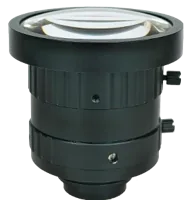
- Type
- Machine vision fixed
- Sensor format
- 2/3"
- Mount
- C-mount
- Resolution
- 6-10 MP
Keep focus, zoom where present, and mechanical mounting stable. Changing focus can alter the imaging geometry enough to require recalibration. Changing aperture can affect corner sharpness and marker localization, so validate the final aperture setting even if the fitted geometry appears unchanged.
For small depth variation in dimensional gauging, review when telecentric optics help. Reduced magnification change does not turn a planar measurement into unrestricted three-dimensional measurement.
Verify physical accuracy independently
Validate the complete chain using a dimensionally checked reference that was not used to fit the homography. Place it at several positions, orientations, and locations near the measurement-area boundary.
For each measurement, record the reference length, measured length, signed error, and repeatability. Keep geometric bias separate from frame-to-frame scatter. A system can produce nearly identical results repeatedly while consistently reporting the wrong length.
For example, if a 100.00 mm reference measures between 100.16 mm and 100.20 mm over repeated frames, its results are tightly grouped but biased. If your permitted absolute error is 0.10 mm, that setup fails despite its repeatability.
Use an uncertainty budget appropriate to the task. Include reference uncertainty, target geometry, marker localization, residual distortion, camera stability, and allowed depth movement. Do not treat fitted reprojection error as a substitute for that budget.
Repeat the checks at production exposure settings. For moving markers, motion blur can shift or broaden the detected center. The guide to camera sampling, speed, and blur provides the relevant acquisition calculations.
Finally, retain the original calibration images, target dimensions, software settings, residual summaries, and independent test results. Saving only the intrinsic matrix makes later troubleshooting unnecessarily difficult.
Check the operating limits before deployment
A planar mapping is appropriate when marker centers remain in a known, stable plane. It is the wrong shortcut when depth changes dominate the error budget, the mounting moves, or the required quantity is a true spatial distance.
Use this release checklist:
- Confirm that the measurement plane matches the marker-center plane, not merely the supporting surface.
- Verify that calibration and measurement use matching image dimensions and coordinate conventions.
- Lock the camera mount and optical adjustments before final validation.
- Test independent reference lengths across the usable field, not only at its center.
- Check stationary and moving markers separately when motion is part of the task.
- Set a recalibration trigger for focus changes, remounting, or failed reference checks.
- Report planar marker separation explicitly when out-of-plane motion is not measured.
If the geometry cannot be constrained, redesign the measurement method before refining the pixel conversion. More calibration images cannot supply missing depth information.
Once the plane, tolerance, and sampling requirements are defined, start the camera configuration or share your geometry and validation requirements through applications support.
Questions
Can the saved camera calibration parameters directly convert pixels to millimeters?
Not by themselves. Intrinsic parameters describe the relationship between image positions and viewing directions. Physical distances require additional geometry, such as known coordinates on a measurement plane or measured depth. A checkerboard pose can provide that geometry only when it represents the plane actually being measured.
Should marker coordinates be measured before or after distortion correction?
Correct the coordinate geometry before calculating physical distances. You can either detect markers in a corrected image or detect them in the original image and correct their coordinates afterward. Both approaches can work, provided the measurement-plane mapping uses exactly the same coordinate convention.
What reprojection error is acceptable for length measurement?
There is no universal acceptance value because the allowable physical error depends on sampling, field position, and the task tolerance. Inspect residual patterns and withheld images, then measure independent physical references. A small fitting residual does not account for every source of dimensional error.
Can one camera measure limb length while markers move freely?
A single camera can measure separation within a known plane, but unconstrained movement introduces unknown depth and perspective changes. Markers can also move relative to the underlying anatomy. Spatial limb measurements therefore need additional geometric information and validation appropriate to the intended use.
When should a calibrated measurement setup be recalibrated?
Recheck calibration after moving the camera, changing focus or zoom, or altering the acquisition geometry. Resizing and cropping may instead require a corresponding coordinate transformation. Keep a fixed reference check in the workflow so that recalibration decisions depend on measured performance as well as equipment changes.