
A synthetic calibration should be easier to diagnose than a physical one because the generating camera parameters are available. Yet a rendered checkerboard can produce enormous focal-length estimates, unstable distortion coefficients, or singular-matrix warnings. These symptoms often indicate a projection mismatch or insufficient calibration geometry rather than a faulty corner detector. Start by validating the renderer against known pixel coordinates, then introduce parameter estimation, image processing, and triangulation in separate stages.
1. Identify which part of the model is failing
Do not begin by changing optimizer tolerances. First determine whether the images contain enough information to recover the parameters you requested.
| Symptom | First likely cause to test | Controlled test | Corrective action |
|---|---|---|---|
| Extremely large focal length with an acceptable-looking fit | Orthographic rendering or weak perspective cues | Render equal objects at different depths | Use perspective projection for a pinhole calibration experiment |
| Singular solve with mostly frontal target images | Insufficient pose diversity | Add views tilted about different target axes | Replace redundant images with geometrically different views |
| Consistent offset or scale error in projected points | Viewport, crop, or coordinate mismatch | Compare direct projections with saved-image coordinates | Express intrinsics in the final image coordinate system |
| Distortion coefficients change dramatically between runs | Unnecessary model complexity or poor image coverage | Fit an ideal pinhole model with distortion fixed to zero | Add distortion parameters only after the simpler model passes |
| Calibration fits, but reconstructed depth is wrong | Extrinsic convention or baseline-scale error | Reconstruct a known point using known camera poses | Correct transforms and establish consistent length units |
An implausible focal length is a symptom, not proof of one particular cause. A narrow field of view can legitimately produce a large focal length measured in pixels.
Keep an explicit reference configuration containing the camera model, image dimensions, target coordinates, and camera poses. Save this separately from estimated parameters so that a successful-looking optimization cannot overwrite your ground truth.
2. Check perspective versus orthographic projection
A conventional pinhole calibration assumes perspective projection. Objects become smaller as their distance from the camera increases.
Here, R and t transform world coordinates into camera coordinates. The coordinates u and v describe image pixels; fx and fy are focal lengths in pixels. This simplified model assumes zero skew and no distortion.
An orthographic camera instead maps lateral camera coordinates to pixels without dividing by depth. That model cannot generally be represented by a finite-focal-length pinhole camera. An optimizer may increase both focal length and distance while preserving approximately the same apparent target size.
Perform a direct experiment before detecting any target corners:
- Place an object perpendicular to the viewing direction at a known camera-space depth.
- Render it, then double its depth without changing its size or orientation.
- Measure its width in the saved images.
Under ideal perspective projection, doubling depth halves image width. Under orthographic projection, image width remains unchanged. Avoid clipping, automatic framing, and camera repositioning during this test.
A scene camera position is also different from a display viewer's camera position. An image viewer may create its own axes and viewing configuration simply to display an existing raster. Those values do not describe the camera that generated the raster.
3. Express intrinsics in final-image pixels
A renderer's viewing angle is not itself a focal length in millimeters. Establish whether the angle is horizontal, vertical, or diagonal, and which viewport it describes.
For an ideal perspective camera with square pixels, zero skew, and a horizontal field of view:
Consider a synthetic image measuring 800 × 600 pixels with a horizontal field of view of 50 degrees:
For a centered image using zero-based pixel-center coordinates, an explicit convention is cx = 399.5 pixels and cy = 299.5 pixels. Confirm the renderer's convention rather than assuming every package uses these values.
The field-of-view relationship comes from projection geometry, but rendered projection parameters and physical lens specifications use different units.
Cropping, resizing, and letterboxing change the effective intrinsics. For a crop beginning at pixel coordinates x0 and y0, followed by a resize using factors sx and sy:
These equations assume a simple coordinate scaling convention. Resampling libraries can introduce a pixel-center offset, so verify the transformed projection against actual saved pixels. Add any letterbox offset afterward.
4. Make target and camera coordinates explicit
A target does not have to occupy a particular world plane. A board in the world X-Z plane is valid if its coordinates and pose transforms are consistent.
The easiest approach is to define a separate target frame. Describe each corner as a planar coordinate, then transform that coordinate into the world frame. For example, target coordinates (a, b, 0) can map to world coordinates (a, 0, b). Keep the target normal consistent with the chosen axis directions.
Record these conventions before estimating anything:
- Which camera axis points forward, and which sign indicates a visible point?
- Does image v increase downward or upward?
- Are image coordinates zero-based or one-based?
- Does the pose transform world coordinates into camera coordinates, or the reverse?
- Are rotations represented with a consistent handedness and axis order?
- Are target spacing, translation, and baseline expressed in the same units?
For the world-to-camera convention used above, the world-space camera center is:
It is not generally equal to t. Confusing the camera center with the translation vector can leave individual images looking plausible while breaking triangulation.
A physical calibration introduces additional target errors. The separate guide to calibration target flatness explains that boundary; synthetic testing should first use exactly planar, known coordinates.
5. Replace redundant views with informative views
Many images do not necessarily provide many independent constraints. Repeated frontal views, even at different distances, can leave focal length and pose strongly coupled.
For planar calibration, the relationship between target coordinates and image coordinates is a homography. Multiple suitable views constrain the shared intrinsic matrix, but nearly redundant homographies can make the estimation poorly conditioned.
As a practical starting point, generate 12–20 views with deliberate geometric variation. This is a collection strategy, not a guarantee that the solve is identifiable.
Include:
- Tilts about both target axes, rather than only rotation within the image plane.
- Different target positions across the image, including areas toward its edges.
- Different apparent target sizes while retaining enough visible corners.
- Moderate oblique views without pushing the target almost edge-on.
For an initial synthetic experiment, tilts around 15–40 degrees can provide useful perspective variation. Adjust them to keep the full target visible and its corners distinguishable. Inspect the resulting projections rather than relying on pose labels alone.
Start with an ideal pinhole model and fixed zero distortion. Then estimate only the parameters your application requires. Freeing every distortion coefficient can conceal a geometry problem by giving the optimizer more ways to fit inconsistent observations.
Keep target coordinates numerically sensible as well. Avoid mixing extremely small target dimensions with extremely large translations when a consistent unit change would make the values easier to handle.
6. Validate calibration without rendered corner detection
Separate the mathematical camera from the image-processing pipeline. Otherwise, an incorrect projection and an incorrect detector can become difficult to distinguish.
Use this staged test:
- Generate exact observations. Project known target corners directly using your reference intrinsics and poses.
- Calibrate from those coordinates. Do not render a checkerboard or run a detector yet.
- Check recovered parameters. Compare focal lengths, principal point, and poses against the reference values.
- Test unseen poses. Project held-out target points using the recovered calibration.
- Introduce rendering. Compare detected corners with their exact projected locations.
- Add controlled noise. Repeat calibration at known noise levels and inspect parameter variation.
Measure reprojection error in final-image pixels:
For an exact, noiseless synthetic test, an initial diagnostic target below 0.01 pixel can help expose implementation mistakes. This is not a universal acceptance threshold for rendered or physical images.
Do not accept low training error alone. A poorly constrained model may fit its calibration views while predicting held-out views incorrectly. Repeat the solve from different initial conditions and compare results.
When rendering enters the test, check image scaling, antialiasing, corner ordering, and board-border interpretation. A detector's corner numbering must match the supplied target-coordinate numbering in every view.
7. Test triangulation before adding rectification
Calibrated intrinsics convert an image location into a viewing ray, not a unique three-dimensional point. Depth requires another constraint, such as a second camera with a known relative pose.
First triangulate synthetic correspondences using the reference camera parameters. Then repeat using the recovered calibration. This separates reconstruction-code errors from calibration errors.
For undistorted image coordinates, the projection matrix is:
Both projection matrices must refer to the same world frame. If the relative translation comes only from two-view image geometry, its magnitude is generally unknown. Establish scale using a known baseline, target dimensions, or another metric reference.
For an ideal rectified pair with identical intrinsics, a horizontal baseline, and matching principal points:
Using the earlier synthetic focal length, a baseline of 0.10 m and disparity of 43 pixels give:
A first-order estimate shows how disparity error affects depth:
That is approximately 9 mm for this example. Smaller disparity makes depth more sensitive to pixel error.
Check positive depth in both camera frames, reprojection agreement, and the angle between viewing rays. Nearly parallel rays produce weak depth estimates. Rectification can simplify matching, but it does not repair incorrect calibration. The stereo camera selection guide covers the corresponding hardware geometry trade-offs.
8. Translate the validated model into a physical setup
A synthetic camera does not need a catalog lens. Physical selection becomes relevant only when you define sensor dimensions, field of view, working distance, and required image detail.
Use area scan cameras and the camera finder to compare acquisition requirements. The LS-MV-133GM-GE is a monochrome GigE camera with a global shutter.

- Sensor format
- 1/2.7"
- Interface
- GigE
- Resolution
- Up to 3 MP
- Shutter
- Global
For optics, compare machine vision lenses in the lens finder. The LS-SMV2528P-6M is a C-mount lens with a 25 mm focal length.
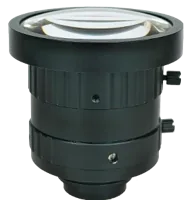
- Type
- Machine vision fixed
- Sensor format
- 2/3"
- Mount
- C-mount
- Resolution
- 6-10 MP
These are physical evaluation candidates, not confirmation that either reproduces the synthetic example. Verify sensor dimensions, lens coverage, focus range, and required optical performance before selecting a combination.
For an independent sizing example, assume an 8 mm sensor width, a 160 mm horizontal field, and a 500 mm object distance measured from the appropriate lens principal plane. A thin-lens estimate gives:
Real lens geometry and catalog working-distance definitions require confirmation. Use the lens focal-length selection guide to interpret this estimate rather than treating it as a complete compatibility check.
9. Close the fault with a repeatable acceptance checklist
Before ordering hardware or trusting reconstructed depth, confirm that:
- Perspective behavior is demonstrated by a controlled depth-change test.
- Reference intrinsics describe the saved raster, including cropping and resizing.
- Target points, detected corners, and pose transforms use documented conventions.
- Calibration views include meaningful tilt and image coverage.
- Exact-coordinate calibration passes before rendered corner detection is introduced.
- Held-out views agree with predictions, not just the training views.
- Known points reconstruct correctly with consistent baseline units.
- Rectification is checked against an already validated camera pair.
Do not force a pinhole calibration onto intentionally orthographic images. Use the matching projection model, or change the rendering setup when the goal is to simulate a perspective camera.
Once these checks pass, start a physical layout in the camera configurator. If model recovery remains unstable, bring the projection settings, target coordinates, image dimensions, pose list, and measured residuals to applications support.
Questions
Why does synthetic camera calibration return a huge focal length?
A large estimate can result from orthographic images, limited perspective variation, or insufficiently diverse target poses. It can also be legitimate for a narrow field of view. Compare the recovered value with the renderer's expected pixel focal length, then check predictions on views excluded from calibration.
Can one synthetic checkerboard image determine the camera intrinsics?
Generally, one planar view does not determine unrestricted camera intrinsics and pose uniquely. Additional assumptions can reduce the unknowns, but ordinary planar calibration should use several geometrically distinct views. Changing tilt about different target axes is more informative than collecting repeated frontal images.
Is a focal length in pixels the same as lens focal length?
Synthetic intrinsics normally express focal length in pixels. A physical lens specification expresses focal length in millimeters. Converting between them requires the active sensor dimensions and image sampling, including any crop or resize. A viewing angle alone does not establish a physical lens specification.
Why can reprojection error be low while triangulated depth is wrong?
Accurate image fitting does not prove that relative camera translation, coordinate conventions, or reconstruction scale are correct. Validate triangulation using known camera poses and known points first. Then substitute estimated calibration and examine both reprojection residuals and three-dimensional position errors.