
A depth camera that works alone can fail when another capture application starts, even though both devices appear in Linux. The second application may select the first camera again, compete for an interface, or request more transport capacity than the shared USB path can provide. Start by proving which device each application opens. Then add streams and cameras gradually, separating software ownership from bandwidth, controller topology and power problems.
1. Separate a startup failure from a running acquisition fault
Record the exact stage that fails: enumeration, opening the device, configuring streams, starting capture, or receiving the first frame. These stages test different things. Seeing a camera in a device list does not prove that its interfaces are available or that its requested streams can start.
A generic input/output error during startup does not identify one cause. It can result from a failed control request, an unavailable interface, a disconnected device or another transport problem. Preserve the complete error and corresponding kernel messages before changing settings.
Use this first decision:
- The second application cannot start: check device selection and ownership before increasing buffers or changing processing threads.
- Both cameras start, but one stops delivering frames: follow the multi-camera acquisition freeze checks.
- Images arrive, but the depth stream cannot be interpreted: investigate missing depth streams and pixel-format handling.
Keep a timestamped startup log for each camera. Include its identity, selected streams, requested frame rate, successful start and first-frame arrival.
2. Select each camera by a stable identity
Do not assume that starting the same example in another terminal selects another device. Many sample applications open the first compatible camera unless their arguments or source explicitly choose otherwise.
Use the installed SDK's documented enumeration and selection methods. Prefer a device-reported unique serial number when available. If no unique identifier exists, establish a documented physical-port mapping and verify it after reconnecting devices. Enumeration order is not a reliable identity.
Build a small inventory before running concurrent capture:
| Inventory item | Why it matters |
|---|---|
| Device-reported unique identifier | Distinguishes cameras independently of discovery order |
| Physical port or topology path | Connects software identity to the installed wiring |
| Associated device nodes | Reveals interfaces belonging to the same camera |
| Negotiated USB speed | Exposes an unexpected lower-speed connection |
| Requested stream profiles | Makes the bandwidth test reproducible |
Log the identity actually opened, not just the identifier requested by the application. If both logs report the same camera, correct selection before investigating transport capacity.
When available, use the manufacturer's documented multicamera example as a baseline. A single process managing explicitly selected devices can simplify diagnosis, but it does not remove hardware limits.
3. Eliminate competing owners without broad permission changes
Close viewers, recording utilities, background services and previous capture processes that may still own a camera. A hidden preview window or an application that failed to exit can leave an interface occupied.
These read-only commands provide useful starting information:
lsusb
lsusb -t
v4l2-ctl --list-devices
fuser -v /dev/video*
The video-device listing command requires the corresponding utility package. It also applies only where the camera exposes video interfaces through that subsystem. Some SDKs access USB interfaces directly or use additional device nodes.
Check the relevant USB device nodes with the system's process-inspection tools when direct USB access is involved. An empty video-node ownership report does not prove that nobody has opened the camera. Process visibility can also be restricted by permissions.
Stop an identified competing application through its normal shutdown method. Do not terminate unrelated services just because they appear in a broad process listing.
If separate processes are required, confirm that the SDK supports that arrangement. Give each process exclusive ownership of its selected camera and clean up device handles after failed starts.
4. Run a staged single-camera-to-multicamera test
Keep processing, display and recording disabled initially. Request the same supported low-load profile on each camera so that the comparison changes only one variable at a time.
- Connect only the first camera and capture its simplest required stream.
- Disconnect it and repeat with the second camera, using the same host port and cable where compatible.
- Connect both cameras, but capture only from the first explicitly selected device.
- Stop that capture and open only the second explicitly selected device.
- Start both cameras with the same minimal stream configuration.
- Add the other required streams individually, recording which change first causes failure.
- Re-enable processing, display and recording separately after acquisition is stable.
Use an initial test interval of 60 seconds per configuration to catch immediate failures. This is a diagnostic interval, not production qualification.
If one camera fails alone on a known-working connection, investigate that device or its software configuration first. If either camera works alone but concurrent capture fails, ownership and shared resources become stronger suspects.
If reduced streams work concurrently, retain that configuration as a known-good baseline. Do not simultaneously replace cables, update software and change frame rates; that destroys the comparison.
5. Estimate the stream payload before adding cameras
Calculate the uncompressed payload for each enabled stream. Use the transmitted pixel format, not the format produced later by application conversion.
For packed formats, use the documented transmitted bits per pixel divided by eight. Compression makes payload variable, so measured traffic and worst-case image content become important.
Consider a hypothetical configuration running every stream at 30 frames/s:
| Stream | Image size | Transmitted storage | Estimated payload |
|---|---|---|---|
| Depth | 848 × 480 pixels | 2 bytes/pixel | 24.4 MB/s |
| Color | 1280 × 720 pixels | 3 bytes/pixel | 82.9 MB/s |
| First infrared stream | 848 × 480 pixels | 1 byte/pixel | 12.2 MB/s |
| Second infrared stream | 848 × 480 pixels | 1 byte/pixel | 12.2 MB/s |
Here, MB/s means decimal megabytes per second. Calculate from the unrounded values:
The allowance is a planning estimate, not a USB scheduling rule or guaranteed operating threshold. Protocol overhead, endpoint reservations, buffering and other traffic affect whether capture starts successfully.
Do not compare this estimate directly with a connector's advertised signaling rate and declare the design safe. The negotiated link, shared upstream path and host implementation all matter.
Disable unused color or infrared streams before reducing a depth stream that the inspection actually needs. Verify that the device supports each requested stream combination.
6. Check host-controller topology, not just socket count
Two physical USB sockets can share the same hub, upstream link or host controller. Moving a cable to an adjacent socket may therefore change nothing.
Use lsusb -t to inspect the hierarchy and negotiated speeds. Look for both cameras beneath a shared external hub or another common upstream segment. Check the expected speed against the device and cable documentation.
For controller identification, these read-only commands can help:
lspci -nnk
readlink -f /sys/bus/usb/devices/usb*
Where PCI controllers are present, the sysfs paths help associate USB root buses with their controller paths. Different root-bus numbers alone do not prove separate controllers: one controller can expose multiple root buses for different USB speed families.
Repeat the minimal concurrent test with cameras on genuinely different controllers when the host provides them. Improvement supports a shared-resource diagnosis, although other upstream resources can still be common.
An expansion controller also needs a suitable upstream connection and supported Linux driver. Adding sockets is not the same as adding independent transport capacity.
7. Separate power, cabling and software compatibility
Watch the kernel log while connecting and starting each camera:
journalctl -k -b --since "5 minutes ago"
Availability depends on the system's logging configuration and your account permissions. Look for disconnects, resets, repeated enumeration or link-speed changes that coincide with startup.
A powered hub may address insufficient peripheral power, but it does not create more upstream bandwidth. Conversely, a separate controller does not automatically provide adequate power for every connected device. Check the documented power budget and approved supply arrangement.
Use documented, compatible camera cables, and review connector, shielding, retention and installation requirements in the accessories finder. A cable that passes enumeration may still fail under sustained traffic.
Camera data, power and I/O cables
366 models · from $39.00For software, record the Linux kernel, SDK, driver components and camera firmware versions. Check the manufacturer's supported combination and obtain packages only from the manufacturer or its distributors.
Change versions deliberately rather than mixing components from unrelated installations. The software upgrade validation checklist provides a useful framework for preserving a working baseline and testing changes.
8. Verify the fix under the intended workload
Once startup succeeds, prove that the application receives the intended streams from the intended cameras. A preview window alone can hide duplicated selection, missing streams or stale frames.
Use this acceptance checklist:
- Confirm that each capture pipeline reports a different expected device identity.
- Record the actual accepted stream profiles, rather than only the requested settings.
- Check timestamps or frame counters using their documented meanings.
- Confirm the received frame rate and account for dropped or incomplete frames.
- Repeat clean application restarts and device reconnects using the supported shutdown sequence.
- Test the installed cable routes and production power arrangement.
- Reintroduce processing, display and storage while watching acquisition performance.
- Run long enough to cover the application's operating cycle and maintenance expectations.
Starting cameras sequentially can reveal whether failure depends on simultaneous initialization. It is not proof that an oversubscribed system is suitable for production.
If capture later fails intermittently, continue with the intermittent acquisition failure checks. Keep startup success and sustained operation as separate acceptance results.
Multiple active depth cameras can also interfere optically. Missing or noisy depth values with otherwise healthy transport require a different investigation from a device-open failure. Use documented emitter control or synchronization features where supported.
9. Check compatibility before ordering replacement hardware
Replacing a camera should follow the failed test, not precede it. A different sensing method does not automatically resolve device ownership, Linux support or a shared USB bottleneck.
The 3D sensors category and camera finder help identify sensing approaches. The catalog identifies MV-DT01WMU as a ToF sensing camera.
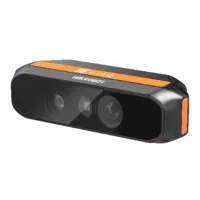
- Type
- Depth / ToF camera
The catalog identifies MV-DPS200P-02 as a projected structured-light camera.
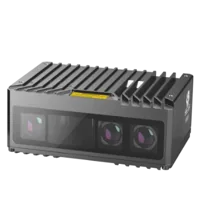
- Type
- Stereo / structured light
These cards identify depth-sensing options, not verified substitutes for the USB setup discussed here. The supplied catalog information does not establish their USB interface, Linux compatibility, simultaneous-camera support or required power arrangements.
Before selecting any replacement, obtain confirmation of the transport interface, supported operating system, SDK architecture, concurrent stream profiles, unique device selection and synchronization requirements. For cables, also confirm connector compatibility, permitted length and whether the installation is static or moving.
Use the accessory configuration step after those requirements are known. For help reviewing the system, send the topology, stream calculations, startup logs and staged-test results through technical support. That evidence makes the next hardware decision specific rather than speculative.
Questions
Why does a second capture application fail when both cameras are detected?
Many capture examples choose the first compatible device unless you supply a selection argument or change their documented configuration. A second terminal does not imply a different camera. Log the actual device identity opened by each process and confirm that each pipeline owns its intended device.
Does each USB depth camera need its own host controller?
Not necessarily. Separate sockets can share a hub, upstream connection or controller. Inspect the USB hierarchy and controller paths before assuming independence. Multiple cameras may work on shared resources when their supported stream combinations, transport demand and power requirements fit the available hardware.
Will a powered USB hub solve multicamera startup failures?
A powered hub can help when the documented peripheral power requirement exceeds what the original connection supplies. It cannot increase the capacity of its upstream data link. Test power and bandwidth separately, and check the hub's supported speed, supply arrangement and aggregate load.
How do you estimate bandwidth for several depth streams?
For each uncompressed stream, multiply image width, height, transmitted bytes per pixel and frame rate. Add every enabled stream, including infrared and color, then total cameras sharing the same path. Treat the result as payload only; protocol overhead and endpoint scheduling still require practical testing.
Should you reduce resolution before changing hardware?
Check identity and ownership first when the failure occurs immediately after another process starts. Reduced resolution or frame rate is a useful controlled test after that. If it helps, investigate stream combinations and shared transport resources rather than assuming that reduced settings are the final solution.