
A variable approach should change how the tool reaches a detected object, not silently move the detected pick position. That distinction becomes difficult when motion callbacks run repeatedly, recipes contain several approach points, or the conveyor continues moving. For engineers integrating vision-guided picking, the practical solution is to separate measurement, waypoint generation, and motion execution. You can then vary the approach while keeping target identity, coordinate frames, and collision checks explicit.
Separate the pick pose from the approach path
Keep the detected pick pose as an unchanged input to the motion planner. Store its coordinate frame, timestamp, target identifier, and measurement revision alongside it. Derive approach waypoints from that input rather than editing the measurement itself.
A useful data model has three layers:
- Measured target: the detected object pose, its identity, and the acquisition reference.
- Approach recipe: displacement vectors, waypoint roles, orientation rules, and permitted parameter ranges.
- Execution plan: the ordered motions generated for that target under the active recipe.
This separation answers an important diagnostic question: did the camera report a different object position, or did the planner choose a different path?
Do not begin by changing every position inside a general motion callback. That callback might serve approach, pick, departure, and recovery actions. Use the controller's documented extension points and inspect the action metadata before applying a modification.
If the image-to-motion interface is not yet established, resolve camera integration and image-input adaptation first. An approach offset cannot correct an undefined pose convention or an incorrect calibration transform.
Define what horizontal means before adding an offset
A horizontal displacement needs a named coordinate frame. The same numerical offset can produce different physical movements depending on which axes it follows.
| Offset frame | What the displacement follows | Main limitation |
|---|---|---|
| Robot base | Fixed installation axes | Does not rotate with the detected object |
| Conveyor | Belt direction and transverse direction | Requires a maintained conveyor transform |
| Object | Detected object orientation | Detection angle errors rotate the approach direction |
| Tool | Current tool orientation | A tilted tool can turn a local sideways move into vertical motion |
For a displacement expressed in frame F, rotate the displacement into the world frame before adding it to the world-frame pick position:
Here, R_WF rotates vectors from frame F into world frame W. Translation is absent because delta_F is a displacement, not an absolute point. Transforming an absolute point between frames also requires the frame translation.
Position and orientation are separate decisions. Adding a displacement does not specify a new tool orientation. Preserve the intended pick orientation unless the approach recipe explicitly defines another orientation and the complete transition has been validated.
Treat the horizontal component and the clearance height as separate parameters. That makes it possible to adjust the lateral route without accidentally changing the final pick depth.
Work through a rotated-object example
Consider a hypothetical stationary target with its pick position expressed in the robot base frame:
- Pick position:
(500, 200, 30) mm. - Object rotation:
90 degreesabout the base vertical axis. - Object-frame lateral displacement:
(40, -20, 0) mm. - Clearance displacement:
80 mmalong the base vertical axis.
Assume the object and base vertical axes are aligned. A positive right-handed quarter-turn maps the object-frame horizontal vector as follows:
One candidate path therefore visits the side waypoint, moves to the overhead waypoint, and descends to the unchanged pick position. These coordinates illustrate the arithmetic; they do not establish safe clearance for a real tool or fixture.
The distinction between offset frames matters immediately. Applying the same horizontal numbers in the base frame would produce a side waypoint at (540, 180, 110) mm. Neither interpretation is inherently correct. The required physical approach determines which frame to use.
If the intended last movement is a diagonal approach rather than a vertical descent, define that explicitly. Do not assume that moving the first approach point sideways automatically creates the desired final path.
For tilted objects, this simplified vertical-axis example is insufficient. Specify whether clearance follows the installation vertical, the object normal, or another validated direction, then transform each displacement accordingly.
Make repeated callbacks harmless
A callback running twice does not necessarily mean the controller intends to execute the same movement twice. It may evaluate geometry during planning, blending, tracking, or execution preparation. The documented callback contract determines what each invocation means.
The safest software pattern is repeatable waypoint generation: identical target data, recipe parameters, and planning context produce identical geometry without changing stored measurements.
read the original target and explicit planning context
identify the operation, target, action role, and waypoint role
if this is not the intended pick-approach action:
    preserve the documented behavior
otherwise:
    derive the waypoint from the original target and recipe
    return the derived geometry without changing the original target
Avoid cumulative modification such as adding the offset to the last returned position. With a requested displacement of 25 mm, repeated addition would produce 50 mm after another invocation. Deriving both results from the original target keeps the displacement at 25 mm.
Filtering only for a broad pick action may still be insufficient. An action can contain several motion stages, and the same stage can be evaluated repeatedly. Where the documented interface provides them, use explicit waypoint roles and stable operation and target identifiers.
Do not identify a waypoint by whether it is the first or second callback invocation. That assumption can fail after retries, recipe changes, or controller updates.
Keep motion scheduling separate from geometry calculation. A geometry callback should not issue extra movements unless its documented contract explicitly permits that behavior. Duplicate-execution protection belongs in the execution state machine, using identifiers scoped to the operation, target, segment, and recipe revision.
Add approach positions as an ordered recipe
When an application needs several intermediate positions, represent them as an ordered path rather than a collection of special cases inside a shared callback.
A recipe might contain these semantic roles:
| Waypoint role | Intended purpose | Variable approach treatment |
|---|---|---|
| Entry | Reach an approved approach corridor | Use the recipe's entry geometry |
| Side approach | Establish lateral clearance | Apply the selected horizontal displacement |
| Overhead approach | Align above the pick | Usually retain the nominal horizontal pick coordinates |
| Pick | Contact or acquire the object | Preserve the measured pick pose and approved tool relationship |
| Departure | Leave with the acquired object | Apply a separately validated departure recipe |
This is a design example, not a requirement that every pick contain all these stages. Extra waypoints can increase cycle time or introduce undesirable transitions.
Give every recipe parameter a frame, unit, allowed range, and update rule. For example, an operator adjustment might be accepted between targets but held constant throughout an active pick. Changing an offset halfway through execution can invalidate an already checked path.
Use a target-specific recipe snapshot so callbacks cannot read inconsistent parameter revisions. On restart, reject or rebuild plans whose target or recipe revision no longer matches the active operation.
The same ownership discipline applies to local recipe switching from operator buttons and vision picking project changeover. Recipe selection and target ownership should be settled before approach geometry is generated.
Keep conveyor motion out of the static offset
A lateral approach offset is a geometric choice. Conveyor compensation accounts for target movement over time. Combining both into an unexplained correction vector makes faults difficult to isolate.
For constant conveyor velocity, a simple displacement estimate is:
This example shows why a correct static offset can still miss a moving target. It is not a substitute for a documented conveyor-tracking implementation, particularly when speed changes.
Determine whether the motion interface expects a pose at image time, a pose predicted for arrival, or geometry attached to a moving conveyor frame. Applying your own compensation to a pose that the controller already tracks can count the conveyor movement twice.
Use a common encoder model and conveyor reference for all approach waypoints. Each waypoint must be evaluated consistently with its own planned execution time, rather than receiving an arbitrary displacement copied from the pick point.
Preserve the acquisition timestamp and encoder reference with the target. Define how the system handles late images, stopped belts, reversed motion, and targets that leave the permitted tracking region.
For stale measurements, use the diagnostic separation in conveyor scene timing. Check conveyor startup synchronization when the error appears only after starting. Repeated image-based corrections are a different control problem, covered by visual servoing loop design.
Validate the swept path, not just its endpoints
Reachable endpoints do not prove that the motion between them is collision-free. Check the swept volume of the tool, carried object, robot links, and relevant cable routing through every segment.
Interpolation and blending matter. A joint-interpolated move need not follow the straight Cartesian line between its endpoints. Blending can also cut inside a corner, reducing clearance that appeared adequate in a waypoint plot.
Include the effects of calibration uncertainty, object variation, grasp error, and carried-part dimensions. Validate the allowed offset range and orientation range, not only the nominal recipe. Check for joint limits, singular configurations, and unexpected inverse-kinematic branch changes.
When the normal overhead approach is wrong, choose another validated route rather than increasing an offset indefinitely. Examples include a tall fixture blocking lateral travel, a neighboring part occupying the side corridor, or a carried object requiring a different departure direction.
Start with offline checks where available. Then commission using the controller's documented safeguarded test procedures. Confirm the actual motion mode and blending behavior; a waypoint preview alone is insufficient.
Choose integration hardware and release the recipe
Hardware selection supports the approach planner, but does not define its motion semantics. Among area scan cameras, check image quality, acquisition timing, interface support, and calibration stability for the actual scene. The camera finder helps narrow the acquisition hardware after those requirements are known.
The LS-MV-133GM-GE is a monochrome GigE camera with a global shutter. Its catalog description does not establish compatibility with a particular robot controller or tracking interface.

- Sensor format
- 1/2.7"
- Interface
- GigE
- Resolution
- Up to 3 MP
- Shutter
- Global
For processing and machine integration, compare vision controllers against the required camera connections, communication interfaces, software environment, and documented motion-system integration.
The MV-SVC2506-16G60-128G is a vision controller with camera, configuration, and communication GigE ports. Confirm the required application interfaces separately; port availability alone does not establish protocol or software compatibility.
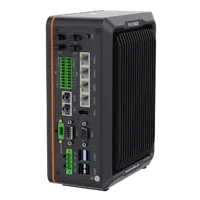
- LAN ports
- 5+ LAN ports
- USB 3 ports
- 2 USB 3 ports
- Light outputs
- 4 built-in channels
- Memory
- 16 GB
Before releasing the approach recipe, complete this checklist:
- Verify the offset sign against a known physical direction in every supported frame.
- Confirm that repeated geometry evaluation does not accumulate displacement or schedule duplicate motion.
- Confirm that unrelated pick, departure, and recovery actions remain unchanged.
- Exercise every supported waypoint sequence and recipe-change boundary.
- Test permitted offset extremes and object orientations through the validated commissioning process.
- Verify timestamp and encoder handling for moving targets.
- Define rejection and recovery behavior when a valid path cannot be produced.
- Record the approved recipe revision and retain a documented rollback path.
Start acquisition selection with the camera configurator. For integration help, bring a frame sketch, waypoint sequence, timing requirements, and interface documentation to applications support.
Questions
Should a variable approach offset change the detected pick position?
No, not when the goal is only to change the route into the grasp. Keep the measured pick pose unchanged and generate separate approach waypoints. If the grasp itself needs an offset, represent that as a distinct, documented tool-to-object relationship so it cannot be confused with path clearance.
Which coordinate frame should define a horizontal approach offset?
Use the base frame for an installation-fixed direction, the conveyor frame for belt-relative motion, or the object frame when the approach should rotate with the part. A tool-frame displacement follows tool orientation and may not remain physically horizontal. Record the chosen frame with every recipe parameter.
What should happen if an approach callback runs more than once?
Repeated invocation can be part of planning or execution preparation, so first check the documented callback behavior. Generate geometry from the original target rather than modifying the previous result. Keep execution scheduling separate, and identify the intended action and waypoint explicitly instead of relying on callback count.
Can a variable approach be used with conveyor tracking?
Yes, but the planner must distinguish geometric displacement from motion compensation. Confirm whether the controller expects image-time coordinates, predicted coordinates, or a conveyor-attached pose. Use consistent timestamps and encoder references across the path, and avoid adding compensation that the tracking system already applies.
Do additional approach positions make the path safer?
More positions can define a useful corridor, but they can also introduce extra transitions, blending changes, and longer execution time. Check the complete swept path, tool orientation, carried object, and joint configuration. Intermediate positions do not replace safeguarding or the machine's validated commissioning procedure.