
A detection box belongs to an image coordinate system, not automatically to a point-cloud array. This distinction matters when you need object distance, a position overlay, or coordinates for downstream motion planning. A cloud can contain fewer points than the image has pixels, and its ordering may change after filtering. Start with synchronized depth registered to the detection image, or verify that an organized cloud preserves that exact pixel grid. Then select valid foreground measurements rather than treating the entire rectangle as one surface.
Choose the representation before writing the lookup
The simplest route to bounding box depth is usually a depth image registered to the image used for detection. Each depth pixel then has a documented relationship to the corresponding detection-image pixel. Registration must include the correct calibration, output geometry, and depth-value convention.
An organized cloud is another valid route, but only when its rows and columns correspond to that same image grid. A cloud organized in the native depth-camera grid does not automatically match a separate color image.
| Available data | Can detection pixels index it directly? | Required check |
|---|---|---|
| Depth registered to the detection image | Yes, after undoing detector resizing or cropping | Same image geometry, frame pairing, and documented depth convention |
| Organized cloud matching the detection image | Yes, through its documented layout | Matching dimensions, registration, timestamps, and retained invalid slots |
| Organized cloud in another camera grid | No | Reproject through the camera calibration |
| Unorganized or compacted cloud | No | Project points into the detection image and resolve visibility |
Coloring a cloud from an image does not prove that cloud indices correspond to image pixels. Texture coordinates can attach color to points while leaving the cloud in depth-camera order, or in no image order at all.
Why the point count changes
A depth image normally reserves a position for every pixel, including pixels without usable depth. A compacted cloud can omit those invalid measurements instead. Its point count then depends on how many measurements survived that frame.
For an illustrative image grid:
If one frame loses 20,000 measurements, it contains 287,200 retained points. If the next loses 35,000, it contains 272,200. Neither count establishes a software fault.
Depth can become invalid because of occlusion, weak return signals, reflective surfaces, range limits, or confidence thresholds. Export settings may also remove points outside the texture image or a configured region. Downsampling and spatial filters can change the count independently of measurement validity.
Deleting a point also changes the relationship between subsequent array indices and original pixels. Even a constant point count does not prove that ordering remains suitable for image lookup.
If depth is missing entirely, resolve acquisition before investigating correspondence. The missing depth-stream troubleshooting article addresses that separate problem.
Verify organization and binary layout
An organized cloud retains a rectangular arrangement. Invalid samples remain as invalid entries rather than disappearing and shifting later points. However, rectangular dimensions alone do not establish which camera image the arrangement represents.
For a documented, row-major point array matching the detection image, the logical index is:
Here, u is the horizontal pixel coordinate and v is the vertical coordinate. This formula is unsuitable for an unorganized cloud or a grid belonging to another camera.
For a binary message such as PointCloud2, logical indexing and byte addressing are different operations. Respect row padding, point spacing, field offsets, field types, and byte order:
Do not assume that coordinates occupy consecutive floating-point values without checking the message fields. Validate buffer bounds before reading, and use a format-aware library where available.
Inspect organization after every conversion or filter. A library operation that removes invalid entries can destroy pixel correspondence even when the incoming cloud was organized. A density flag is not a substitute for validating the selected coordinates.
Match registration, geometry, and timestamps
Depth and color cameras generally have different viewpoints and intrinsics. Their images can have identical dimensions without observing the same ray at a given pixel.
Registration requires reconstructing a depth measurement in its source camera frame, transforming it into the target camera frame, and projecting it through the target camera model. Visibility must also be resolved when several source measurements reach the same target pixel. Some target pixels will have no valid depth because the depth camera could not see that surface.
Check these conditions before using direct pixel lookup:
- The detection image and registered depth use the same output dimensions and pixel geometry.
- Both streams use compatible distortion handling; raw and rectified images are not interchangeable.
- The calibration belongs to the active camera configuration and mounting arrangement.
- The depth frame is paired with the image that produced the detection.
- Any later resize, crop, rotation, or mirroring is accounted for.
Timing errors can look like calibration errors on moving objects. At a lateral speed of 0.15 m/s, a 20 ms mismatch produces an estimated displacement of 0.15 × 0.020 = 0.003 m, or 3 mm. Camera motion can add further error.
Use timestamps and a documented synchronization policy rather than whichever depth frame happens to arrive last. The image-overlay debugging guide provides a useful approach for displaying coordinates and frame information together.
Undo detector preprocessing before sampling depth
Detection coordinates may refer to a resized network input rather than the original image. Padding is especially easy to overlook because the displayed detection can still appear plausible.
Suppose an original image measures 1280 × 720 pixels and the detector accepts a 640 × 640 input. Preserving aspect ratio gives a scale of 0.5. The resized image becomes 640 × 360, leaving 140 pixels of padding above and below when centered.
The inverse mapping is:
A network-space box with horizontal limits 250 and 390, and vertical limits 230 and 330, becomes:
Apply the inverse of the actual preprocessing pipeline, including any crop offsets. Clip the resulting region to valid image bounds and use a consistent rectangle convention, such as inclusive left/top and exclusive right/bottom.
Check the result by drawing the mapped rectangle on the original image. Then display the depth samples selected by that rectangle. This exposes offset, scale, and axis errors before they become misleading distance measurements.
Estimate foreground depth, not rectangle depth
A bounding box can contain the object, background, gaps, and neighboring objects. Its center can fall on a hole or an invalid measurement. A single center sample is therefore a fragile default.
Use a selection process appropriate to the task:
- Map the detection region into the registered depth grid.
- Select an instance mask when available, or a justified interior region of the box.
- Reject non-finite values, documented invalid codes, and measurements outside the application range.
- Separate foreground from background using depth grouping, spatial continuity, or an expected operating interval.
- Estimate depth from the selected surface, often using a median for resistance to isolated outliers.
- Return the estimate with sample count, valid fraction, spread, and frame timestamp.
The nearest point is not automatically the object. A foreground obstruction or isolated outlier can be closer. Likewise, the largest depth group may be the background when a narrow object occupies little of its box.
As an illustrative case, consider 60 sampled locations. Twelve are invalid, leaving 48 valid measurements. If inspection identifies 36 as object samples and 12 as background, the valid fraction is 48 / 60 = 80%, while selected object support is 36 / 60 = 60%. These describe different aspects of measurement quality.
If support is inadequate or the distribution contains unresolved surfaces, report no reliable estimate. Do not substitute zero or silently reuse an older value.
Convert the selected pixel and depth into coordinates
For a rectified pinhole camera, optical-axis depth can be deprojected using the intrinsics associated with that exact image grid:
Here, fx and fy are focal lengths expressed in pixels, while cx and cy are principal-point coordinates. Spatial coordinates have the same units as Z.
Using the mapped box from the previous example, its center is (640, 280). Assume an illustrative calibration with fx = fy = 800 pixels, cx = 640, and cy = 360. For selected depth Z = 1.20 m:
These values describe a point in the chosen optical frame, under the stated assumptions. Verify the actual axis convention before transforming it into another coordinate system.
Also verify whether the depth stream reports optical-axis depth, radial range, or another quantity. The formulas above do not accept radial range unchanged. Registered output may also retain a source-camera depth convention; use its documented deprojection method unless target-frame semantics are confirmed.
A box-center ray combined with a regional median gives an approximate representative position. It is not necessarily a measured surface point or the object's geometric center. For those tasks, deproject the selected foreground samples and fit the geometry you actually need.
Choose hardware for usable measurements and accessible data
Compare 3D sensors by their suitability for the surface, operating distance, motion, and required accuracy. Then confirm that the software interface exposes depth units, invalid-value definitions, calibration, timestamps, and the required registration output. A sensing-method label alone establishes none of those interface details.
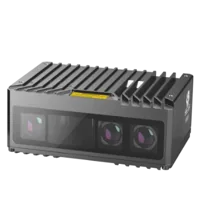
The MV-DPS200P-02 is a projected structured-light camera.
- Type
- Stereo / structured light
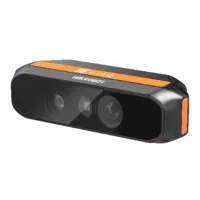
The MV-DT01WMU is a ToF sensing camera.
- Type
- Depth / ToF camera
Treat these as different sensing approaches to evaluate, not evidence that either provides a particular aligned stream or organized-cloud mode. Request the relevant interface documentation and representative captures for your proposed configuration.
A separate camera from the area scan cameras category can supply the detection image, but it creates an additional calibration and synchronization relationship. Rigid mounting does not eliminate the need to establish that relationship.
Check image sampling as well. If an illustrative 800 mm scene width spans 1280 pixels, the nominal scale at that plane is 800 / 1280 = 0.625 mm/pixel. A 30 mm object spans about 30 / 0.625 = 48 pixels. Depth may provide fewer valid samples because its resolution, visibility, and confidence limits differ.
Use the camera finder to narrow hardware candidates, then verify depth support experimentally. More color-image pixels do not create additional depth measurements.
Validate correspondence and recognize its limits
Start with a stationary, opaque object against a background at a clearly different distance. Move the object across the image and compare its visible outline with the selected depth region. Repeat near the center, edges, and depth discontinuities.
Before accepting the implementation, check:
- Geometry: mapped boxes remain aligned after preprocessing and output-resolution changes.
- Timing: image, depth, and detection identifiers remain associated during motion and processing delays.
- Invalid handling: holes produce rejected samples, not artificial near-zero objects.
- Organization: any conversion preserves pixel slots, or explicitly switches to reprojection.
- Foreground selection: background and neighboring objects do not dominate the estimate.
- Units and frames: displayed distance and transformed coordinates agree with a known reference.
- Failure behavior: insufficient support produces an explicit unavailable result.
Direct lookup is the wrong method when only an unorganized cloud is available. Instead, transform and project its points into the detection image, retain visible candidates, and apply the foreground-selection process. This reconstructs correspondence; reshaping the existing array does not.
A single depth value is also insufficient for objects spanning several depths, partially occluded assemblies, or tasks requiring orientation. Preserve the selected points and estimate the relevant surface or object model. Display-friendly interpolation should remain separate from measurement data, a distinction also discussed in the quantitative image-fusion guide.
For hardware selection, start with the camera configuration workflow. For correspondence questions, send the image dimensions, timestamp policy, calibration convention, cloud layout, and a representative capture through application support. Those details are more useful than point count alone.
Questions
Why does the point cloud contain a different number of points in each frame?
A compacted cloud contains only retained measurements, so invalid-depth rejection, confidence filtering, cropping, and downsampling can change its size. That behavior does not establish whether acquisition is faulty. Check the output configuration and whether invalid samples retain their original grid positions before using image coordinates as indices.
Can I index a cloud when its width and height match the color image?
Matching dimensions are necessary for direct lookup but are not sufficient. The cloud must represent the same image grid, registration geometry, and acquisition time. Also verify that conversions preserve invalid entries and that detector coordinates have been mapped back from any resized or padded input.
Should bounding box depth use the center pixel or the median?
Use a foreground region rather than an arbitrary rectangle statistic. A mask or validated depth group can exclude background and neighboring objects. Calculate a suitable estimate from valid selected samples, and reject the result when support or consistency falls below thresholds established for your application.
Is the reported depth the straight-line distance to the object?
Not generally. Many depth streams report distance along the camera's optical axis. Straight-line range also depends on the point's lateral coordinates. Confirm the stream's documented convention before deprojection, and distinguish a representative visible-surface position from an object's geometric center.