
An exposure control can appear in a camera's feature list yet fail whenever your application reads or changes it. This becomes confusing when infrared exposure works while the color stream rejects every request. For developers integrating cameras with multiple imaging sensors, the first task is to separate control ownership, operating mode, and software compatibility. The tests below help you establish which configuration is supported before changing hardware or adding workarounds.
Separate feature visibility from working control
Start by treating enumeration as discovery, not proof of successful access. A feature list may describe controls exposed through a software interface without establishing that each control works in every sensor mode, stream profile, or acquisition state.
A working infrared exposure setting proves something about the infrared path. It does not establish that the color sensor uses the same control object, exposure units, or automatic-exposure implementation.
Use this diagnostic order to avoid changing several variables at once:
| Check | What to establish | Next action |
|---|---|---|
| Sensor ownership | The control belongs to the color sensor | Select the documented color-sensor interface |
| Automatic mode | Manual exposure is currently writable | Use the documented automatic-to-manual transition |
| Range and access | Reported limits describe an adjustable, readable control | Validate permissions, units, and increments |
| Stream configuration | The selected profile supports the operation | Reproduce with a documented profile |
| Software stack | Application, driver, and firmware form a supported combination | Test with the manufacturer's supplied utility |
This differs from a feature that never appears. For that symptom, use the feature-access error troubleshooting guide. Here, the control exists; the question is whether the selected interface can execute it.
Identify the sensor owner and exposure mode
A device containing color and infrared sensors may present several logical sensors or interfaces. A device-wide handle, a depth-processing interface, and a color-sensor interface are not automatically interchangeable.
Record the device identifier, logical sensor name, active streams, and selected profile before querying controls. Confirm ownership using the manufacturer's documented feature map or sample application. Do not identify the owner merely by assuming the first enumerated sensor is the color sensor.
Next, inspect the documented access state. Some interfaces distinguish available, readable, and writable controls. Others provide less detail. Where available, record these separately rather than reducing them to a single supported flag.
Automatic exposure can also change manual-control access. A manual exposure feature may become read-only or unavailable while automatic exposure is active. Follow the documented transition, then query access and range again. Do not assume a successful mode-change request means the sensor has already completed that transition.
An automatic-exposure tuning parameter is not necessarily an exposure-time setting. Brightness targets, image regions, and controller gains may belong to a different sensor or algorithm. A similar name is insufficient evidence of color-stream ownership.
For the distinction between optical aperture, sensor integration time, and electronic gain, see automatic iris, exposure and gain control.
Validate the reported range without guessing units
Capture the minimum, maximum, increment, default, current value, and access status when the interface exposes them. Record query failures individually: a failed current-value read should not erase a successfully retrieved range.
A range whose minimum and maximum are both zero is degenerate. It supplies no adjustable interval. Depending on the documented interface, it could describe a fixed value, an unavailable feature, or incomplete capability reporting. It does not justify writing zero repeatedly, and it does not prove that zero represents a valid exposure duration.
For a documented discrete control with a positive increment, candidate values normally follow this grid:
Apply this only where the interface defines that increment convention. A reported zero increment does not establish a usable integer grid; check the documented meaning before validating values.
Also confirm the numeric type. Integer controls, floating-point controls, and enumerations require different handling. Avoid silent conversions that turn a requested duration into an unrelated raw integer.
Use the exposure and gain units guide when a control's numeric value lacks an obvious physical meaning. Establishing microseconds, milliseconds, or device-specific units comes before choosing a test value.
Run a minimal acquisition test
Remove image processing, display callbacks, background parameter updates, and additional camera clients from the first test. Keep only discovery, configuration, acquisition, and logging. Use normal maintenance procedures if the camera participates in machine control.
- Record the environment. Save the application version, camera identifier, firmware version, operating system, driver, and camera-library version. Obtain software and documentation only from the manufacturer or its distributors.
- Select the documented color interface. Log its identity and profile. Initially disable unrelated streams only if the device supports color-only operation.
- Query without writing. Record exposure availability, readability, writability, limits, increment, and automatic-exposure mode. Catch and log each error separately.
- Compare acquisition states where supported. Query before acquisition and after acquisition starts. Do not move a write between states unless documentation permits that operation there.
- Request manual mode through the documented sequence. Check the result, allow any specified transition time, then refresh the exposure metadata.
- Write one valid value. Choose it from the refreshed range and documented increment grid. Read it back if supported, and capture frames to check that acquisition remains healthy.
- Stop cleanly and repeat. Release the device normally, reopen it, and repeat the same sequence. Add other streams and application components back individually after the minimal case works.
Do not require color-only operation when the device architecture needs another stream enabled. In that case, use the smallest documented stream combination and preserve its settings throughout the test.
If the application terminates, distinguish a handled camera error from an unhandled exception or process fault. Preserve the first error and relevant stack trace before introducing retries. Repeated calls can obscure the operation that originally failed.
Trace invalid-argument errors to the failing operation
An invalid-argument error identifies a rejected request, not necessarily the reason it was rejected. Possible causes include the wrong control owner, an unsupported operating state, an invalid value, or a translation problem between software layers.
On Linux, this may appear as EINVAL or error 22. If the log identifies a driver control operation, record that context. Do not interpret the numeric error alone as proof of a hardware defect.
Log these fields for each failed request:
- Logical sensor and control identifier.
- Operation: range query, current-value read, mode change, or value write.
- Requested value and its documented units, if applicable.
- Access flags and range returned immediately beforehand.
- Active stream profiles and acquisition state.
- Complete error text and whether frames continued arriving.
Then run the manufacturer's supplied utility using the same documented profile. If the utility also fails, application complexity is less likely to explain the symptom. If it succeeds, compare its sensor selection and operation sequence with your minimal test.
A failure confined to one software combination warrants a compatibility check. Use a manufacturer-supported combination for the target operating system; do not install unrelated firmware or manually force undocumented driver controls.
Work through an adjustable range and a fixed range
Consider a hypothetical interface reporting a manual exposure range of 100–10,000 microseconds with a 100-microsecond increment. These are example values, not specifications for a catalog product.
A request for 2,300 microseconds follows the grid:
The result is a nonnegative integer, and the request lies inside the range. A request for 2,350 microseconds gives 22.5, so it does not follow this example's increment grid. Even a valid grid value still requires the correct owner, writable state, and supported profile.
Now consider a second report with minimum zero and maximum zero. There is no alternative value to select from that interval. Stop treating the feature as an ordinary adjustable exposure control. Check its documented meaning and compare the report with the supplied utility.
The difference matters during diagnosis. If every valid request fails only on color, changing exposure arithmetic is unlikely to resolve an ownership or compatibility problem. If only off-grid values fail, your application's validation may be the relevant fix.
Finally, distinguish a requested setting from an effective setting. Where supported, use frame-associated metadata to establish when a change reached captured images. The per-frame exposure and gain verification guide explains that separate check.
Choose hardware only after proving the control requirement
Do not select replacement hardware solely because the existing feature list looks inconsistent. First define the requirement: independently adjustable color exposure, documented units, supported readback, required stream combinations, and the operating system you intend to deploy.
For a standalone color image, compare area scan cameras through the camera finder. The MV-CU020-90GC is a color, global-shutter GigE area scan camera. That identifies its imaging category; it does not establish compatibility with your application's exposure API.
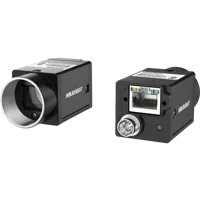
- Sensor format
- 1/1.7"
- Interface
- GigE
- Resolution
- Up to 3 MP
- Shutter
- Global
If depth remains essential, review 3D sensors against the complete acquisition requirement. The MV-DPS200P-02 is a projected structured-light 3D camera. Confirm the available streams, color-image provision, and exposure controls from its documentation before treating it as a replacement.
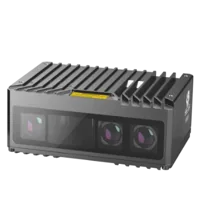
- Type
- Stereo / structured light
A separate color camera is not automatically a substitute for an integrated color-and-depth device. It can introduce synchronization, mounting, calibration, and registration work. If your actual fault is a missing depth stream rather than a rejected exposure request, follow the missing depth stream diagnostic guide instead.
Laser profilers and stereo 3D cameras
170 models · from $699.00Verify the fix and check before ordering
A single successful write is not enough evidence for deployment. Validate the complete operating sequence and keep the test repeatable.
- Reopen the device. Confirm the application selects the intended sensor after a fresh connection.
- Exercise automatic and manual modes. Test only documented transitions, including the transition used during startup.
- Repeat the production stream combination. A successful isolated test does not prove the combined configuration works.
- Check readback appropriately. Use documented tolerances, quantization, and reporting delays rather than assuming exact immediate equality.
- Inspect captured images. Keep illumination and gain controlled while checking whether exposure changes affect the image as expected.
- Test failure handling. A rejected request should produce a useful diagnostic and a defined application response, not an endless retry loop.
- Document remaining limits. Record unsupported profiles, read-only states, and settings that require acquisition to stop.
Before ordering, request confirmation of the exact control workflow, not simply the presence of an exposure feature. Include your required streams and software environment in that request.
GigE, USB3, 10GigE and CoaXPress
982 models · from $149.00Take the supported next step
Keep the minimal test, capability report, and first failure log together. They provide a clear basis for manufacturer support or hardware selection without relying on speculative control writes.
If the supported utility works, correct your application's ownership, mode transition, or value handling. If it also fails in a documented configuration, pursue a supported software fix or hardware alternative. Start a camera configuration, or send the acquisition requirements and diagnostic results through applications support before choosing a replacement.
Questions
Why does infrared exposure work when color exposure fails?
Color and infrared sensors can expose separate control interfaces and operating rules. Success on the infrared path does not validate the color path. Identify the documented color-sensor owner, then check its access state, automatic-exposure mode, and supported stream profile before attempting another write.
Does an exposure range of zero to zero mean the feature is broken?
It does not provide an adjustable interval, but its precise meaning depends on the interface documentation. It may represent a fixed setting or unavailable capability information. Compare the result with the manufacturer's supplied utility rather than assuming zero is a usable exposure duration.
Should automatic exposure be disabled before setting manual exposure?
Only make that transition using the documented procedure. Some cameras restrict manual exposure while automatic control is active, and access may change after the transition. Refresh the feature's access status and range before selecting a manual value, then verify the effective result where supported.
Does a driver invalid-argument error prove the camera is defective?
No. An invalid-argument response can result from an unsupported value, incorrect sensor ownership, acquisition state, or software translation problem. Reproduce the request in a minimal application and the manufacturer's utility using a supported configuration before attributing the failure to hardware.
When should a rejected exposure control lead to replacement hardware?
Replacement becomes reasonable when the documented control requirements cannot be met by a supported configuration. Specify independent color exposure, units, readback, stream combinations, and operating-system support. If depth is required, also account for synchronization and registration before choosing a separate color camera.