
A packed camera buffer cannot become a valid image merely by assigning a wider pixel type. Packing changes how adjacent pixel values share bytes; a matrix header changes only how software interprets those bytes. This procedure is for developers receiving Bayer buffers through a camera acquisition API. You will identify the transport layout, decode it into owned unsigned storage, and verify the result before applying color reconstruction. Start with the acquisition library's documented converter when it supports the exact received format.
- Confirm the received format and documented packing layout.
- Validate row sizes and buffer lifetime, then decode into owned unsigned storage.
- Verify numerical samples before applying Bayer reconstruction or preview scaling.
1. Identify the received pixel format
Read the pixel-format identifier attached to the completed image, together with its width, height, image offset and row stride. Do not rely only on the format requested during camera configuration. A conversion stage or restored configuration may change what your application receives.
Keep these representations separate:
| Representation | Pixel storage | Appropriate handling |
|---|---|---|
| Bayer with 8-bit samples | One byte per sample | Wrap or copy with the correct row stride |
| Bayer with unpacked 12-bit samples | Usually one 16-bit container per sample, as documented | Check alignment and byte order before wrapping |
| Bayer with packed 12-bit samples | Adjacent samples share bytes | Decode into separate unsigned sample containers |
| Reconstructed color | Multiple color channels | Use the documented channel order and depth |
A type such as CV_16UC1 describes unsigned, single-channel storage with a 16-bit container. It does not instruct a matrix library to unpack the source.
Record the complete identifier. Formats such as BayerRG12p and BayerRG12Packed must not be treated as aliases. Consult the acquisition API's format definition or its documented converter for that exact identifier.
If the format feature itself cannot be accessed, first follow the feature-access error diagnosis. A missing configuration node and an incorrectly decoded buffer require different fixes.
2. Match the decoder to an explicit byte layout
The following example uses a specifically defined layout: two unsigned samples form a contiguous, least-significant-bit-first sequence across three bytes. Use these equations only when the received format documentation specifies this arrangement.
Byte b0: P0 bits 7 through 0
Byte b1: P1 bits 3 through 0, followed by P0 bits 11 through 8
Byte b2: P1 bits 11 through 4
In the middle byte, the low nibble belongs to the first pixel and the high nibble belongs to the second pixel.
For a known pair, choose P0 = 0x123 and P1 = 0xABC. The expected bytes are 0x23, 0xC1, 0xAB:
- First sample:
0x23 | (0x01 << 8) = 0x123 = 291. - Second sample:
0x0C | (0xAB << 4) = 0xABC = 2748.
This small example checks both nibble positions. A decoder that returns the right values in the wrong order is still incorrect: it also changes the apparent Bayer mosaic.
Other packing arrangements can distribute the upper and lower bits differently. Do not select an algorithm because its name contains only the same sample depth.
3. Calculate row sizes before touching the buffer
For the illustrated packing arrangement and an even image width, each pair occupies three bytes. Calculate the useful row size separately from the actual source stride.
These equations assume positive dimensions, independent row packing, and an even width. Odd widths require the documented final-pixel arrangement; reject them if your decoder does not implement it.
Consider a hypothetical image measuring 640 pixels across and 480 rows high:
- Packed row:
640 × 12 / 8 = 960 bytes. - Destination row without padding:
640 × 2 = 1280 bytes. - Destination allocation:
1280 × 480 = 614400 bytes.
Suppose the source stride is 968 bytes. Each row then contains 8 bytes beyond the packed samples. The minimum readable image span is:
An allocation containing the complete final padded row would occupy 480 × 968 = 464640 bytes. The distinction matters when an API reports valid image bytes separately from allocation capacity.
Check the image region, not merely the total transfer payload. Additional metadata or other image components must not become input pixels. Apply the documented image offset before validating the available span.
Use checked size arithmetic before allocating or multiplying dimensions. Reject a source stride smaller than the packed row size. For the destination, verify its stride is large enough and that the allocation covers every written row.
4. Decode into owned unsigned storage
Prefer a documented conversion function that accepts the exact source identifier and produces unpacked Bayer samples. Check whether its output is right-aligned or left-aligned within each destination container.
If manual decoding is necessary, allocate the destination first. The following C++-style kernel implements only the byte layout defined above. It assumes that dimensions, source span, destination span and arithmetic have already passed validation.
// src: readable image bytes, after any documented image offset
// srcStrideBytes: distance between source row starts
// dst: aligned, writable uint16_t storage
// dstStrideElements: destination row stride measured in uint16_t elements
// width: positive and even; height: positive

for (size_t y = 0; y < height; ++y) {
    const uint8_t* rowIn = src + y * srcStrideBytes;
    uint16_t* rowOut = dst + y * dstStrideElements;

    for (size_t x = 0; x < width; x += 2) {
        const size_t j = (x / 2) * 3;
        const uint16_t b0 = rowIn[j];
        const uint16_t b1 = rowIn[j + 1];
        const uint16_t b2 = rowIn[j + 2];

        rowOut[x] = b0 | ((b1 & 0x0F) << 8);
        rowOut[x + 1] = (b1 >> 4) | (b2 << 4);
    }
}
The input bytes are unsigned, and intermediate values are widened before shifting. Source-row padding is skipped because each row starts from the reported stride, not from the previous row's final decoded sample.
These numerical assignments create native unsigned values in destination memory. If you later save raw destination bytes, specify their byte order as part of the file format.
For a matrix interface, create an owning CV_16UC1 destination and use its actual row stride, or retain the allocation owner alongside a non-owning header. A header around external memory does not extend that memory's lifetime.
Keep the acquisition result valid until decoding finishes. Once the result is released or requeued, the camera API may reuse its buffer. For asynchronous work, either retain ownership through the documented mechanism or copy the required bytes before release.
5. Validate values before looking at color
Test the unpacker independently from the camera first. Synthetic bytes make failures reproducible and expose errors that a natural scene can hide.
Use at least these input patterns:
- Zero and full scale: expected samples are 0 and 4095 for right-aligned 12-bit data.
- Distinct adjacent values: the worked pair should produce 291 followed by 2748, without reversal.
- A rising sequence: consecutive sample values expose periodic discontinuities and swapped pairs.
- Nibble boundaries: include 15, 16, 255 and 256 to exercise bit transfers.
- Different row endings: give each row a distinct final pair and include source padding.
A valid range is necessary but insufficient. An incorrect decoder can still produce values between 0 and 4095. Compare every output sample with the expected synthetic array.
Next, compare captured output against the acquisition library's documented converter when available. Hold the same source buffer for both conversions. Compare dimensions, sample values and row boundaries before any brightness scaling or demosaicing.
For a right-aligned result, the upper four bits should be zero. An intentionally left-aligned result may instead have its lower four bits clear. That pattern alone is not an error; it must agree with the selected output convention.
If corruption appears only during sustained acquisition, investigate ownership and queue handling using the multi-camera buffer and callback troubleshooting guide. A decoder cannot repair bytes that changed while it was reading them.
6. Apply the Bayer pattern and display scaling separately
An unpacked Bayer image still contains one sample per pixel, not three color channels. Demosaicing reconstructs color from the spatial mosaic after unpacking has restored the numerical samples.
Select the conversion for the mosaic at the delivered image's upper-left pixel. A crop starting at an odd column or odd row can change that phase. Some devices or APIs update the reported pattern; others require documented handling by the application. Check the received image metadata rather than assuming the full-sensor pattern remains unchanged.
Also verify the library's naming convention for its Bayer conversion constants. Similar abbreviations do not justify guessing the channel arrangement.
A correct right-aligned image can look dark when a viewer assumes the entire 16-bit range. For a simple preview of right-aligned samples, shifting right by four maps the 12-bit range into an 8-bit range:
Keep the original unpacked image for measurement. Preview scaling is not a packing correction, and shifting left does not recover additional sensor information. Confirm that your demosaicing operation supports the destination depth before using it in the processing pipeline.
7. Separate decoding faults from acquisition faults
Start decoding only after the acquisition API reports a successful image with valid dimensions and an accessible image region. An unsupported image type and an absent stream are different conditions.
The closest related guide, unknown pixel formats and missing depth streams, explains that distinction for stream selection. Here, the task is to interpret an already delivered Bayer component correctly.
| Symptom | First test | Likely corrective action |
|---|---|---|
| Adjacent samples appear reversed | Decode a distinct known pair | Correct sample ordering in the packing equations |
| Regular errors repeat through every row | Compare nibble-boundary patterns | Match the exact documented packing layout |
| Rows become progressively displaced | Check source stride against useful row bytes | Restart decoding at each reported row boundary |
| Values differ by a constant power-of-two factor | Inspect output alignment before scaling | Use the intended right- or left-aligned convention |
| Intensities are correct but colors are wrong | Check crop parity and Bayer conversion selection | Correct mosaic phase or output channel interpretation |
| Corruption appears under processing load | Retain or copy the acquisition buffer | Correct ownership and queue lifetime |
| No valid image is delivered | Check acquisition status and component selection | Repair acquisition before changing the unpacker |
Do not mask a row-stride problem by cropping away the damaged edge. The same addressing error may still affect every subsequent row.
8. Confirm integration details before selecting hardware
Use the area scan cameras category and camera finder to shortlist the physical camera requirements. Packed output support must then be confirmed separately for the selected camera, firmware and acquisition software.
The MV-CU020-90GC is a catalog example of a color area scan camera. Its inclusion here does not establish support for the illustrated packing layout.
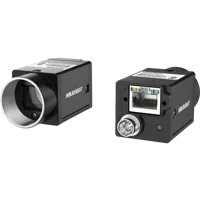
- Sensor format
- 1/1.7"
- Interface
- GigE
- Resolution
- Up to 3 MP
- Shutter
- Global
The MV-CH120-11UC is another catalog example to evaluate against your integration requirements. Confirm its available output formats through the documented interface before committing to a decoder.
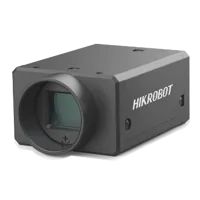
- Sensor format
- 1.1"
- Interface
- USB3
- Resolution
- 12 MP
- Shutter
- Global
Before ordering, request confirmation of the exact pixel-format identifiers, row-padding behavior, conversion API, buffer-lifetime rules and supported processing environment. Packed transport can reduce image-data volume relative to unpacked containers, but it adds decoding work unless another supported stage performs that conversion.
Do not infer available camera formats from the formats an acquisition library can theoretically decode. They are separate compatibility questions.
9. Use an acceptance checklist before deployment
Save the received format identifier and dimensions alongside a small set of representative test buffers. Make the following checks part of your integration tests:
- Exact format identifier selects the correct decoder, with no silent fallback.
- Useful row size, source stride and accessible image span agree.
- Odd widths are either documented and tested or explicitly rejected.
- Synthetic patterns pass at nibble boundaries and padded row boundaries.
- Output alignment is defined before preview scaling or demosaicing.
- Bayer phase remains correct after every supported crop setting.
- Destination storage remains valid for downstream consumers.
- Acquisition buffers cannot be recycled while a decoder reads them.
- Reconfiguration causes dimensions, format and allocation sizes to be checked again.
Keep the successful test buffers as regression fixtures. A future software update should reproduce the same sample values before its color output is accepted.
For camera selection, start with the camera configurator. If format compatibility is uncertain, send the exact identifier, dimensions, stride and a small documented byte example through application support before choosing hardware.
Questions
Can I wrap packed Bayer data directly as CV_16UC1?
No. A matrix type defines how existing memory is interpreted; it does not rearrange packed samples. Decode the source into separate unsigned containers first, or use the acquisition library's documented converter. Then create the matrix with the destination's actual dimensions, stride and ownership.
Are Bayer 12p and Bayer 12Packed interchangeable?
They must not be treated as interchangeable identifiers. Match the complete received name to its documented byte arrangement or supported conversion function. Equal sample depth and similar names do not establish identical nibble positions, pixel ordering or handling of incomplete groups.
Why does a correctly unpacked image look dark?
Right-aligned samples occupy only part of the available unsigned container range. A viewer expecting full-range data may therefore display them dark. Inspect numerical values first, then apply a separate preview mapping. Preserve the original unpacked samples for measurements and later processing.
What causes diagonal corruption or displaced rows after unpacking?
Decoded rows commonly shift when the implementation advances by useful sample bytes instead of the reported source stride. Check row padding, image offsets and whether packing restarts at each row. Use synthetic rows with different boundary values to distinguish addressing errors from incorrect nibble extraction.
Can processing continue after the acquisition result is released?
Not always. A non-owning image header does not keep an acquisition buffer alive. Follow the API's documented retention mechanism or copy the image before release. Otherwise, acquisition may overwrite the same memory while your processing code still reads it.