
A fixed reader can produce sharp images and still reject every label when its decoder supports the wrong barcode family. This matters when replacing an older station, adding a second supplier, or maintaining equipment that must read existing labels. Start with explicit Industrial 2 of 5 support, not a general claim of numeric barcode reading. Then verify decoder settings, label quality, and the exact data delivered to your application. The following checks separate those questions before you commit to hardware.
Industrial and Interleaved are different decoder requirements
Industrial 2 of 5 and Interleaved 2 of 5 are numeric symbologies, but their names do not describe interchangeable formats. A reader supporting one does not automatically support the other.
Industrial 2 of 5 represents each digit using five bars: two wide and three narrow. Spaces separate the bars and characters rather than encoding a second digit. Interleaved 2 of 5 combines two digits within a pattern: one digit is represented by five bars, and the other by the five intervening spaces.
Their start and stop patterns also differ. Consequently, selecting the wrong decoder is not something that sharpening, thresholding, or increased resolution can reliably repair.
| Property | Industrial 2 of 5 | Interleaved 2 of 5 |
|---|---|---|
| Character set | Numeric digits | Numeric digits |
| Digit representation | Five bars per digit | Five bars and five spaces encode a digit pair |
| Information in spaces | Does not encode the paired digit | Encodes the second digit of each pair |
| Paired-digit requirement | No inherent paired-digit requirement | Encoded digit count is even |
| Compatibility evidence | Explicit support for the Industrial format | Explicit support for the Interleaved format |
For Interleaved 2 of 5, padding or a check digit can affect the relationship between application payload length and encoded length. Do not infer the symbology from the number of digits your host receives.
Terminology can also vary between documentation sets. If a manual uses a related name such as discrete or standard 2 of 5, ask the manufacturer to confirm the precise format using your label artwork or a verified sample. A similar name alone is insufficient evidence.
Verify support in documentation before comparing hardware
Begin with the fixed code readers category, but treat its interface and imaging filters as a hardware shortlist. Those filters do not establish support for a particular decoder. Use the camera and reader finder to narrow physical and communications requirements only after recording the symbology requirement.
For each candidate, obtain the current manual and configuration reference from the manufacturer or its authorized distributor. Check the following:
- The supported-symbology table explicitly identifies the required format.
- The document applies to the exact reader variant under consideration.
- The firmware version used for evaluation matches the documented support.
- The decoder can be enabled through the documented configuration method.
- Any decoder license or software entitlement is included or separately identified.
- Length limits, check-digit behavior, and output formatting meet the application requirements.
Record the document revision and relevant section alongside the proposed part. If the documentation says only “2 of 5,” request written clarification rather than interpreting that wording as support for both formats.
Retain an exported configuration with the evaluation results. Otherwise, a replacement reader may arrive with different defaults even when the hardware selection is unchanged.
Separate decoder compatibility from optical readability
Once support is confirmed, check whether the reader can resolve the narrowest printed elements throughout the working envelope. Decoder compatibility and image quality are separate acceptance conditions.
A useful initial estimate relates horizontal image sampling to the narrowest bar or space. Choose a provisional sampling target, then validate it experimentally rather than treating it as a universal decoding threshold.
Suppose the horizontal field of view is 100 mm, the narrowest element is 0.25 mm, and the initial target is 4 pixels per narrow element:
This estimates sampling across the complete field, not just across the barcode. It assumes the field and element width are measured in the same object plane. Rotation, perspective, focus variation, print spread, and image processing can reduce usable margin.
Check the reader's actual image dimensions and field of view rather than choosing from a megapixel total alone. The barcode, its required quiet zones, and expected placement variation must all fit within the usable image.
The barcode rotation, blur and glare guide addresses image defects after the correct decoder has been established. Use it when labels decode inconsistently, not as a substitute for checking format support.
Lighting must preserve the distinction between narrow and wide elements. Test glossy covers, faded printing, curved surfaces, and shadows with production samples. A clean label held stationary at the center of the image is only a starting point.
Configure length, check digits and host output deliberately
Commission the reader with the required decoder enabled. Where the documented controls allow it, disable unrelated symbologies during initial testing. This reduces ambiguity when interpreting failures and unexpected results.
Set the expected data lengths as narrowly as the application permits. If production contains several legitimate lengths, document each rather than opening an unnecessarily broad range. Length filtering is useful protection, but it does not replace checking the decoded value against the expected record.
Check-digit handling needs an explicit agreement between the label definition, reader, and host application. Determine whether a check digit exists, whether the reader validates it, and whether that digit is included in transmitted data. Do not select a check-digit option merely because it improves the apparent read rate.
Leading zeros must remain data. For example, 0012345 and 12345 may identify different records even if an application converts both into the same integer. Store identifiers as strings unless the application specification explicitly requires numeric conversion.
Also define:
- Whether a symbology identifier is transmitted.
- Which prefix, suffix, delimiter, or message wrapper is required.
- How a no-read is reported.
- How results are associated with acquisition requests.
- Whether repeated reads are suppressed or transmitted.
The application-side scanner data capture guide explains why receiving characters is distinct from receiving a complete application record. Verify the documented communications behavior for your chosen interface; do not assume every USB reader behaves like a keyboard.
Build an acceptance test around known labels
Prepare a ground-truth file before testing. Each physical label should have a sample identifier, expected payload, expected symbology, and a clear acceptance classification. Use the approved label definition to establish the truth rather than relying only on another reader's output.
Include clean labels, typical production labels, and the worst acceptable print condition. Cover the shortest and longest permitted payloads, leading zeros, and all valid check-digit arrangements. Add odd-length payloads where the Industrial format and application permit them.
A compact test matrix might use three label conditions, three positions, and two conveyor speeds. Repeating each combination across 50 acquisition requests gives:
Distribute the positions across the permitted reading area, including its edges. Test the nearest and farthest permitted distances separately if working distance varies significantly.
Add negative trials using blank targets and labels that should not be accepted. For example, 100 blank trials and 100 wrong-format trials bring the total to 1,100 requests. These figures are an illustrative starting point, not a universal qualification requirement.
Classify every result as correct, no-read, wrong payload, duplicate, or missing response. A wrong payload must not be counted as a successful read simply because the decoder returned characters.
If 897 of the 900 valid trials produce the correct first response, the observed first-response success rate is:
Report the three failures separately, including their test conditions. Aggregate percentages can hide a weak edge position or a specific print defect. Zero wrong payloads in a limited trial also does not prove a zero false-acceptance probability.
Measure response time against the machine's actual decision deadline. Where results authorize handling operations, the barcode verification and handling guide explains why successful decoding and permission to act should remain separate checks.
Treat catalog readers as candidates, not confirmed matches
The supplied catalog information identifies hardware characteristics, but it does not state Industrial 2 of 5 decoder support. Neither candidate below should be ordered for this requirement without documentation review and representative-label testing.
The LS-R172-S1 lists a USB interface and a global shutter. It is a candidate for an application whose documented USB communication mode suits the host.
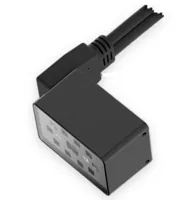
- Resolution
- Up to 3 MP
- Shutter
- Global
- Interface
- USB
The LS-RS100-12 lists an Ethernet interface and a global shutter. It is a candidate where the documented network protocol and result handling match the control system.
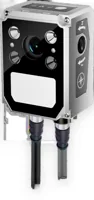
- Resolution
- Up to 3 MP
- Shutter
- Global
- Interface
- Ethernet
An interface name does not establish the supported application protocol, trigger method, message framing, or decoder list. Request those details explicitly. Likewise, a global shutter does not by itself establish adequate lighting, exposure, or read performance on moving labels.
Compare the documented configuration tools, mounting requirements, cables, and result interfaces after symbology support is established. If neither candidate has confirmed support, continue the selection process rather than substituting Interleaved support for the actual requirement.
Diagnose failed trials in a controlled order
Change one variable at a time and retain the corresponding image, configuration, and raw output where the reader provides them. This distinguishes an unsupported format from an optical or application-side failure.
| Observed symptom | First test | Corrective direction |
|---|---|---|
| Every verified Industrial label fails | Check exact decoder support and enable state | Confirm the documented format before changing optics |
| Only certain payload lengths fail | Compare configured limits with encoded and transmitted lengths | Correct length and check-digit settings |
| Leading zeros disappear | Compare raw reader output with stored application data | Remove unintended numeric conversion or formatting |
| Stationary labels read but moving labels fail | Compare captured images under both conditions | Address exposure, illumination, focus, and acquisition timing |
| Center labels read but edge labels fail | Inspect field coverage, quiet zones, and edge focus | Adjust placement limits or the optical setup |
| Reader reports success but the host records nothing | Capture the documented result interface | Correct framing, result handling, or request association |
Avoid changing decoder settings to compensate for damaged labels unless those settings remain consistent with the approved label specification. A permissive configuration may make a demonstration look better while weakening production acceptance rules.
After any firmware or recipe change, repeat the relevant acceptance trials. Preserve a known-good label set so future maintenance has a repeatable baseline.
Check these items before ordering
Use this release checklist to turn the evaluation into a repeatable purchasing specification:
- Exact symbology: the documented format is Industrial 2 of 5, not merely a similarly named family.
- Exact hardware and firmware: the evaluated combination is identified in the acceptance record.
- Decoder entitlement: any required licensed feature is included through legitimate vendor channels.
- Label specification: payload lengths, check-digit rules, quiet zones, and print tolerances are defined.
- Reading envelope: distance, position, orientation, and motion limits have been tested.
- Application contract: leading zeros, result framing, no-read handling, and response timing are verified.
- Recovery record: the configuration export and documented restoration procedure are retained.
When the usual replacement-reader approach fails, consider whether the label format can be changed under controlled change management. That decision requires checking every downstream reader and application; changing only the new station can create a compatibility problem elsewhere.
1D/2D codes on the line
618 models · from $399.00Send representative labels, the approved symbology definition, and your interface requirements through application support. Use the camera selection configurator to organize the remaining hardware requirements after decoder compatibility has been confirmed.
Questions
Does Interleaved 2 of 5 support include Industrial 2 of 5?
No. The formats arrange numeric information differently and use different start and stop patterns. Support must be stated for the Industrial format in documentation covering the exact reader and firmware. A specification that says only “2 of 5” needs clarification before purchase.
How can I verify compatibility before buying a fixed reader?
Request an evaluation using verified production samples and a documented reader configuration. Compare the returned strings with known payloads, including leading zeros and check digits. Include placement, distance, and motion variation, then record no-reads, wrong results, and response timing separately.
Can higher resolution make an unsupported barcode readable?
Increasing image resolution cannot add a missing decoder. More sampling may help when the correct decoder is present but narrow elements are poorly resolved. Establish explicit format support first, then investigate focus, field of view, lighting, print quality, and motion blur.
Why do leading zeros disappear from a decoded identifier?
Not necessarily. A payload can reach the host as a string and then lose zeros during numeric conversion, database insertion, or display formatting. Capture the raw output first. Also check the reader's documented formatting, padding, and check-digit settings before changing the label.
Are the readers shown here confirmed to support Industrial 2 of 5?
The catalog context provided here does not specify Industrial 2 of 5 support for either candidate. They illustrate hardware options, not verified decoder compatibility. Obtain the applicable documentation and complete a representative-label acceptance test before selecting either for this requirement.