
Component pin tips: select the useful height region with a thin light plane
The source pin light makes the tips stand out while reducing the bright housing/background seen in the comparison. It is a useful contrast strategy for locating leads, separate from measuring their height or proving electrical contact.
Select a useful tip signal before asking software to locate it.
 Real camera capture
- Proposed light housing (spec)120 × 150 × 26 mm
- EvidenceReal application-lab captures
- Camera (proposed)2448 × 2048 monochrome
- Field (derived proposal)33.78 × 28.26 mm derived from printed 0.25x magnification
Lighting application-lab image sheet
What the camera saw
Cropped from the source test sheet; original test annotations are retained. Captures are not generated or enhanced. Drag a comparison slider, or open any image full size.


Source pin light: Source pin-light capture: bright tip regions are more isolated from the background; original red box retained.
The challenge
A locating algorithm can be distracted by the component body, pin shafts and fixture below the tips. The useful signal is often the tip region itself.
How it was solved
The source names LS-BRV150120-W2. This is one catalog assembly with two inward-facing light rails, not two complete units in the quote.
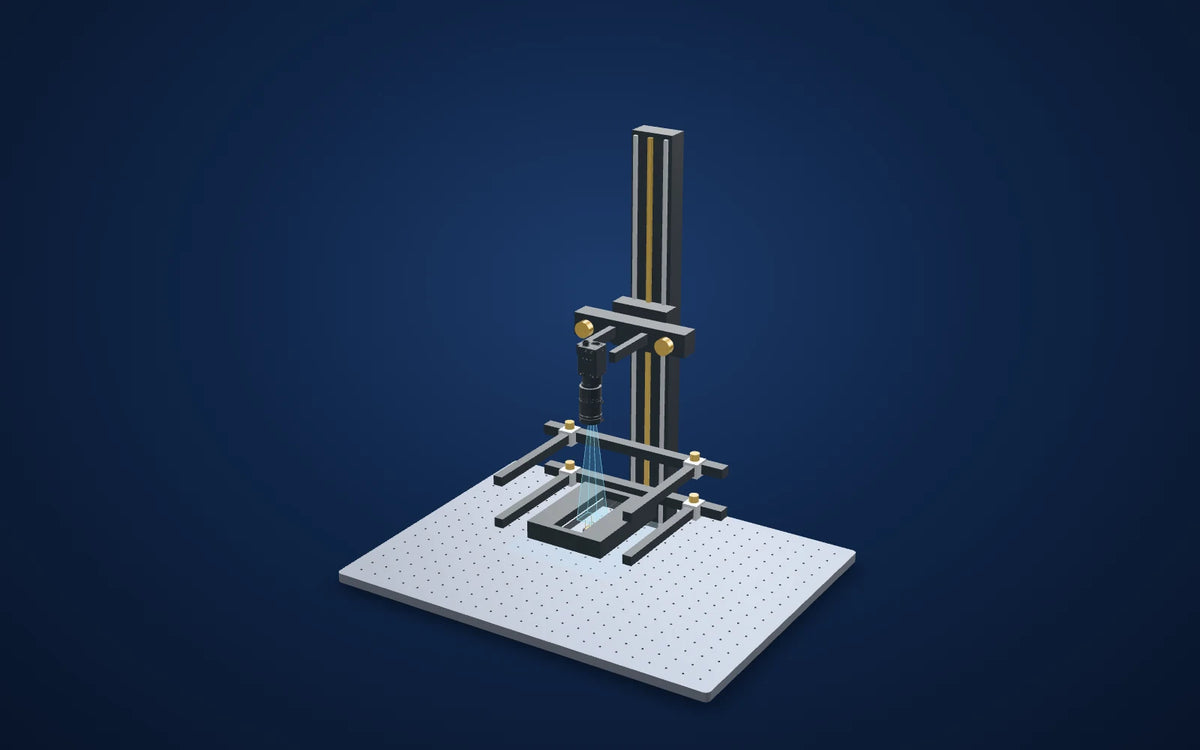
The proposed frame is aligned around the pin-tip plane. Frame position, part supports and illumination-plane thickness are schematic; a real setup must establish the useful height interval.
Why it works
- 1
A narrow directional light field can suppress background features while retaining the pin-tip signal.
- 2
A bright tip is not a calibrated height measurement. The source does not give a plane-thickness specification, height rejection threshold or pin-location uncertainty.
Lighting application-lab image sheet
Evidence you can inspect
The source comparison isolates the pin tips more strongly than its ring-light reference; a separate five-pin example retains visible tip regions.
The source reports improved pin-location contrast, without a calibrated height plane, positional accuracy or production false-call rate.
An application-lab lighting demonstration, not a customer deployment or a qualified production inspection. Proposed camera, lens, fixture and scene spacing require a fresh trial. Source observations do not establish a defect-size limit, accuracy guarantee or production false-call rate.
From image contrast to a production decision
What to validate on your part
- 01
Align the actual tips
Adjust the light and fixture using known good leads and document the useful illumination-height interval.
- 02
Challenge the background
Include component-body finish, pin tilt, housing reflections and fixture-position variation.
- 03
Validate localization
Measure repeated tip locations and test known missing/displaced leads; use a separate calibrated method if height is required.
From the demo to your test bench
Parts in this setup
 LightTested
LS-BRV150120-W2
Pin inspection light, 150 x 120 x 26 mm (LS-BRV150120-W2)
Exact source assembly, one unit. Printed footprint 150 × 120 mm and height 26 mm; the drawing gives an adjustable 22–46 mm clear width and 130 mm clear length.
$119.00
In proposed setup
LightTested
LS-BRV150120-W2
Pin inspection light, 150 x 120 x 26 mm (LS-BRV150120-W2)
Exact source assembly, one unit. Printed footprint 150 × 120 mm and height 26 mm; the drawing gives an adjustable 22–46 mm clear width and 130 mm clear length.
$119.00
In proposed setup
 CameraOur pick
MV-CS050-10GM(NPOE)
Hikrobot MV-CS050-10GM(NPOE) 5 MP GigE area scan camera, IMX264, Gen 2 basic version, Mono, Without PoE
Proposed 5 MP monochrome global-shutter camera, 2448 × 2048 pixels at 3.45 µm, C-mount. The source camera is unidentified. This NPOE model requires separate power and does not support PoE.
$819.00
In proposed setup
CameraOur pick
MV-CS050-10GM(NPOE)
Hikrobot MV-CS050-10GM(NPOE) 5 MP GigE area scan camera, IMX264, Gen 2 basic version, Mono, Without PoE
Proposed 5 MP monochrome global-shutter camera, 2448 × 2048 pixels at 3.45 µm, C-mount. The source camera is unidentified. This NPOE model requires separate power and does not support PoE.
$819.00
In proposed setup
 LensOur pick
LS-KF3528M-ML
35mm, F2.8, 1.1", C-mount, Macro lens (59 mm (-0.7X) to 150 mm (-0.25X)) (LS-KF3528M-ML)
35 mm C-mount macro lens. Its printed 0.25x / 150 mm working-distance pair gives a derived 33.78 × 28.26 mm field on the proposed camera. Confirm focus, coverage and the actual part plane.
$339.00
In proposed setup
LensOur pick
LS-KF3528M-ML
35mm, F2.8, 1.1", C-mount, Macro lens (59 mm (-0.7X) to 150 mm (-0.25X)) (LS-KF3528M-ML)
35 mm C-mount macro lens. Its printed 0.25x / 150 mm working-distance pair gives a derived 33.78 × 28.26 mm field on the proposed camera. Confirm focus, coverage and the actual part plane.
$339.00
In proposed setup
 Camera test stationOur pick
LS-BT-XZ-G-6-6045
Camera stand with XZ adjustment and glass tray, height 600 mm (LS-BT-XZ-G-6-6045)
600 mm column, 600 × 450 mm breadboard, glass tray and two lighting holders. Proposed bench fixture; actual load, travel, clamps, mounting fasteners and light clearance must be confirmed.
$359.00
In proposed setup
Camera test stationOur pick
LS-BT-XZ-G-6-6045
Camera stand with XZ adjustment and glass tray, height 600 mm (LS-BT-XZ-G-6-6045)
600 mm column, 600 × 450 mm breadboard, glass tray and two lighting holders. Proposed bench fixture; actual load, travel, clamps, mounting fasteners and light clearance must be confirmed.
$359.00
In proposed setup
"Tested" identifies the part named in the source. "Our pick" is a proposed alternative or supporting part. Confirm colour, optics, controllers, power supplies, cables and mounting before ordering.
The set-up
| Source camera | Not identified in the source sheet |
|---|---|
| Camera and lens | Proposed catalog components |
| Proposed field | 33.78 × 28.26 mm derived from printed 0.25x magnification |
| Lens-to-part in proposed scene | 150 mm; printed working-distance pair |
| Mounting (proposed) | LS-BT-XZ-G-6-6045 · catalog test station with two lighting holders |
Mount the optics with intent
The station is an optical test bench, with its two lighting holders included in the catalog listing. The 3D column and base follow the published height and footprint. Carriages, clamps and part supports are schematic: confirm camera screw pattern, lens support, light fasteners, permissible load and actual travel before ordering.
Complete the electrical system
Select a controller against the exact light voltage, drive mode and power, then confirm camera data/power/I/O cables and a suitable PC. These are not silently added to the proposed optical kit.
Build this system
Start from this setup, adapt it to your part.
The configurator opens with this study's camera, lens, light and station picked. Swap any part, check fit and price, then buy or ask for a quote.
Camera and available lens CAD are published models. Light envelopes and the station base/height use printed dimensions. Part shapes, brackets, holders, shielding and spacing are illustrative; they are not reconstructions of a source part or a complete mechanically validated assembly. Light paths explain the proposed arrangement and do not simulate optical performance. The proposed field is derived from the printed camera pixel dimensions and the stated lens magnification/working-distance pair, not measured from the source capture.
Electronics and devices
Related case studies

 Electronics and devices
Bent pins on connectors and boards
Separate real pin lean from perspective.Field of view50.46 × 37.85 mmExplore the study
Electronics and devices
Bent pins on connectors and boards
Separate real pin lean from perspective.Field of view50.46 × 37.85 mmExplore the study

 Electronics and devices
Black-painted metal under a flat dome
Make the reflected field consistent before calling a surface defect.Proposed light housing (spec)140 × 140 × 11.5 mmExplore the study
Electronics and devices
Black-painted metal under a flat dome
Make the reflected field consistent before calling a surface defect.Proposed light housing (spec)140 × 140 × 11.5 mmExplore the study

 Electronics and devices
Chip pockets beneath reflective cover film
Treat cover-film glare as an optical problem before changing the algorithm.Proposed light housing (spec)140 × 140 × 11.5 mmExplore the study
Electronics and devices
Chip pockets beneath reflective cover film
Treat cover-film glare as an optical problem before changing the algorithm.Proposed light housing (spec)140 × 140 × 11.5 mmExplore the study
Make the next trial specific.
Tell us the part size, smallest defect or tolerance, available working distance, material and line speed. Include what a good part and a reject look like.
About this case study: the photos and camera images come from the application laboratory of the maker of the lighting and optics we sell, imaged on the parts shown; your results depend on your part, camera and set-up. This is an application-lab study, not a LumaSpec customer deployment. Source figures are reported results; proposed components require a fresh trial. The 3D scene illustrates the arrangement and does not simulate imaging performance.