
Vision controllers
Fanless industrial PC, Intel Pentium Bay Trail N3520, barebone (LS-SYG2XN3520)
Model LS-SYG2XN3520
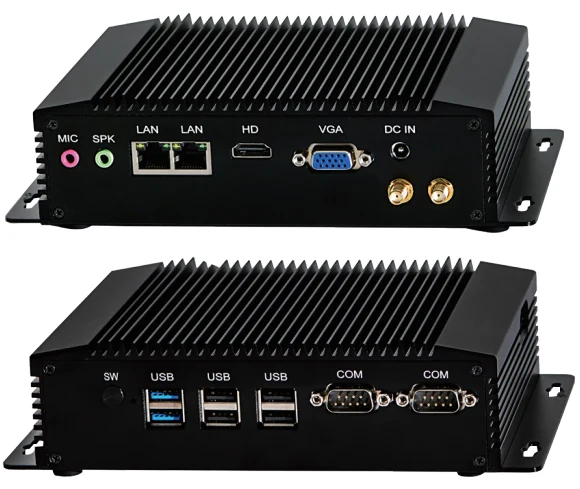
Fanless industrial PC, Intel Pentium Bay Trail N3520, barebone. Fanless aluminium industrial computer to run machine-vision software next to the line; memory: 1xSO-DIMM DDR3L Slot, max 8GB DDR3L; storage: 1xMSATA3.0 SSD and 1xSATA3.0 HDD. Barebone: memory, storage and Wi-Fi are quoted with it.
Features
- 2xRS232/RS422/RS485(convert from BIOS)
- Support 256-level Watchdog, 8-bit GPIO, Auto power on Without fan, Fanless system
- One embedded Micro SIM card slot
- Black colour Aluminum alloy case
- Can be mounted on the wall by optional long screws
Specifications
| Model | LS-SYG2XN3520 |
|---|---|
| Processor | Intel Pentium Bay Trail N3520 |
| Processor details | Intel Pentium Bay Trail N3520 22nm 4 Core 4 Threads 2.17GHz Max 2.42GHz, TDP 7.5W Intel HD Graphics for Intel Atom Processor Z3700 series |
| Configuration | Barebone: no memory, no storage and no Wi-Fi module fitted; add them to your quote request |
| I/O | HDMI, VGA, LED, 2USB3.0, 4USB2.0, 2RS232/422/485 COM, MIC, SPK, 2 RJ45 Giga LAN, Switch On/Off, DC IN, 2WiFi holes |
| Memory | 1xSO-DIMM DDR3L Slot, max 8GB DDR3L |
| Storage | 1xMSATA3.0 SSD and 1xSATA3.0 HDD |
| Wireless | Inbuilt 3G/4G/WiFi&Bluetooth with Dual antennas(optional) |
| Operating system | Windows / Linux |
| Dimensions | 175 x 125 x 37 mm |
| Weight | 1.5 kg per set |
| In the box | Mini PC device, Power Adapter, dual wifi antennas(optional) |
| Certification | CE, FCC, RoHS (manufacturer) |
Applications
- Machine-vision inspection PC
- Line-side data collection and control
Complete the station
The configurator matches a camera, lens, light, light controller and cables to each other, and to this part.
Configure a system Selection guide